EasyManua.ls Logo

Bticino N4510C - User Manual

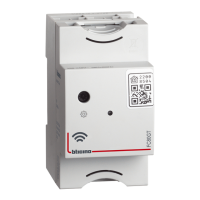
Bticino N4510C
28 pages
Print Icon
To Next Page IconTo Next Page
Loading...
Installation Manual
www.bticino.com
Smart with Netatmo
electric system
RA00185AB-05/21-PC
Question and Answer IconNeed help?

Do you have a question about the Bticino N4510C and is the answer not in the manual?

Summary

Smart with Netatmo System: General Features

Installing the Smart with Netatmo Electric System

Associate Connected Devices in Netatmo System

Adding a Connected Device to the System

Adding Wireless Scenario Controls

Associate Wireless Light and Shutter Controls

Dissociating Wireless Controls

Resetting to Factory Settings

Procedure for Wireless Controls

Steps to reset wireless controls to their factory default settings.

Procedure for Wired Devices

Steps to reset wired devices to their factory default settings.

Using the Home + Control App

Summary

Smart with Netatmo System: General Features

Installing the Smart with Netatmo Electric System

Associate Connected Devices in Netatmo System

Adding a Connected Device to the System

Adding Wireless Scenario Controls

Associate Wireless Light and Shutter Controls

Dissociating Wireless Controls

Resetting to Factory Settings

Procedure for Wireless Controls

Steps to reset wireless controls to their factory default settings.

Procedure for Wired Devices

Steps to reset wired devices to their factory default settings.

Using the Home + Control App

Bticino N4510C Specifications

General IconGeneral
ManufacturerBticino
CategoryGateway
ModelN4510C
Power Supply100-240 V AC
Operating Temperature-5°C to 45°C
MountingDIN rail
Protection ClassIP20
Communication ProtocolKNX
ProtocolKNX
FunctionGateway
Storage Temperature-25°C to +55 °C
Relative Humidity5% to 95% non-condensing

Related product manuals