7
SCREEN AND CONTROL ELEMENTS
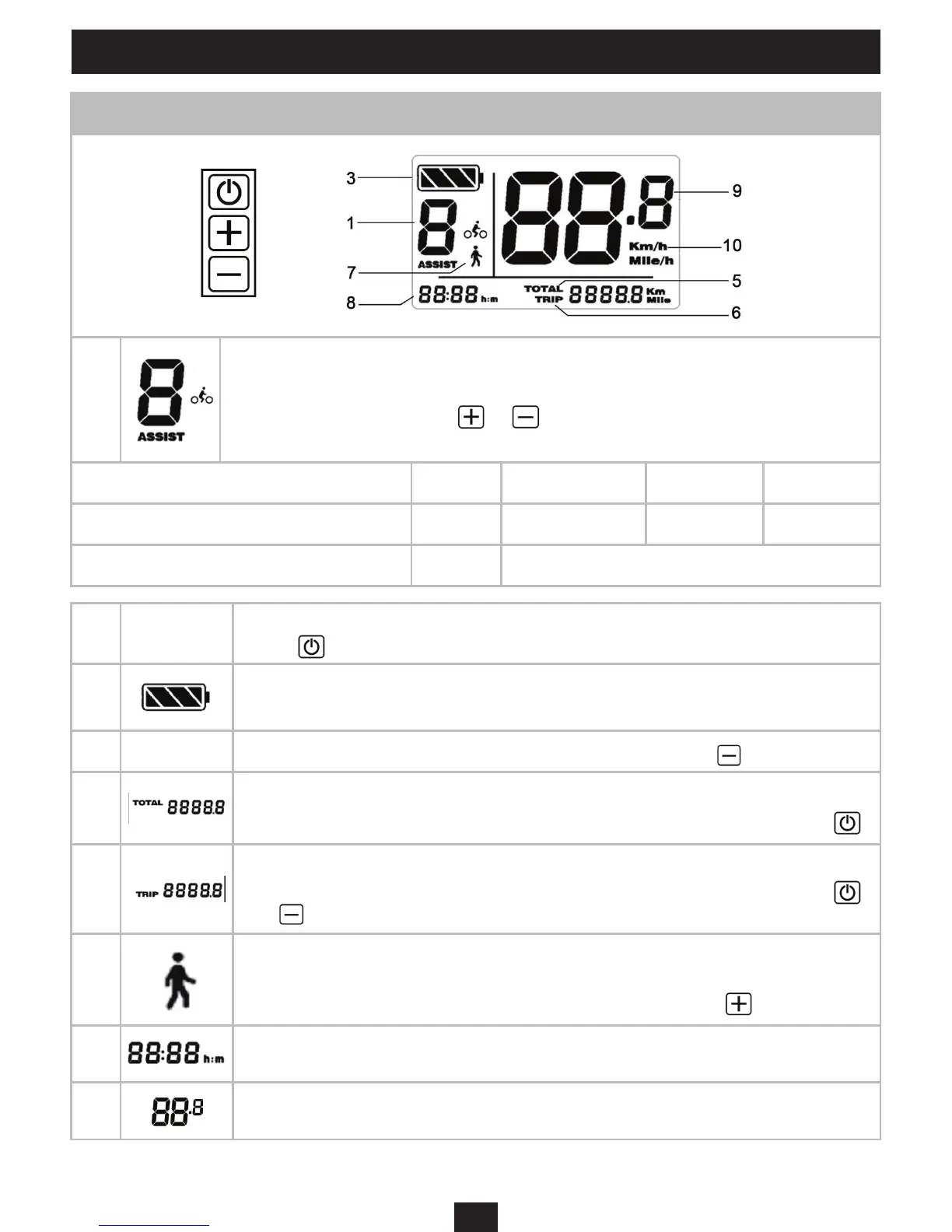
Screen data and function
1
Assiance mode (0-1-2-3):
«0» no assiance. «1» is the default assiance mode. Change from one mode to
the next by briey pressing on or Each mode corresponds to the maximum
speeds of assiance dened below:
Mode 0 1 2 3
Maximum assiance speeds*** 0 km/h 17 km/h 22 km/h 25 km/h
Average autonomous range*** / 50 km (eimated with mode 2 active)
2 ON / OFF
Switch the electric assiance of the bike on and o by pressing and holding the
button
3
Battery level*: Five battery levels.
When the battery level is low, the indicator arts to ash.
4 LIGHTS
- Switch the lights on and o by pressing and holding the button
5
TOTAL: Overall diance meter
Switch between TOTAL meter and TRIP meter by pressing briey on the button
6
TRIP: Partial diance counter (in km)
Switch between TOTAL meter and TRIP meter by pressing briey on the button
and
7
»Pederian» mode: allows the bike to be moved without pedalling at a walking
speed of 6 km/h maximum. Warning - this mode should not be used while on the
bike. Switch pederian mode on and o by pressing and holding
8
Hour See Parameters (11) for time adjument,
9
Speedometer


 To Next Page