
 Need help?
Do you have a question about the BUDDEE BD903209-BK and is the answer not in the manual?
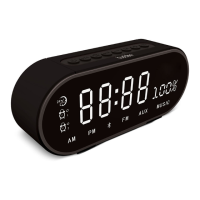
Details the Buddee Bluetooth Digital Alarm Clock's features like a large LED display, alarm, FM radio, and multiple playback options.
Button to turn Bluetooth connectivity on or off.
Navigates to the previous track or decreases volume.
Controls media playback, answers calls, and enters FM mode.
Navigates to the next track or increases volume.
Decreases settings or volume levels.
Cycles through different operating modes of the device.
Increases settings or volume levels.
Activates the snooze function or adjusts display brightness.
Main power switch for the alarm clock.
Port for charging the alarm clock using a micro-USB cable.
Port to charge external devices using the alarm clock's battery.
Input for connecting external audio devices via a 3.5mm cable.
Slot for playing audio directly from a TF memory card.
Instructions for switching the alarm clock on and off using the rear toggle switch.
How to increase or decrease the alarm clock's volume using specific buttons.
Guide on connecting the micro-USB cable for charging and identifying charging status.
Step-by-step instructions to set the correct time, including hour, minute, and 12/24 hour format.
Procedure for setting one or two alarms, including selecting tones and enabling/disabling.
How to snooze an active alarm and turn it off completely.
Steps to connect your device to the alarm clock via Bluetooth.
How to play music from a TF memory card.
Instructions for connecting and playing audio via the 3.5mm AUX cable.
Guide to tuning into FM radio stations, including auto-search.
How to use the USB port to charge an external device.
The Buddee Bluetooth® Digital Alarm Clock is a versatile device designed to provide timekeeping, alarm functions, audio playback, and device charging capabilities. It features a large LED display for easy visibility and a compact design suitable for various settings.
The primary function of this device is to serve as a digital alarm clock. It displays the time clearly on its large LED screen and offers dual alarm settings, allowing users to set two separate alarms. The alarm can be snoozed for five minutes by pressing any button, and it can be turned off completely by double-pressing the 'Snooze / Dimming' button. The alarm can be snoozed up to three times before it turns off automatically. Users can choose from five available alarm tones. The clock supports both 24-hour and 12-hour (AM/PM) time formats, which can be adjusted during the time setting process.
Beyond timekeeping, the device offers multiple audio playback options. It supports wireless audio streaming via Bluetooth®, allowing users to connect their smartphones, tablets, or laptops and play music through the integrated speaker. The Bluetooth® connection has a wireless range of up to 10 meters. For wired audio connections, a 3.5mm AUX input is available, enabling playback from devices that do not support Bluetooth®. Additionally, the alarm clock includes a TF (microSD) memory card slot, allowing users to play audio files directly from a memory card.
An integrated FM radio function provides access to local radio stations. To use the FM radio, the micro-USB charging cable acts as an antenna, which needs to be inserted into the micro-USB charging port. The device supports auto-search for radio stations, and users can navigate between stations using the 'Next' and 'Previous' buttons.
Another key feature is its ability to charge other devices. The alarm clock includes a USB output port, allowing users to connect their USB charging cables and power their smartphones or other portable devices. This feature is particularly useful for overnight charging, consolidating multiple functions into one bedside device.
The Buddee Bluetooth® Digital Alarm Clock is designed for straightforward operation. Powering the device on and off is done via a toggle switch located at the rear. Upon activation, the LED display shows the time, a clock icon, battery level, and an alarm icon if an alarm is set.
Setting the time involves holding down the 'Mode' button until the hour flashes, then using the 'Up' and 'Down' buttons to adjust the hour. Subsequent presses of the 'Mode' button allow adjustment of minutes and selection between 24-hour or AM/PM formats. The settings are saved by holding down the 'Mode' button.
Alarm settings follow a similar pattern. Users press the 'Mode' button once to access the first alarm, then hold it down to enter the alarm setting mode. The hours and minutes can be adjusted using the 'Up' and 'Down' buttons. The 'Mode' button is also used to select the alarm tone and to toggle the alarm 'ON' or 'OFF'. The device supports setting a second alarm by pressing the 'Mode' button twice and repeating the alarm setting steps.
Volume control is intuitive, with the default volume level set at 10 and a range from 1 to 15. Volume can be increased by holding down the 'Next' button and decreased by holding down the 'Previous' button.
For Bluetooth® pairing, users hold down the Bluetooth ON/OFF button to enter Bluetooth mode. The device will emit a Bluetooth tone and begin searching for nearby devices. Once 'BD-ALMCLK-1' is selected from the list of Bluetooth devices on a smartphone, tablet, or laptop, audio can be streamed.
When using the TF memory card mode, users insert a TF card into the slot at the rear of the clock after holding down the Bluetooth ON/OFF button. The device automatically switches to TF card mode and begins playback. Songs can be navigated using the 'Previous' and 'Next' buttons. Removing the TF card automatically returns the device to Bluetooth® mode.
The AUX audio mode is activated by connecting a 3.5mm AUX audio cable from an external device to the AUX input jack on the rear of the clock. The device automatically switches to AUX mode. Disconnecting the cable returns the device to Bluetooth® mode.
To charge an external device, the USB end of a charging cable is inserted into the USB charge port on the rear of the Alarm Clock, and the other end into the device to be charged. The charging icon on the external device will indicate that charging has commenced. If the Alarm Clock is not plugged into a USB power source, it will draw power from its internal battery to charge the external device.
The device is powered by a micro-USB 5V DC input. It includes a micro-USB charging cable for this purpose. The red LED charging indicator flashes while the device is charging and stops flashing once the internal battery is fully charged. When the battery level drops below 20%, a low battery prompt will sound, and the Alarm Clock's functionality will be limited to time display only to conserve battery life. This indicates that the device needs to be recharged to restore full functionality.
The package includes the Bluetooth® Digital Alarm Clock unit, a micro-USB charging cable, a 3.5mm AUX cable, and a user manual. It is recommended to read the user manual carefully for optimum performance and safety before connecting, operating, or adjusting the product. This ensures proper usage and helps maintain the device's longevity.
 General
| Model | BD903209-BK |
|---|---|
| Category | Clock |
| Color | Black |
| Power Source | Battery |
| Display Type | Digital |
| Features | Snooze |
| Type | Alarm Clock |

 To Next Page