Troubleshooting
If your BUFFALO appliance develops a fault, please check the following table before making a call to the
Helpline or your BUFFALO dealer.
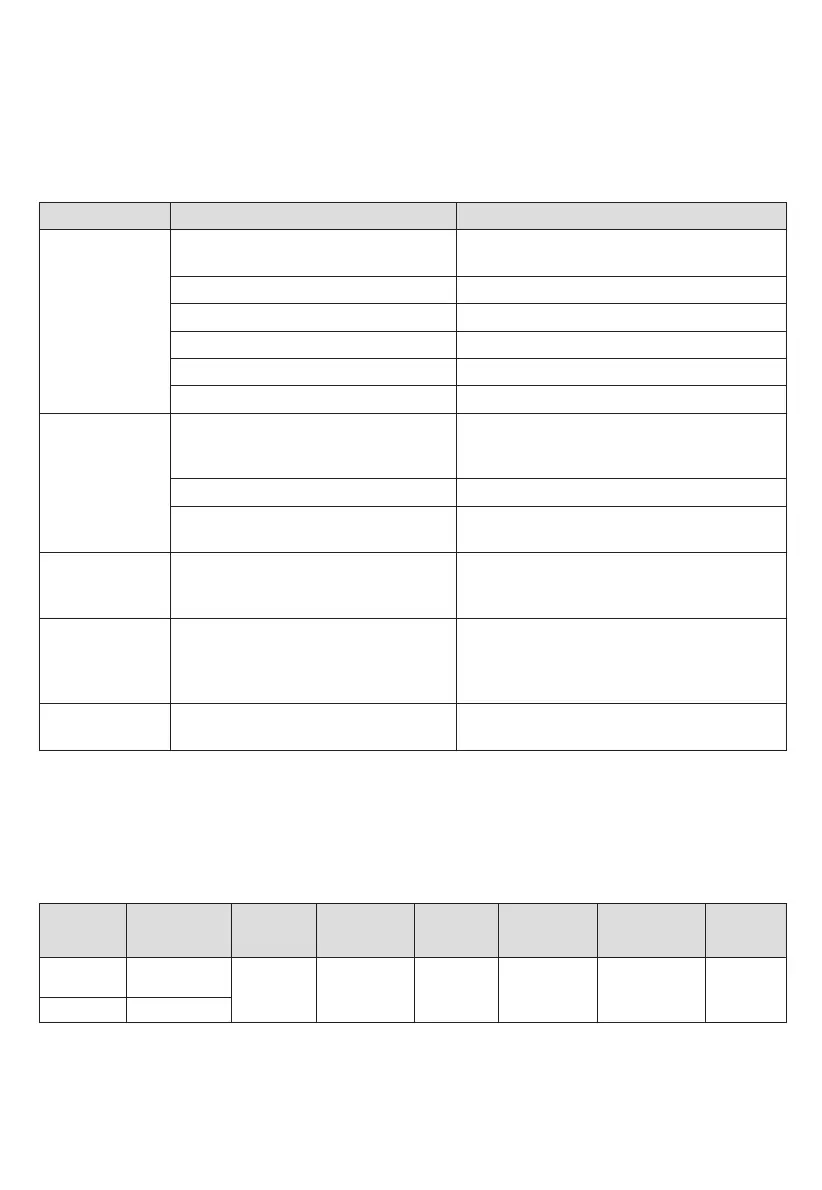
Fault Probable Cause Solution
The unit is not
working
The unit is not switched on Check the unit is plugged in correctly and
switched on
Plug and lead are damaged Call BUFFALO agent or qualified technician
Fuse in the plug has blown Replace the plug fuse
Power supply Check power supply
Internal wiring fault Call BUFFALO agent or qualified technician
Door is not closed properly Close door securely
Arcing/Sparking Metallic or other inappropriate
materials are being used in food
preparation
Remove metal objects. Use microwave-safe
utensils only
Spilled food remains inside the oven Clean the interior of the oven
The oven is operated when empty Do not operate the oven when empty. It is
very dangerous
Microwave oven
interfering with
TV reception
Radio and TV reception is interfered
when then appliance is operating.
It is normal
Steam
accumulating on
door and hot air
out of vents
In cooking, steam may come out of
food. Most will get out of vents but
some may accumulate on cool places
like the oven door.
It is normal
Dim oven light In low power microwave cooking, oven
light may become dim.
It is normal
Technical Specifications
Model Voltage Power
Microwave
Output
Oven
Capacity
Operation
Frequency
Dimensions
h x w x d
(mm)
Weight
(kg)
FB862
230-230-240~
50Hz
1550W 1000W 25L
311 x 511 x
432
14.7
FB862-E
230~ 50Hz
2450MHz


 To Next Page