
EasyManua.ls Logo

Bug-O Systems GO-FER III-OX - User Manual

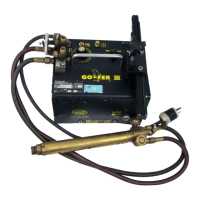
Bug-O Systems GO-FER III-OX
22 pages
Print Icon
To Next Page IconTo Next Page
Loading...
INSTRUCTIONS
AND
PARTS MANUAL
A DIVISION OF WELD TOOLING CORPORATION
280 TECHNOLOGY DRIVE CANONSBURG, PENNSYLVANIA 15317-9564 USA
PHONE: 412-331-1776 http://www.bugo.com FAX: 412- 331- 0383









GO-FER III-OX
GO-FER III-PL
GO-FER III-WD
LIT-GO-FER-IPM-0113

Questions and Answers

  • C
    Christina TaylorAug 5, 2025
    What to do if Bug-O Systems Welding System runs, but there is no control over speed?
    • R
      Rachel OliverAug 5, 2025
      If your Bug-O Systems Welding System runs but you cannot control the speed, the issue might be a faulty speed control board. First, check the connection. If the connection is fine, replace the control board.
  • M
    Michele WardAug 16, 2025
    What to do if Bug-O Systems Welding System does not run, but the indicator light is on?
    • A
      annwallAug 16, 2025
      If your Bug-O Systems Welding System does not run, but the indicator light is on, it could be due to a bad connection or a faulty speed control board. Check the wiring connections to ensure 12 VAC appears across the secondary of the transformer. Tighten the terminal screws on the speed control board. If the DC Volts are 0 across the leads to the motor, replace the control board.
  • L
    Lisa HallAug 26, 2025
    How to fix Bug-O Systems Welding System that does not run and the indicator light is off?
    • L
      Laura SmithAug 26, 2025
      If your Bug-O Systems Welding System does not run and the indicator light is off, here are a few things to check: * First, ensure the machine is receiving power by checking the power line supply voltage and making sure the line cord is firmly plugged in. * If power is not the issue, disconnect the machine and inspect the internal wiring for shorts. Also, check if the circuit breaker has tripped, the motor is shorted, the speed control board is faulty, or the transformer is burned out. If you find any wiring faults, rewire them. If no faults are found, set the direction switch to 'OFF', reset the breaker, and plug the machine in. If the breaker trips again, replace the control board, or replace the transformer.

Summary

SAFETY

ELECTRIC SHOCK HAZARDS

Warnings about electric shock hazards and essential precautions to prevent injury or death.

EQUIPMENT DAMAGE RISKS

Information regarding potential equipment damage and necessary steps to avoid it during operation.

FALLING EQUIPMENT WARNINGS

Potential risks associated with falling equipment, including personal injury and damage.

MOVING PARTS HAZARDS

Details on serious injury risks from moving parts and safe operational practices.

IMPORTANT SAFETY INSTRUCTIONS

Emphasizes reading the instruction manual thoroughly before installing and using the equipment.

HIGH FREQUENCY OPERATION WARNINGS

OPERATIONAL PRECAUTIONS

Specific precautions required when using plasma, TIG, or other processes that use high frequency to strike an arc.

PRODUCT INTRODUCTION

KEY FEATURES OVERVIEW

Highlights the main features of the GO-FER III, including speed control, clutch, circuit breaker, and carrying handle.

OPERATING AND SETUP PROCEDURES

TRACK SETUP

Instructions for attaching magnet plate assemblies and spacer bars to the track for stability.

MACHINE POSITIONING AND ADJUSTMENT

Guidance on how to position and adjust the GO-FER III carriage on the track for smooth movement.

WHEEL ADJUSTMENT

Procedure for adjusting the machine's wheels using shim washers and a hex bolt for proper gear mesh.

GO-FER III-WD WELDING SETUP

Specific setup instructions for the GO-FER III Welding Kit, including torch and cable connections.

MACHINE OPERATION

Steps for operating the machine, including switch settings, power cord connection, and speed control.

GO-FER III-PL PLASMA SETUP

PLASMA TORCH SETUP

Instructions for setting up the torch holder, clamp, and rack for plasma cutting applications.

PLASMA MACHINE OPERATION

Operation steps for the GO-FER III Plasma unit, including switch and speed control.

GO-FER III-OX OXY-FUEL SETUP

OXY-FUEL TORCH SETUP

Instructions for setting up the torch holder and connecting the hose assembly for oxy-fuel cutting.

OXY-FUEL MACHINE OPERATION

Operation steps for the GO-FER III Oxy-Fuel unit, including switch and speed control.

GOF-3250-WD WELDING KIT SPECIFICATIONS

TECHNICAL DATA WELDING

Detailed technical specifications for the GO-FER III Welding Kit, including power, speed, and capacity.

GOF-3250-PL PLASMA KIT SPECIFICATIONS

TECHNICAL DATA PLASMA

Detailed technical specifications for the GO-FER III Plasma Kit, including power, speed, and capacity.

GOF-3250-OX OXY-FUEL KIT SPECIFICATIONS

TECHNICAL DATA OXY-FUEL

Detailed technical specifications for the GO-FER III Oxy-Fuel Kit, including power, speed, and capacity.

GO-FER III WIRING DIAGRAM

ELECTRICAL COMPONENT CHART

Chart listing electrical components with corresponding part numbers for different voltage configurations.

GOF-3240-WD EXPLODED VIEW

GOF-3240-WD PARTS LIST

GOF-3240-PL EXPLODED VIEW

GOF-3240-PL PARTS LIST

GOF-3240-OX EXPLODED VIEW

GOF-3240-OX PARTS LIST

ACCESSORIES LIST

ACCESSORIES CONTD. - RADIUS CUTTING

GOF-3142 RADIUS CUTTING ATTACHMENT

Details on the GOF-3142 attachment, enabling circle cutting by converting from straight-line operation.

ACCESSORIES CONTD. - CONTACTOR

BUG-5485 CONTACTOR WIRING DIAGRAM

Wiring diagram and description for the BUG-5485 Contactor / Cable Anchor accessory.

TROUBLESHOOTING COMMON PROBLEMS

PRODUCT WARRANTY INFORMATION

Bug-O Systems GO-FER III-OX Specifications

General IconGeneral
BrandBug-O Systems
ModelGO-FER III-OX
CategoryWelding System
LanguageEnglish