EasyManua.ls Logo

Buick 2012 LaCrosse - Audio System Operation; Power, Volume, and Source Selection; Radio Station and Favorite Management; Menu and Settings Navigation

Buick 2012 LaCrosse
16 pages
Print Icon
To Next Page IconTo Next Page
To Previous Page IconTo Previous Page
Loading...
8
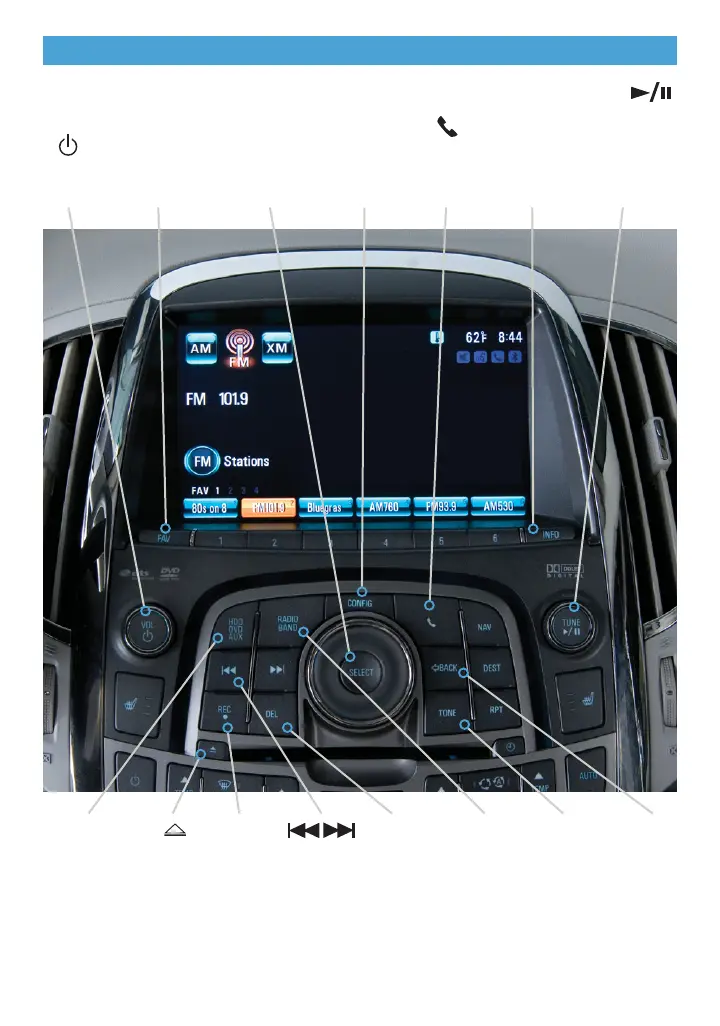
Audio System
Audio system with CD/DVD/HDD and Navigation shown
Power/
Volume
Open the
Phone
menu
INFO:
Display
available
song
information
MENU/
SELECT:
Open/select
menus
FAV:
Display pages
of favorite
radio stations
or stored
favorites list
CONFIG:
Open the
Settings
menu
TUNE/ :
Tune radio
stations or
play/pause
audio or
video
HDD/DVD/
AUX:
Play an audio
file, DVD or
portable audio
device
:
Previous or
next radio
station,
track or file
Eject
CD or
DVD
REC:
Record
content
DEL:
Delete
current file
TONE:
Open the
Tone
menu
RADIO
BAND:
FM, AM,
XM
See Infotainment System in your Owner Manual.
BACK:
Move
back one
level in
the menus

Related product manuals