EasyManua.ls Logo

Buick 2014 Verano - Warning Lights, Gauges, and Indicators

Buick 2014 Verano
20 pages
Print Icon
To Next Page IconTo Next Page
To Previous Page IconTo Previous Page
Loading...
8
Audio System
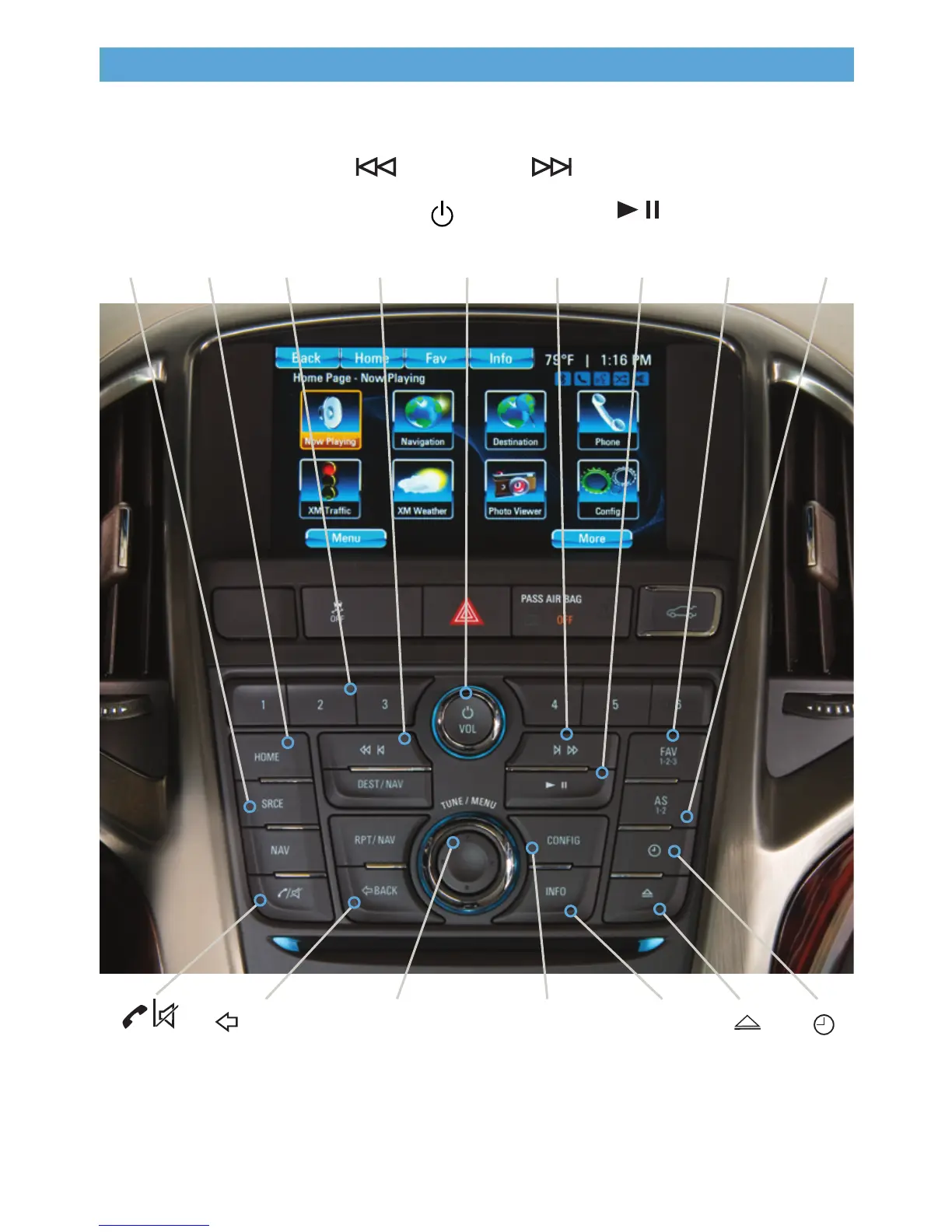
Radio with CD, Touch Screen and Navigation shown
SRCE:
Select
the audio
source
/VOL:
Power/
Volume
Next radio
station,
track or
le
1–6:
Favorite
preset
stations
HOME:
Main
screen
Previous
radio
station,
track or le
Play/
Pause
Open the
Phone
menu/Mute
the vehicle
speakers
INFO:
Display
available
song
information
CONFIG:
Open the
Conguration
menu
TUNE/MENU:
Turn the knob to
highlight menu items
or tune radio stations;
push the chrome ring to
open/select menu items
See Infotainment System in your Owner Manual.
Open the
Clock
menu
BACK:
Move back
one level
in the
menus
FAV:
Display
pages of
favorite
radio
stations
AS:
Autostore
list of
stations with
strongest
signal
Eject
disc
Refer to your Owner Manual for important safety information about using the infotainment system
while driving.

Other manuals for Buick 2014 Verano

Related product manuals