9
For any help concerning the set up and use of your TV please call the Customer Helpline: 0845 604 0105
Remote Control - DVD
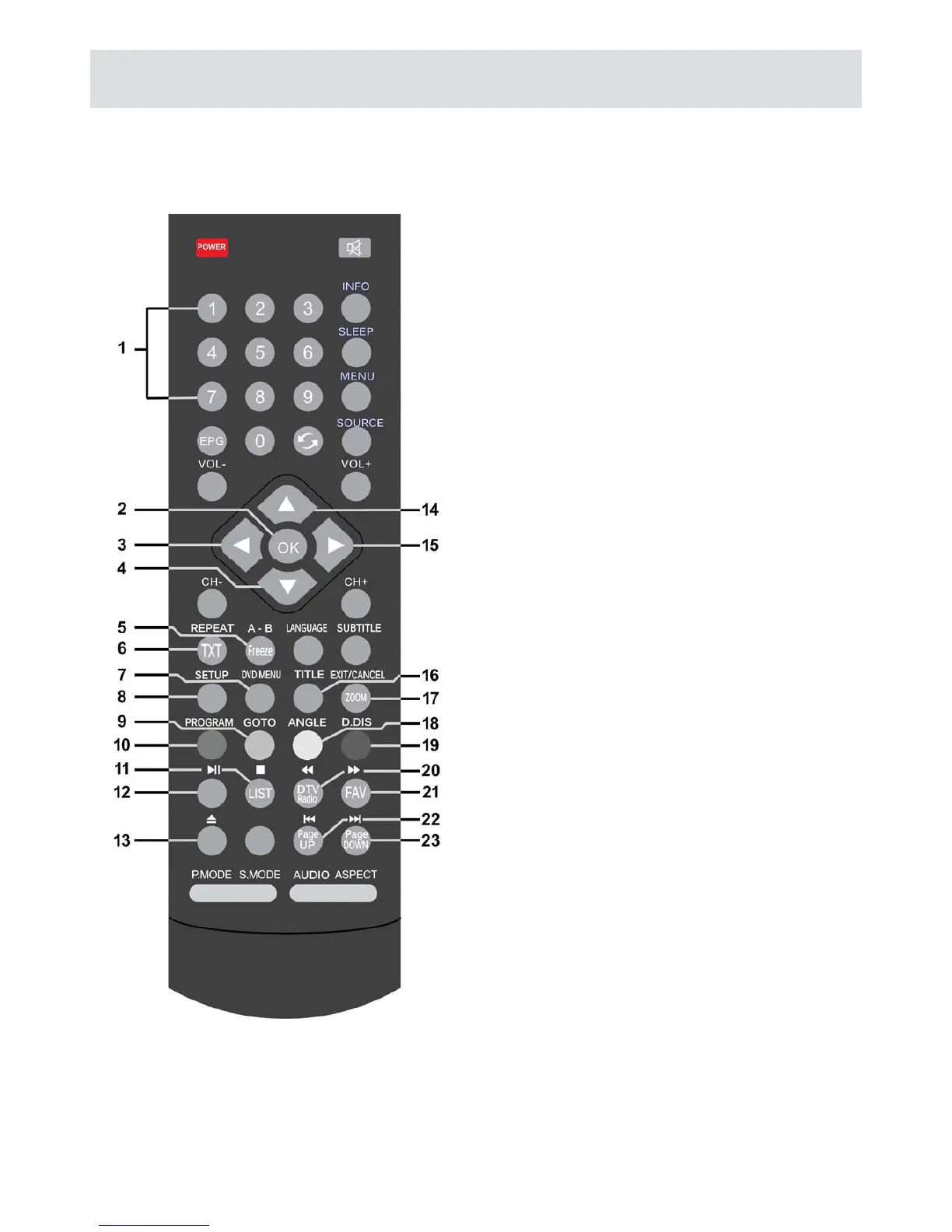
1. 0-9 Numeric keys: Number entry; title, track,
chapter selection
2. OK
3. Left arrow: Navigation
4. Down arrow: Navigation
5. A-B: Loop playback section, press once for
start, press again for end, press again to
cancel
6. REPEAT: Repeat track, title or chapter
7. DVD MENU: Display main disc menu
8. SETUP: Enter DVD player settings and
options
9. GOTO: Enter direct time, track or title
10. PROGRAM: Program playback order
11. STOP: Stop playback, press again to clear
resume point
12. PLAY/PAUSE: Play disc, toggle play and
pause during playback
13. Eject: Eject disc from player
14. Up arrow: Navigation
15. Right arrow: Navigation
16. TITLE: Display disc title menu
17. ZOOM: Cycle picture zoom level
18. ANGLE: Cycle disc angle, if supported
19. D.DIS: Display playback information
20. Rewind: Cycle rewind speeds
21. Fast Forward: Cycle fast forward speeds
22. Skip back: Skip back track or title
23. Skip forward: Skip forward track or title



 To Next Page