Connections
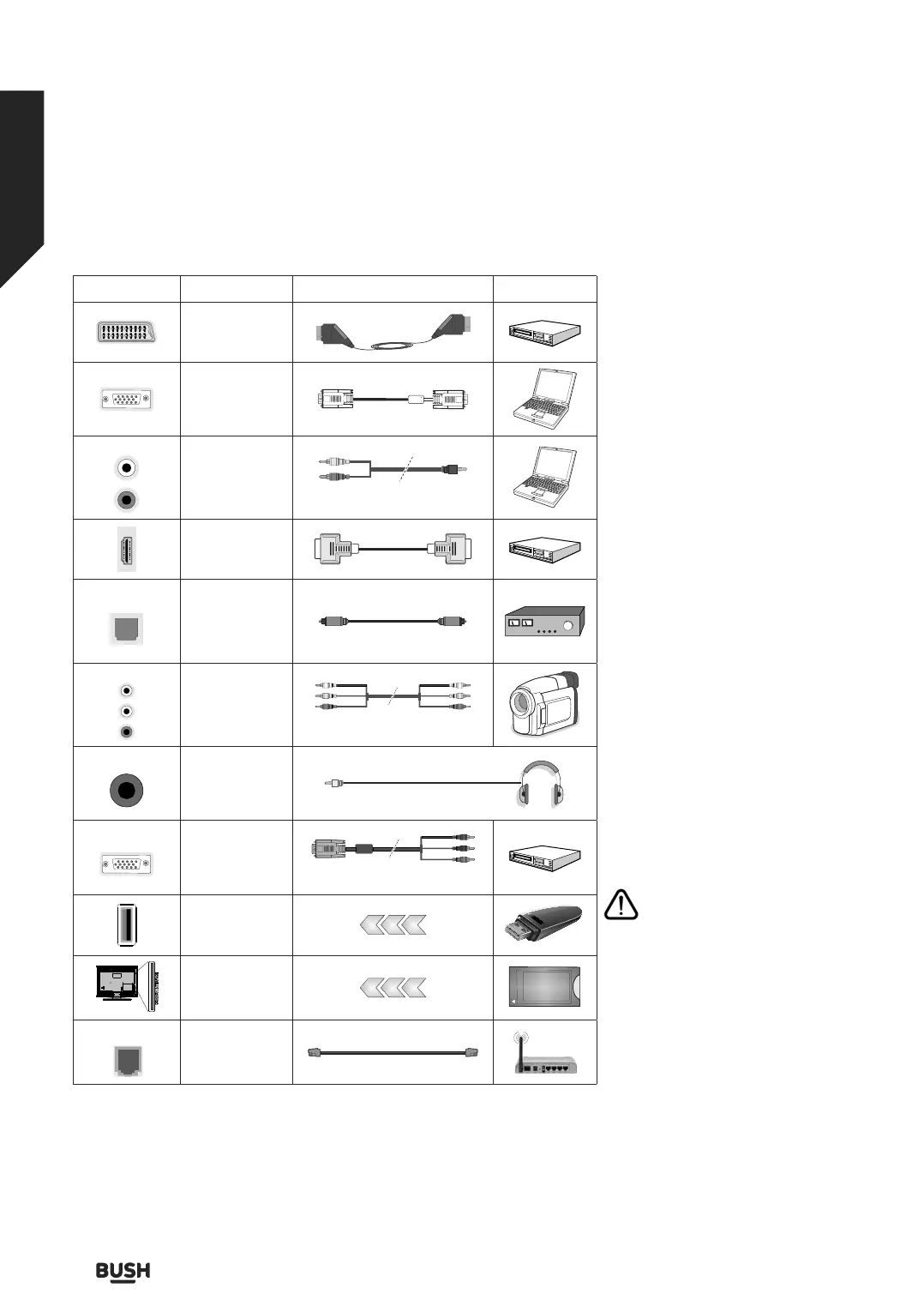
Connector Type Cables Device
Scart
Connection
(back)
VGA
Connection
(back)
AUDIO IN
PC/YPbPr
Audio
Connection
(side)
YPbPr/PC Audio Cable
HDMI
Connection
(back)
SPDIF
SPDIF
(Optical Out)
Connection
(back)
SIDE AV
Side AV
(Audio/Video)
Connection
(side)
AV Cable
HEADPHONE
Headphone
Connection
(side)
PC to YPBPR
YPbPr Video
Connection
(back)
PC to YPbPr Connection Cable
USB
Connection
(side)
CI
Connection
(side)
CAM
module
LAN
Ethernet
Connection
(back)
LAN / Ethernet Cable
See the illustrations on the left side.
You can use YPbPr to VGA cable to
enable YPbPr signal via VGA input. You
cannot use VGA and YPbPr at the same
time. To enable PC/YPbPr audio, you
will need to use the side audio inputs
with a YPbPr/PC audio cable for audio
connection. If an external device is
connected via the SCART socket, the
TV may automatically switch to EXT1
mode. When receiving DTV channels
(Mpeg4 H.264, H.265) or while in
Media Browser mode, output will not
be available via the scart socket. When
using the wall mounting kit (available
from a third party in the market, if not
supplied), we recommend that you
plug all your cables into the back of
the TV before mounting on the wall.
Insert or remove the CI module only
when the TV is SWITCHED OFF. You
should refer to the module instruction
manual for details of the settings. The/
Each USB input of your TV supports
devices up to 500mA. Connecting
devices that have current value above
500mA may damage your TV. When
connecting equipment using an
HDMI cable to your TV, to guarantee
sucient immunity against parasitic
frequency radiation, you have to use a
high speed shielded (high grade) HDMI
cable with ferrites.
If you want to connect a device
to the TV, make sure that both
the TV and the device are turned o
before making any connection. After
the connection is done, you can turn
on the units and use them.
Connections
Bringing it all together
Connections14
If you require any technical guidance or find that your TV is not operating as intended, a simple solution can often be found in the Troubleshooting section of these instructions,












 To Next Page