Installing your Built-in Oven
Bringing it all together
Installing your Built-in Oven
16
If you require any technical guidance or find t at your product is not operating as intended, a simple solution can often be found in the Troubleshooting section of these instructions,
·
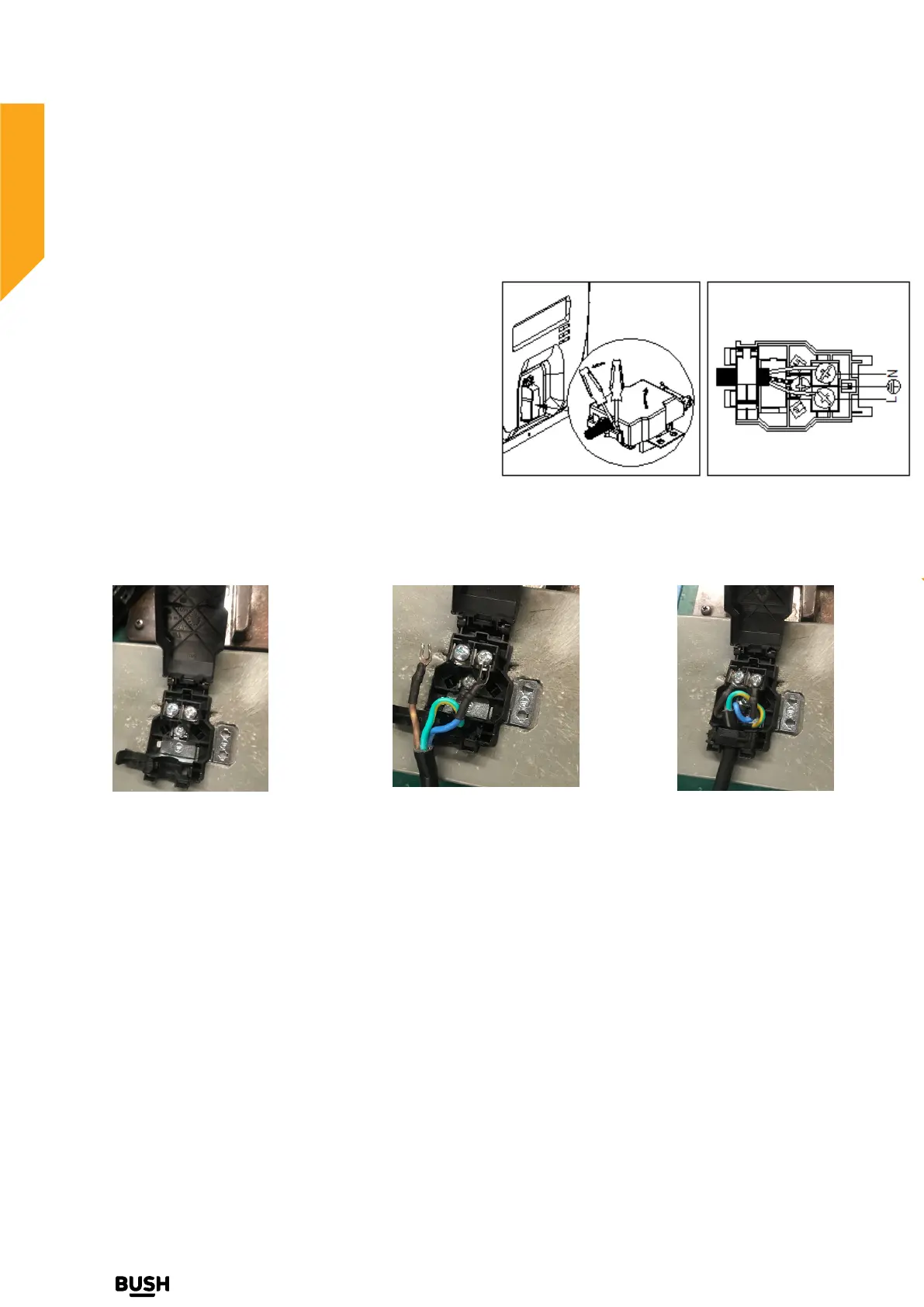
Using a screwdriver ,prize the bolt o
n the side tabs of the
terminal board cover ;
·
Using a screwdriver unhooking the
no.2fixing hooks,
Fitting on a Power Supply Cable
Opening the terminal board:
pull open the cover of the terminal board. To
install the cable, proceed as follows:
·
Remove the w
ire clamp screw and the three contact screws L-N -
·
Fasten the wires beneath the screw heads
using the following color scheme :Blue (N) Brown (L) Yellow-Green
·
Fasten the supply ca
ble in place with the clamp and close the cover of the terminal board .
Open the terminal board
Fasten the wires beneath
the screw heads
Fasten the supply cable
in place with the clamp


 To Next Page