
 Need help?
Do you have a question about the Bushnell BackTrack 36-0050 and is the answer not in the manual?
Identifies MARK/Backlight and MODE/Power buttons.
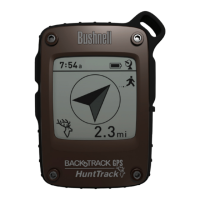
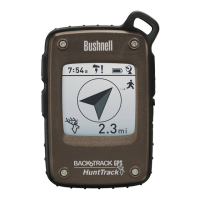
Describes battery indicator, distance units, and icons.
Explains directional arrows, compass mode icon, and satellite lock.
Choose between Home, Car, or Star icons for storage.
Store the current spot's GPS coordinates.
Follow directional arrows to return to a stored location.
Explains PUSH (brief press) vs HOLD (2-second press) for buttons.
Steps for battery insertion and achieving GPS satellite lock.
Hold MARK button to store location; select icon first.
Turn on, select icon, and follow arrow/distance to destination.
Unit conversion, backlight control, and auto-power off details.
GPS system accuracy is ±3-5 meters; subject to government control.
Do not use while driving; ensure safe mounting if used in a vehicle.
Covers liability disclaimers and FCC compliance notes.
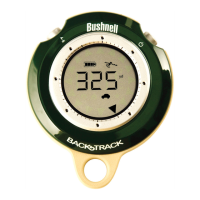
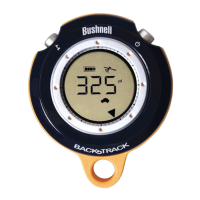
The Bushnell BackTrack is a compact, handheld GPS device designed to help users mark and return to specific locations. It serves as a supplemental navigation aid, providing directional guidance and distance information to pre-marked spots. The device is user-friendly, featuring a simple interface with a few buttons and a clear display.
The primary function of the Bushnell BackTrack is to store up to three distinct locations and guide the user back to them. It utilizes GPS satellite signals to determine the user's current position and the relative direction and distance to a marked location. The device can also function as a digital compass, displaying the current heading in degrees and indicating North with an arrow.
When a location is marked, the BackTrack records its GPS coordinates. As the user moves away from the marked spot, the device's display will show an arrow pointing in the general direction of the saved location and the distance to it. The distance displayed will decrease as the user approaches the destination. Once the user reaches the marked location, the display will show a full circle of arrows, indicating arrival.
The BackTrack offers three distinct "location memory slots," represented by icons: a house, a car, and a star. These icons allow users to categorize and remember different types of locations. For example, the "house" icon might be used for a campground, the "car" icon for a parked vehicle, and the "star" icon for a favorite scenic spot. This categorization helps users easily identify and select the desired return point.
The device is designed for outdoor use and requires a clear view of the sky to ensure good quality GPS reception. It is important to note that the BackTrack is intended as a supplemental aid and should not be relied upon for applications requiring precise measurements or for aircraft navigation.
The Bushnell BackTrack is operated using two main buttons: the MODE/Power button and the MARK/Backlight button.
Turning On/Off and Mode Selection: To turn the device on, the user needs to HOLD the MODE/Power button. The BackTrack will automatically return to the last mode selected when turned back on. To turn it off manually, the user can HOLD the MODE/Power button. The device also has an automatic power-off feature that activates after 10 minutes of inactivity (no buttons pressed) to conserve battery life. The MODE/Power button is also used to cycle through the different display modes: the digital compass mode and the three location modes (house, car, star). A brief PUSH of this button will switch between these modes.
Marking a Location: To mark a location, the user first selects one of the three location icons (house, car, or star) by PUSHING the MODE/Power button until the desired icon is displayed. Once the icon is selected, the user must HOLD the MARK button for 2 seconds. The distance display will change to "0" to confirm that the location has been successfully marked. It is crucial to ensure that the satellite icon on the display has stopped blinking before marking a location, indicating that the device has achieved a GPS lock. The device remembers the marked location even when turned off. If a user marks a new location using an icon that was previously used, the new location will replace the old one.
Returning to a Location: To return to a previously marked location, the user turns on the BackTrack. The device will typically default to the last mode and location used. If the user wishes to return to a different marked location, they can PUSH the MODE/Power button to select the corresponding icon. The display will then show an arrow pointing towards the marked location and the distance to it. The user simply follows the arrow, and the distance will decrease until they reach the destination.
Digital Compass Mode: The BackTrack can be used as a digital compass. To access this mode, the user PUSHES the MODE/Power button until the compass mode icon (an arrow within a circle) is displayed. In this mode, an arrow on the display points North, and the current direction the user is facing is shown in degrees.
Backlight: The display backlight can be activated at any time by a brief PUSH of the MARK button. The backlight will automatically turn off after approximately 20 seconds.
Changing Units: The device allows users to switch between English (yards/miles) and Metric (meters/kilometers) units for distance display. To change the units, the user must HOLD both the MARK and MODE/Power buttons simultaneously while in any of the Location modes (not in Digital Compass mode). The display will indicate the change from "yd" to "m". The BackTrack automatically adjusts between yards/meters and miles/kilometers for longer distances. The maximum distance the device can display is 999 miles or kilometers.
Battery Replacement: The Bushnell BackTrack is powered by two "AAA" alkaline or lithium batteries. To replace the batteries, the user needs to twist the round battery cover on the back of the device clockwise to open it. After inserting the new batteries in the direction marked inside the compartment, the cover should be replaced by rotating it counterclockwise. The device's display includes a "Battery" icon that indicates when the battery power is low, signaling the need for replacement.
GPS Lock: For optimal performance, it is important to ensure the device has a GPS lock before marking a location. The "Satellite" icon on the display will stop flashing once a GPS lock is achieved. The initial GPS lock may take longer the first time the device is used, but subsequent power-ons should be quicker. To save time, it is recommended to turn on the BackTrack a minute or two before needing to mark a location, such as when entering a parking lot.
The Bushnell BackTrack is designed for durability and ease of use, providing a straightforward solution for remembering and returning to important outdoor locations.
 General
| Battery Life | Up to 20 hours |
|---|---|
| Waypoints | 3 |
| Display Type | LCD |
| Power Source | 2 AAA batteries |
| Water Resistance | Water resistant |
| GPS Accuracy | Within 5 meters |


 To Next Page