
 Need help?
Do you have a question about the Bushnell RXS100 and is the answer not in the manual?
Details the sight's state-of-the-art reflex design, dual-eye open usage, and parallax-free performance.
Emphasizes firearm safety, clearing actions, and proper sight positioning to prevent injury during mounting.
Covers base installation, eye relief, adapter plates, and using the included mount with torque specifications.
Guides on activating the battery, removing the protective disc, and correctly seating the battery cover.
Instructions for replacing a depleted battery following the same installation procedure.
Explains how to turn the sight on by pressing brightness buttons and turn it off by holding the down button.
Details how to increase or decrease the dot intensity across 8 brightness levels using dedicated buttons.
Emphasizes safety during the sighting-in process, including using approved ranges and checking bores.
Step-by-step guide using bore sighting or visual methods to align the red dot with the point of impact.
Provides guidance for operating the sight in extreme heat, cold, salt air, dust, and humid conditions.
Warns against cleaning lenses with fingers and recommends using lens paper or cloth to avoid scratches.
Addresses issues like discharged batteries, incorrect installation, or faulty buttons, with solutions.
Covers problems such as adjustment limits or moving impact points, suggesting checks for mounting and firearm performance.
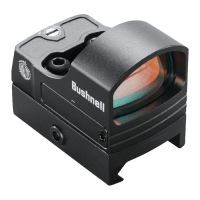
The Bushnell RXS-100 Red Dot Reflex Sight is an illuminated optical sight designed for various shooting applications, including hunting, plinking, and target shooting with pistols, rifles, and shotguns. It offers a state-of-the-art design focused on enhancing the shooter's experience through improved accuracy and faster target acquisition.
The RXS-100 is a reflex sight, meaning its illuminated reticle is pre-focused to ensure the aiming point always appears sharp on the target. Unlike traditional open sights that require the shooter to choose between focusing on the rear sight, front sight, or target, this device allows for a clear view of the target with the reticle superimposed. This design facilitates shooting with both eyes open, providing unlimited eye relief and increasing the shooter's awareness of their surroundings. The sight's limited parallax design ensures the dot remains fixed on the target even with slight eye movement, contributing to greater speed and accuracy. The electronic illuminated dot is pre-focused to be parallax-free at 50 yards, with minimal parallax error from close range up to 100 yards.
The sight can be mounted directly to compatible pistol slides or accessory mounts that utilize the Leupold DeltaPoint® Pro footprint. Alternatively, it can be mounted to accessory rails using the included low-profile Weaver style mount. It features a 4 MOA (Minute of Angle) dot, which serves as the aiming point. The brightness of this dot is adjustable across 8 settings, allowing users to optimize visibility in various lighting conditions, from dim indoor environments to bright daylight. The highest two settings are designed for bright daylight visibility, though users should be aware that these settings might produce some stray reflections from the LED package in darker conditions, which is normal and can be mitigated by reducing brightness.
To power on the sight, either the Brightness "Up" or "Down" button must be pressed for 1 second. To power off, the Brightness "Down" button needs to be held for 3 seconds. The brightness can be adjusted by single presses of the "Up" or "Down" buttons, with each press changing the brightness by one level.
A key feature for extended use is its impressive battery life, which can exceed 5,000 hours at a typical brightness level of "3." To further conserve battery power, the RXS-100 incorporates a 1-hour auto-timeout feature. This timer resets if any button is pressed, ensuring the sight remains active during use but powers down if left unattended. Battery access is designed for convenience, allowing replacement without unmounting the sight.
Sighting in or zeroing the RXS-100 can be performed using a bore sighter or by visual bore sighting through a rifle's barrel. For handguns, iron sights can be used as a reference for initial dot alignment. The process involves resting the firearm on a stable support, powering on the sight, and adjusting the dot's brightness. The windage and elevation adjustments, which are detented, provide 1 MOA per click and 30 MOA per full revolution, allowing for precise alignment of the red dot with the target. After initial bore sighting, test shots are fired to determine the point of impact, and adjustments are made to move the impact point in the desired direction. It is recommended to use the same ammunition consistently for final sighting in.
The sight is designed to perform in various extreme conditions, including heat, cold, salt air, and dust storms. While no special procedures are required for extreme heat, users should avoid prolonged exposure. Extreme cold may shorten battery life. In salt air environments, a light film of oil should be maintained on exposed steel components. During dust and sand storms, the sight should be kept covered when not in use.
Battery replacement is straightforward. The sight uses a CR2032 lithium battery. Before initial use, a protective plastic disc covering the battery must be removed. This involves loosening a screw on the right side of the battery cover. The screw is retained by an O-ring to prevent loss. When reinstalling the cover, it's important to ensure the cover's tab end is properly seated before engaging the screw. The battery should be inserted with the negative (-) side facing up and the positive (+) side facing down. If the reticle dims or fails to light, the battery should be replaced following these steps.
For cleaning the lenses, it is crucial to use lens paper or a microfiber cleaning cloth. Fingers should never be used to clean the lenses to prevent scratching the glass. Before using a cloth, any loose debris like sand or grass should be removed with a soft brush or "canned air." The battery cover should be securely hand-tightened to prevent moisture ingress, as the sight is not waterproof or sprayproof. After exposure to any form of moisture, the sight should be wiped dry as soon as possible.
Troubleshooting guidance is provided for common issues such as the red dot not appearing or difficulty in zeroing. Solutions include checking and replacing the battery, ensuring correct battery installation and contact, and inspecting the alignment of the mount to the barrel. If issues persist, contacting Bushnell customer service is recommended.
 General
| Magnification | 1x |
|---|---|
| Adjustment Graduation | 1 MOA |
| Eye Relief | Unlimited |
| Battery Type | CR2032 |
| Fogproof | Yes |
| Mount Type | Picatinny |
| Battery Life | 5000 hours |
| Waterproof | Yes |


 To Next Page