Chapter 14 Compile the Combination Pattern and the Embroidering Pattern
66 BECS-528 Computerized Embroidery Machine's Manual
Chapter 14 Compile the Combination Pattern and the Embroidering Pattern
14-1 Compile the Combination Pattern (Create Basic Pattern from
Combination Pattern)
Operation:
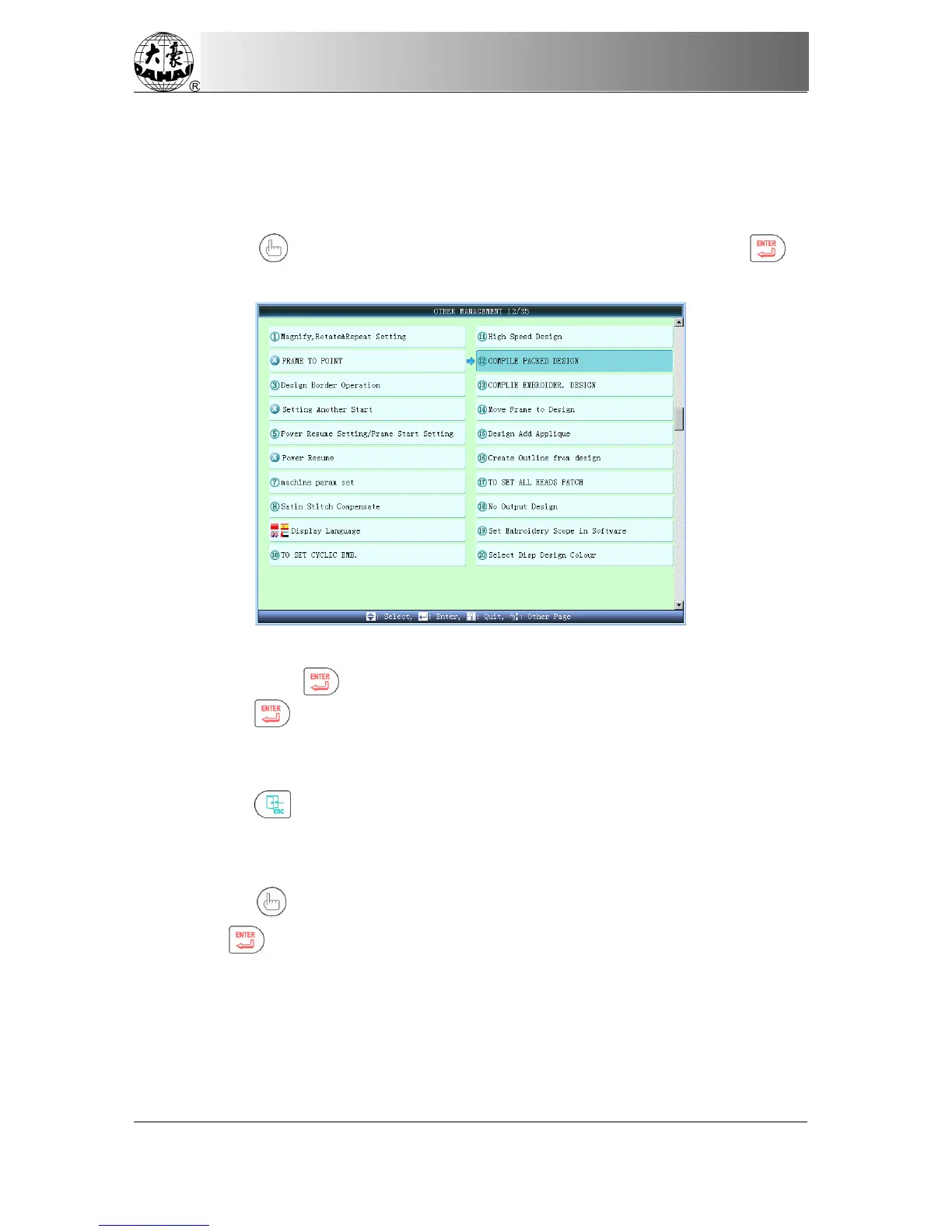
(1) Press "
" and move icon to “Compile Packed Design”. Then press to
enter the interface for compiling the combination pattern,
(2) The system will list the memory pattern. Select the combination pattern for
compiling and press “ ” to go to next step
(3) Press " " key to confirm compiling the packed pattern, or press other key to exit.
(4) Input the number of new pattern, and the system will create the new normal pattern
automatically, which is identical with the packed pattern.
(5) Press " " key to go to the main interface.
14-2 Compile the Embroidering Pattern
Operation: (This operation is practical only when user sets scaling, rotation and repetition)
(1) Press " " key and move the icon to "COMPILE EMBROIDER. DESIGN", and
then press " " key to enter the operation interface for creating normal pattern from
parameters.



 To Next Page