EasyManua.ls Logo

BUXTON REI-TW 300 - User Manual

BUXTON REI-TW 300
92 pages
Print Icon
To Next Page IconTo Next Page
Loading...
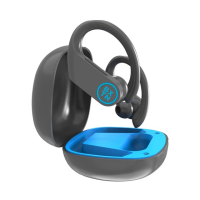
EN HIGHLY DURABLE SPORTS TWS WIRELESS HEADPHONES
CZ SPORTOVNÍ EXTRÉMNĚ ODOLNÁ TWS BEZDRÁTOVÁ SLUCHÁTKA
SK ŠPORTOVÉ EXTRÉMNE ODOLNÉ TWS BEZDRÔTOVÉ SLÚCHADLÁ
PL SPORTOWE WYTKOWO WYTRZYMAŁE SŁUCHAWKI BEZPRZEWODOWE TWS
HU EXTRÉM TARTÓS TWS VEZETÉK NÉLKÜLI SPORT FÜLHALLGA
SR SPORTSKE, EKSTREMNO OTPORNE BEŽIČNE SLUŠALICE TWS
HR SPORTSKE, EKSTREMNO OTPORNE BEŽIČNE SLUŠALICE TWS
EL ΑΣΎΡΜΑΤΑ ΑΚΟΎΣΤΙΚΑ TWS ΓΙΑ ΣΠΟΡ, ΕΞΑΙΡΕΤΙΚΉΣ ΑΝΤΟΧΉΣ
User manual • Návod kobsluze • Návod na použitie
•Instrukcja obsługi • Használati útmutató •Uputstvo
zaupotrebu • Upute za uporabu • Εγχειρίδιο χρήστη
REI-TW 300
Question and Answer IconNeed help?

Do you have a question about the BUXTON REI-TW 300 and is the answer not in the manual?

Overview

This document describes the Buxton REI-TW 300, a pair of highly durable sports TWS (True Wireless Stereo) wireless headphones.

Function Description

The Buxton REI-TW 300 headphones are designed for sports use, offering robust durability and wireless convenience. They can be used with any compatible device that supports Bluetooth wireless technology. A key feature is the ability to manage up to two phone calls simultaneously while also enjoying music playback. The headphones are water and dust resistant, rated to IPX7, making them suitable for various outdoor and active environments.

Important Technical Specifications

Bluetooth:

  • Version: V5.0 with BLE (Bluetooth Low Energy)
  • Supported Profiles: HSP V1.2, HFP V1.7, A2DP V1.3, AVRCP
  • Supported Audio Codecs: SBC / AAC / apt-X
  • Chipset: Qualcomm
  • Wireless Operating Distance: Up to 15 meters (in open space without obstacles)
  • Bluetooth Frequency: 2,402–2,480 GHz
  • Bluetooth Radiation Power: ≤ 4 dBm

Audio:

  • Speakers Diameter: 11 mm
  • Frequency Range: 20 Hz – 20 kHz
  • Sensitivity: 95 dB / 1 mW (@ 1 kHz)
  • Impedance: 32 Ω

Battery & Charging:

  • Headphones Battery: 60 mAh
  • Charging Station Battery: 650 mAh
  • Charging Time (Headphones): Max. 1.5 hours
  • Charging Time (Charging Station): Max. 2 hours
  • Operating Time (Music/Call): Up to 8 hours* + 5 more charging cycles from the charging station.
    • Note: Operating times may vary depending on the operating mode and device settings.
  • Charging Connector: USB type C
  • Charging Cable: USB A - USB type C

Physical Characteristics:

  • Headphones Dimensions and Weight: 48 × 38 × 30 mm, 10 g (each headphone)
  • Charging Station Dimensions and Weight: 76 × 69 × 42 mm, 54 g
  • Charging Station Indicator Light: 4x blue LED indicator lights

Usage Features

Getting Started:

  • Turning On:
    • Automatic: Remove headphones from the charging station.
    • Manual: When off, press and hold the multifunction button (MFB) for 3 seconds until the indicator light flashes blue for 1 second.
  • Fitting and Wearing: Carefully insert the headphones into your ears and adjust for comfort. Different headphone tip sizes (S, M, L) are provided. Headphones are marked R/L on the inside for correct channel placement.

Pairing:

  • Two Headphones: Once turned on, both headphones automatically enter pairing mode. After successful connection, one flashes blue, the other alternates red and blue.
  • Mobile Phone: Activate Bluetooth on your phone, search for "REI-TW 300_L" or "REI-TW 300_R" and select. The connected headphone will then send a pairing message to the phone for the other headphone.
    • Warning: Minimize BT device volume before pairing to prevent damage.
    • Note: Ensure headphones are connected to each other before pairing with the phone.
    • Note: Multi-call management requires Bluetooth V1.5 or higher on the mobile phone.

Charging:

  • Headphones: Place in the charging station. LED is red during charging, turns blue for 30 seconds when fully charged, then off.
  • Charging Station: Connect to a 5V DC power source.
    • Charge Status: Open the top cover; 4 LEDs indicate charge level (0-25%, 25-50%, 50-75%, 75-100%). LEDs turn off 3 seconds after headphones are removed. Headphones recharge automatically when placed back in the station.
    • Warning: Use only suitable chargers. Do not force open headphones or charging station.

Basic Features:

  • Answering a Call: Press MFB once during an incoming call, or use the phone button.
  • Rejecting a Call: Press and hold MFB for 1 second during an incoming call.
  • Ending a Call: Briefly press MFB or use the phone button.
  • Turning Off:
    • Manual: Press and hold MFB on either headphone for 3 seconds (both turn off).
    • Automatic: Place headphones back in the charging station.
  • Volume Control: Briefly press "+" to increase, "-" to decrease volume.
    • Warning: Avoid prolonged use at high volume to prevent hearing damage. Do not use while driving, cycling, or in situations requiring rapid reactions.
  • Previous / Next Song: Press and hold "-" for previous track, press and hold "+" for next track.
  • Play/Pause: Press MFB once to pause, press again to resume.
  • SIRI / Google Assistant: Press MFB twice when paired with phone to activate voice assistant.

Restoration of Factory Settings:

  • With headphones off, press and hold both MFB buttons simultaneously for 8 seconds until the indicator light flashes blue and red for 1 second. Paired device information is deleted, and headphones turn off. Turn them on again to enter pairing mode.

Maintenance Features

  • Cleaning: Do not use coarse cleaning agents.
  • Protection: Avoid contact with sharp objects. Do not expose to extreme temperatures, humidity, or dust.
  • Storage: If not used for extended periods, recharge batteries every two to three months. Store with a charged battery.
  • Safety: Do not throw headphones or station into fire or water.

BUXTON REI-TW 300 Specifications

General IconGeneral
BrandBUXTON
ModelREI-TW 300
CategoryWireless Headphones
LanguageEnglish