

EasyManua.ls Logo

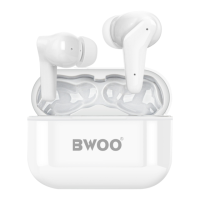
BWOO BW79 - User Manual

BWOO BW79
10 pages
Print Icon
To Next Page IconTo Next Page
Loading...
BW79
TRUE WIRELESS
STEREO
https://bwoohk.com
Question and Answer IconNeed help?

Do you have a question about the BWOO BW79 and is the answer not in the manual?

Overview

This document outlines the features and operations of the BWOO BW79 True Wireless Stereo earbuds.

Function Description

The BWOO BW79 are true wireless stereo earbuds designed for audio playback and call management. They automatically power on and enter pairing mode when removed from their charging case, and automatically shut down or attempt to reconnect when placed back in the case or after a period of inactivity. The earbuds offer touch controls for music playback, volume adjustment, voice assistant activation, and call handling. They also feature Active Noise Cancellation (ANC) with on/off functionality.

Important Technical Specifications

While specific technical specifications like battery capacity, Bluetooth version, or driver size are not explicitly detailed in this manual, the device is a "True Wireless Stereo" (TWS) earbud system, implying Bluetooth connectivity for wireless audio transmission. The manual mentions a battery voltage drop to 3V as a trigger for automatic shutdown, indicating a low voltage cutoff mechanism. The charging method involves a standard charger wire, with a caution against using fast charging to preserve the headset's service life. The product package includes the earbuds, a charging case, a charging cable, and silicone ear tips in sizes L, M, and S.

Usage Features

1. Power On, Pairing, and Connecting:

  • Automatic Power On: The BW79 earbuds automatically power on when taken out of the charging case.
  • Automatic Pairing Mode: Upon power-on, the earbuds automatically enter pairing mode.
  • Connecting to Device: To connect, users need to turn on Bluetooth on their mobile phone, search for "BW79" in the device list, and select it to connect.
  • Automatic Reconnection: If disconnected, the earbuds will automatically attempt to reconnect for 3 minutes.
  • Automatic Shutdown: The earbuds will automatically shut down if placed back in the charging case and the lid is closed, or if there is no connection for 5 minutes, or if the battery voltage drops to 3V.

2. Inserting Earphones: The manual provides a visual guide for correctly inserting the earphones into the ear, showing the earbud being placed into the ear canal.

3. Music Operations: The earbuds feature touch controls on both the left (L) and right (R) earbuds for various music functions:

  • Play/Pause: Single press on either L or R earbud.
  • Next Track: Double press on the R earbud.
  • Previous Track: Triple press on the R earbud.
  • Volume Up: Hold the R earbud.
  • Volume Down: Hold the L earbud.
  • Start Voice Assistant: Triple press on the L earbud.

4. Call Operations: The earbuds also support touch controls for managing phone calls:

  • Incoming Call (Answer): Single press on either L or R earbud.
  • End Call: Hold either L or R earbud.
  • Call Rejection: Single press on either L or R earbud.
  • ANC ON: Double press on the L earbud.
  • ANC OFF: Double press on the L earbud.

Maintenance Features

Charging:

  • The earbuds are charged by placing them in the charging case, which is then connected to a power source using the provided charger wire.
  • Important Note: Users are advised to use the original charger wire to charge the headset. It is crucial to avoid using fast charging, as this can damage the device and reduce its service life.

Box Overview: The product package includes:

  • Two BW79 earbuds (Left and Right).
  • A charging case.
  • A charging cable.
  • Silicone ear tips in three sizes: Large (L), Medium (M), and Small (S), allowing users to choose the most comfortable and secure fit.

The manual concludes with the BWOO brand logo and the website address: https://bwoohk.com.
BWOO BW79 Specifications

General IconGeneral
BrandBWOO
ModelBW79
CategoryHeadphone
LanguageEnglish