7
4
18
17
19
8
16
15
6
14
9
3
2
12
10
USB display
5
11
1
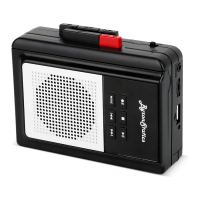
KCS-312B
batteries or use a USB power supply.
Note: Battery and USB cable not included.
13
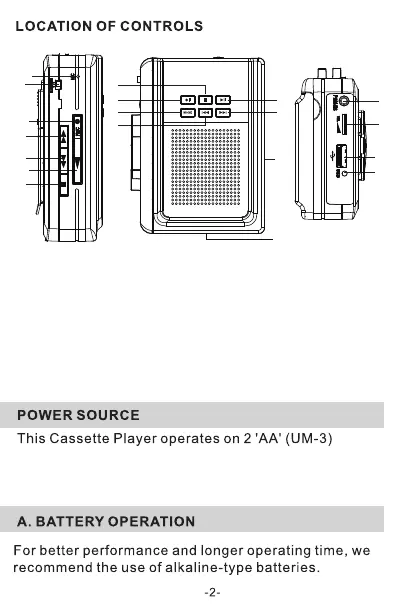
10 .USB PORT
11 .USB INDICATO R
12. BATTE RY COMPARTMEN
13 .MICRO USB 5 V DC
14.USB M OVENEXT
15.USB M OVEPREVIOUS
16.USB PL AY MODE
17.USB RECORD BUTTON
18.USB STOP BUTTON
19.USB PL AY/PAU SE BUTTON
1.
2.
3.
4.
5 .PL AY BUTT ON
6.
7.
8.
9.
STOP BUTT ON
FAST FORWARD
FAST BACK WARD
FUNCTION SELE CTOR
RECORD BUTT ON
MIC
EAR PHONE JA CK
VOLUME CONTROL
3.
*
USB PLAY
Insert the USB device to USB port .
Set USB/TAPE switch to USB.
1.
2.
1.
2.
If you are using USB power, we recommend that you remove
any batteries first.
Insert a micro USB cable(not supplied)
into the USB port on the device and
use a suitable USB power supply.
Please remove any batteries from the unit
if unit will not be used for a period of time.
please allow slight interference on AM radio reception when using USB power supply
1
2
3
3.
USB PLAY MODE
.One Click the MODE button to repeat the single.
.Double Click the MODE button to repeat all the tunes.
.Third Click the MODE button to play random .
Press PLAY/PAUSE button to playback music from USB device.
Press PLAY/PAUSE button again to stop play.
USB RECORDING
1.
Insert the USB device to USB port ,the red USB indicator is on.
2.
Press the USB recordin g button and the red USB indicator flashes to
start recording.
Press the USB recordin g button again stop recording, and the
recordin g file will be saved as WAV file automatically.
Press PLAY/PAUSE button to play the recording file.
3.
4.
TAPE TRANSCRIPTION USB
1.
Insert the USB device to USB port , set USB/TAPE switch to
tape, and Press PLAY button to play the tape.
2. Press the USB recording button and the red USB indicator
flashes to start recording the contents of the tape.
3. Press the USB recording button again to stop recording, the red
USB indicator will not flash, the recording file will be saved as
Stop the cassette play , Set USB/TAPE switch to USB. and
press MoveNext button several times to find the last file is the
newly recorded file. then press PLAY/PAUSE button to
play the recording file.
WAV file automatically.
Note: Delete the recording file on your computer only after
connecting to the computer.
4.


 To Next Page
 Loading...