Need help?
Do you have a question about the C. Crane CC RADIO SOLAR and is the answer not in the manual?
Important safety advice before operating the radio, including volume settings and hearing protection.
Fields for recording serial number, date of purchase, and dealer details for future reference.
Lists items included in the radio box and advice on keeping packaging for potential servicing.
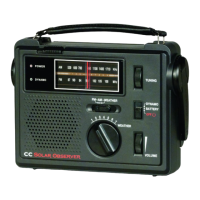
Overview of the CCRadio Solar's unique design, AM antenna, and solar panel features.
Advice on avoiding high temperatures, direct sunlight, and potential battery leakage.
Suggestion to use texting for communication during power and phone system outages.
Warnings against exposing the product to rain or moisture and not removing the radio back.
Explanation of warning symbols indicating dangerous voltage and important instructions.
Instructions for fully charging the internal battery before first use and maintenance.
Regular checks, using specified accessories, and advice on handling crank operation.
Recommendations for charging and risks associated with unapproved power adapters.
Precautions to keep the radio and AC adapter cord out of reach of children to prevent accidents.
Keep the radio dry to prevent damage; seek professional service if liquid enters the unit.
Avoid high temperatures, particularly inside vehicles, to prevent melting or fire hazards.
Refer all service work to qualified personnel to avoid exposing yourself to voltage and voiding warranties.
Use only qualified-installed external antennas or cables to avoid potential hazards.
Guide to using solar panel, dynamo crank, AC adapter, and AA batteries for radio operation.
Step-by-step instructions for inserting AA or 18650 Li-ion batteries into the radio.
Explanation of icons and indicators on the radio's LCD screen, such as battery status and signal strength.
Details on operating the power/sleep timer, tuning, band selection, and volume control.
How to save and recall favorite radio stations using the five memory buttons.
Instructions for adjusting the LCD display brightness and its automatic shut-off behavior.
Using the earphone jack, AUX input jack, and radio power/charging jack.
Information on the battery selection switch and compatibility with different battery types.
Operating the built-in flashlight and locking/unlocking the radio controls for safety.
How to use the radio's USB port to charge a mobile phone during emergencies.
Step-by-step instructions to set the current time on the radio using memory button #1.
Instructions for setting and disabling the radio's alarm function using memory button #2.
How to disable or enable audible beeps for button presses, except for alarm and weather alerts.
Switching the display between frequency and clock time while listening to the radio.
Activating 9/10 kHz AM tuning modes and expanding the FM band coverage.
Enabling High Power Audio Mode for improved audio quality and loudness.
Adjusting AM tuning steps and activating narrow AM filters for better reception.
Procedure to reset the radio to its default factory settings using memory buttons #1 and #5.
Hidden setting to access and manage additional station memory pages for AM and FM bands.
Solutions for non-responsive buttons, radio shut-offs, blank display, and memory retention problems.
Tips for poor AM/FM reception and understanding the battery level indicator with rechargeable batteries.
The CCRadio Solar is an emergency radio designed for reliable performance and ease of use, even in challenging situations. It combines several power sources, robust construction, and user-friendly features to ensure you stay connected and informed.
The CCRadio Solar serves primarily as a radio receiver for AM, FM, and Weather bands. It is equipped with an oversized AM antenna for superior long-distance reception and utilizes the latest chip technology for good FM reception. Beyond its radio capabilities, it integrates emergency features such as a phone charger, a flashlight, and a NOAA Weather Alert system, making it a versatile tool for preparedness. The radio is designed to be simple to operate, with easily accessible controls and a clear display.
The radio offers multiple ways to power it, ensuring operation even when traditional power sources are unavailable. You can power it using its oversized solar panel by placing it in direct sunlight. For optimal charging of the internal Li-ion battery via solar, it's best to leave the radio off. Eight hours of direct sunlight can provide 10 to 14 hours of playtime at medium volume.
Alternatively, the radio can be powered by winding its dynamo crank, located on the back. Winding at about two rotations per second for 90 seconds can provide 8-13 minutes of playtime, varying with winding speed, volume, and band selection. If the Li-ion battery is deeply depleted, it may require more winding to reach the necessary voltage (above 3.3 volts) to power the radio.
For continuous power or charging, an optional AC charging adapter can be connected to the Micro-USB charging jack on the side. While this allows for continuous power, it's recommended to unplug the adapter when listening to AM radio to avoid potential noise or interference. A full charge of the internal Li-ion battery via AC adapter takes approximately 8 hours.
The CCRadio Solar also supports "AA" alkaline batteries as an alternative power source, providing about 40 hours of playtime at normal volume. Rechargeable NiMH "AA" batteries can also be used, offering about 35 hours of play, though the radio does not charge these batteries. It's crucial not to use Lithium type "AA" batteries. A battery selection switch under the rubber flap allows you to choose between the Li-ion battery and "AA" batteries.
The radio features a clear LCD display that shows the battery icon, page number for station memories, station memories (1-5), reception signal strength, band indicator (AM, FM, Weather), frequency/time, beep ON/OFF status, alarm activation, sleep timer activation, and lock switch activation. The display light stays on for 10 seconds after each button press. If plugged into continuous power, the display light can be kept on continuously at a desired brightness by pressing and holding the POWER and LIGHT buttons.
Tuning is straightforward: a quick press of the tuning buttons increments the frequency, while holding them for one second initiates an automatic tune to the next strong station. Continuous holding cycles through the entire band. The BAND button cycles between FM, AM, and Weather bands.
An important emergency feature is the NOAA Weather Alert. By pressing and holding the BAND button for more than 3 seconds, you can activate this alert, which monitors the selected weather channel for NOAA alerts. When an alert is issued, the radio will beep and provide important information. You can select the alert duration (4hr, 8hr, or 16hr). A flashing display light indicates the alert is active.
Volume is adjusted by rotating a control knob. The radio allows you to save up to five favorite stations per page to memory buttons (1-5) by pressing and holding a button for two seconds while the station is playing. A quick press recalls a saved station. The "Page" function offers 20 additional presets for AM and FM, accessible by quickly pressing memory buttons #3 and #5 simultaneously to enter page selection mode, then pressing 1-5 to select the desired page.
For private listening, earphones can be connected to the 1/8" (3.5mm) earphone jack. Strong FM stations will provide stereo sound, while weak FM, all AM, and Weather stations will be in mono. The AUX input jack allows the CCRadio Solar to function as a speaker for external devices. Connecting a 1/8" stereo patch cable from your device's audio output to the AUX input automatically switches the radio to AUX input mode, utilizing high power audio for best sound quality.
A super bright LED flashlight is located on the left side of the radio. Pressing the "Light" button once turns it on, and the button itself glows in the dark, aiding location during power outages. To prevent accidental button presses, the radio can be locked by pressing and holding the BAND and POWER buttons simultaneously for two seconds; the volume knob remains functional in this mode.
The radio also includes a phone charger jack (standard USB port). In an emergency, cranking the radio for 90 seconds can provide enough power for a few quick calls, depending on your phone model. To initiate charging, attach your phone's charging cable to the USB port under the rubber flap and press and hold the "Light" button for 2 seconds. The battery icon on the screen will indicate charging. If your phone doesn't charge, try fully powering it off and retrying. Charging stops when the radio battery is fully depleted.
Several hidden features enhance the radio's functionality:
To ensure optimal battery life, it is recommended to fully deplete and recharge the internal battery every 6 months if the radio has not been used. If the radio is unused for more than 6 months, winding the crank for at least 30 seconds helps maintain battery health before a full charge.
The internal 3.7V Lithium-ion 18650 rechargeable battery (3000mAh) is designed for about 300-500 full charge and discharge cycles and is replaceable.
For troubleshooting, if buttons are unresponsive but the display is on, the radio might be locked. Unlock it by pressing and holding the BAND and POWER buttons for two seconds. If the radio shuts off quickly, check for low batteries. If the LCD display is blank despite a full charge or new batteries, verify the battery selector switch position and battery insertion direction. If stations aren't holding in memory, ensure you are pressing and releasing the memory button quickly to recall, and pressing and holding for two seconds to save.
For poor AM reception, try rotating the radio, moving it away from electronic devices that cause interference, and unplugging any power source to see if battery operation improves reception. For FM and Weather bands, fully extend the whip antenna and try different orientations for the strongest signal. Note that the battery power level indicator is calibrated for alkaline batteries (1.5 volts at full charge), so rechargeable NiMH "AA" batteries (1.25 volts when fully charged) will show a partial charge on the display.
 General
| Type | Portable Radio |
|---|---|
| Tuning | Digital |
| AM Frequency Range | 520 - 1710 kHz |
| Weight | 1.2 lbs |
| Speaker | Built-in |
| Headphone Jack | Yes |
| Emergency Light | Yes |
| Water Resistance | No |
| Power Source | Solar |
| Frequency Bands | AM, FM |
| FM Frequency Range | 87 - 108 MHz |
| Features | Solar Panel, Hand Crank, NOAA Weather Alert |
| Battery Type | Rechargeable NiMH |
| Alert Function | NOAA Weather Alert |

 To Next Page