Another Option to Protect the CC DX Mile from Cold Conditions
If it is possible to move the outdoor receiver (CC DX Mile) inside for protection, you can add a
Low Loss Coax N Type Female to N Type Male cable to extend the distance from the outdoor
antenna and the receiver. To minimize line loss, we recommend the cable to not exceed 6 feet.
The cable will connect to the outdoor antenna’s N Type connector and then to the CC DX Mile's N
Type connector. We recommend weather proofing each connection with coaxial tape.
For More Speed connect a WiFi Router - (Not Required)
WiFi speed is variable and depends on distance and other conditions. The CC Vector provides
enough speed for browsing the Internet with several devices or streaming video on one device.
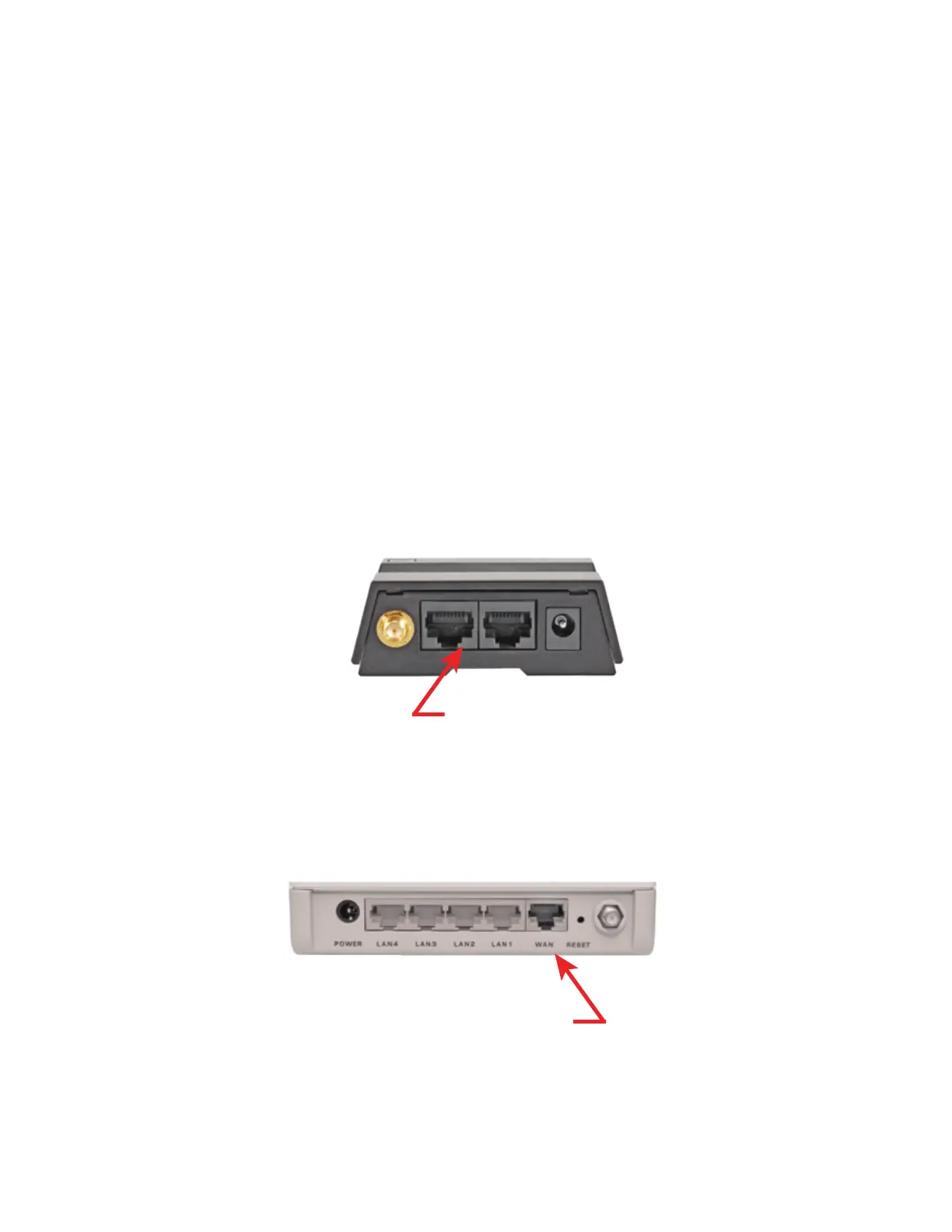
To improve the WiFi speed on all your devices connect a WiFi router (not included) to the LAN
port of the CC Vector.
1) Setup the CC Vector normally using the included directions.
2) Confirm that the CC Vector is working by browsing the Internet while wirelessly connected to it.
3) Connect the included 18” network cable (or use your own longer network cable) to the LAN
port of the CC Vector.
4) Connect the other end of the network cable to the “Internet” or “WAN” port on the back of your
WiFi router.
5) Test the setup by wirelessly connecting your computer or other device to the router’s WiFi
signal and browse the Internet.
6
Back of CC Vector
LAN Ports
Wireless Router
Internet or WAN Port


 To Next Page