CC WiFi Page 5
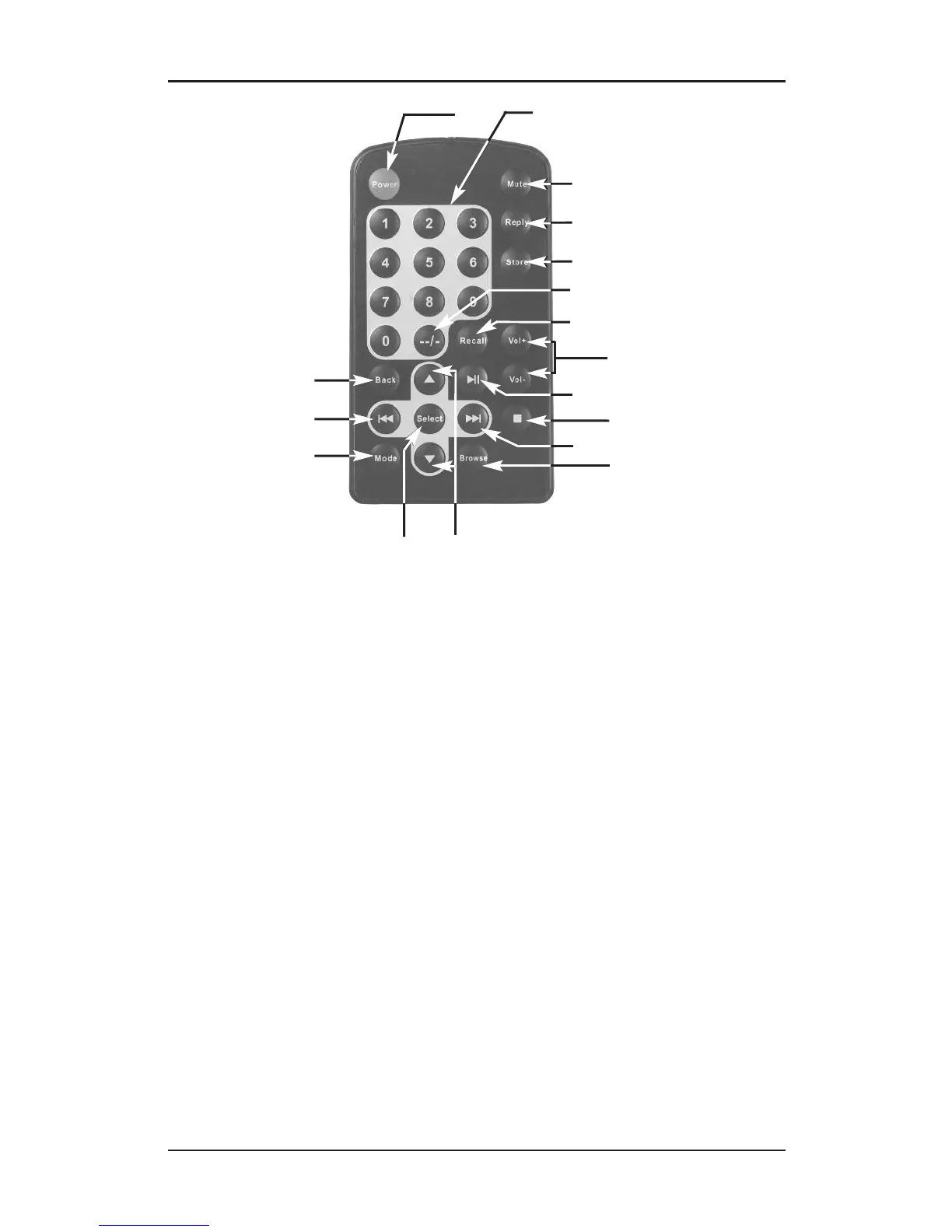
Location of Controls — Remote Control
e
POWER: Switch radio
ON/OFF
r
1-9: Store presets and recall
functions
t
MUTE: Mute the audio
y
REPLY: Used for Pandora,
Aupeo! and adding stations
to Reciva
u
STORE: Store up to 99
radio stations
i
--/-: Used for presets 10 and
above
o
RECALL: Play pre-set
stations
p
+ or - VOL: Adjust volume
[
PLAY/PAUSE: Play or pause
track
]
STOP: Stop track play. Press
and hold to delete a track
from the playlist
A
NEXT: Play next track
S
BROWSE: View tracks in
playlist
D
UP/DOWN: Scroll through
options
F
SELECT: Select a displayed
option
G
MODE: Switch between
Repeat and Shuffle modes
H
PREV: Play previous track
J
BACK: Reverts back to the
previous menu or option
e
t
u
y
i
r
S
A
p
[
F
G
H
J
D
o
]
Buttons 23-26 and 29-30 are used only in Media Player
mode while playing tracks from your computer.




 To Next Page