12
Energy-saving mode temperature setting
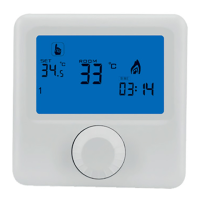
In the setting screen, rotate the rotary key to choose the
icon and press the key to enter into
energy-saving mode temperature setting screen. Rotate the rotary key to adjust the temperature
and press the key to conrm and return to the setting screen. After 5 seconds, it automatically
returns to the main screen. The default energy-saving temperature is 17ºC.
Comfort mode temperature setting
In the setting screen, rotate the rotary key to choose
icon and press the key to enter into com-
fort mode temperature setting screen. Rotate the rotary key to adjust the temperature and press
the key to conrm and return to the setting screen. After 5 seconds, it automatically returns to the
main screen. The default comfort temperature is 21ºC.
Time setting
In the setting screen, rotate the rotary key to choose
TIME
icon and press the key to enter into
time setting screen.
Firstly, minutes are ashing. Rotate the rotary key to adjust the minute value and press the key to
conrm.
Then, hours are ashing. Rotate the rotary key to adjust the hour value and press the key to con-
rm.
Finally weekday is ashing. Rotate the rotary key to select the current weekday and press the key
to conrm and return to the setting screen. After 5 seconds, it automatically returns to the main
screen.
Automatic programming
In the setting screen, rotate the rotary key to choose
PROG
icon and press the key to enter into
automatic programming.
From 0:00 to 23:00, the interval is ashing in the timeline located in the bottom of the screen and
it is possible to select as setting temperature between the comfort mode temperature and the
energy-saving mode temperature. When it is selected, press the key to conrm and jump to the
next interval. It is the same process from Monday to Sunday.
Note: In the timeline, the rhombus indicates that the selected temperature is the comfort tempera-
ture and if the rhombus does not appear, it means that the setting temperature is the energy-saving
temperature.
Advanced options
In the setting screen, rotate the rotary key to choose the
ADVANCED
icon and press the key to enter i the
advanced option screen. Rotate the rotary key to select the desired parameter and press the key to
set this parameter.
Symbol Description Parameter setting
Default
value
A1
Measured
temperature
adjustment
-9-+9 ºC 0.0 ºC


 To Next Page
 Loading...