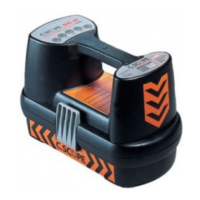
C.Scope Cable Avoidance Tool: Function Checks
It is recommended that the operation of the C.Scope Cable Avoidance Tool and Signal
Generator is checked before use.
Battery Condition - Check by depressing the On/Off switch beneath the handle. The
display will show at least one solid segment if the batteries are ok. Ensure power on
tone is heard.
Power Mode - Select Power Mode. Set Sensitivity fully clockwise and point the body of
the C.Scope Cable Avoidance Tool at a fluorescent light from a distance of 1m. Switch the
light on. A loud tone should be heard and the display should read greater than 50% full
scale. Reducing the sensitivity should cause the displayed reading to reduce and the tone
to cut out.
Radio Mode - Select Radio Mode. Set the Sensitivity fully clockwise and, from a distance
of less than 0.25m, point the unit at a metal conductor of length greater than 100m (for
example a pipe or cable). A warbling tone should be heard. The display should read
greater than 50% full scale.
NOTE These tests may need to be carried out in more than one location or with more than one source to gain a
positive signal.
33


 To Next Page
 Loading...