30
BLUETOOTH CONNECTION TO AN ANDROID TABLET
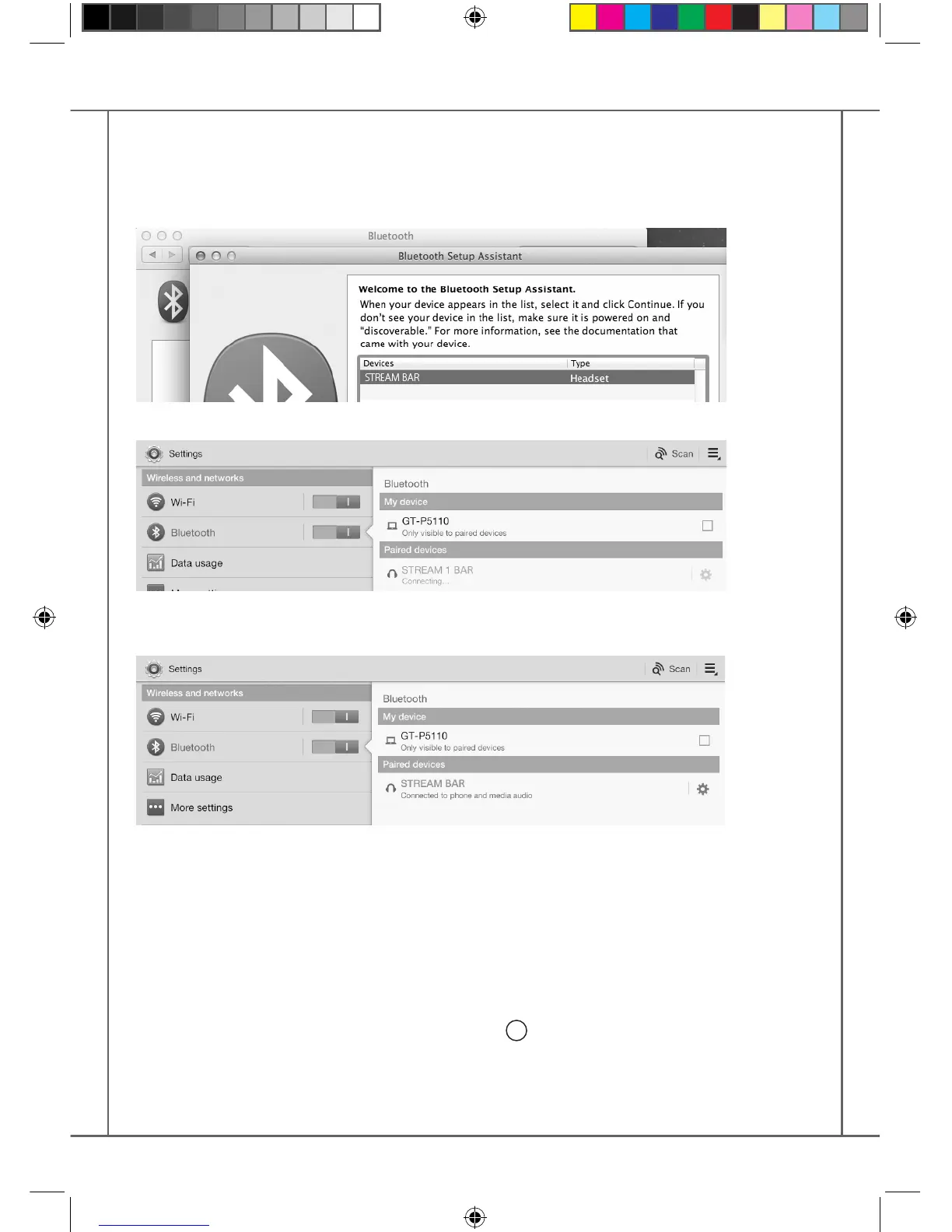
- If not already done, activate the Bluetooth Function in the « Settings » menu of your tablet by
pressing on the ON-OFF switch.
- Press “Scan for devices” and select « Cabasse STREAM BAR » among the available devices.
STREAM BAR is now paired with the tablet and connected to STREAM BAR is no other Blue-
tooth connection to STREAM BAR is active.
If the message « Connection.. » does not show up, stop the running Bluetooth connection with
another device, either through the set up menu of the device or by switching o and on the
STREAM BAR. Press on « Cabasse STREAM BAR » again.
To play on STREAM BAR the audio les stored in the tablet (or smartphone), open the audio
player application, select a le and press on “play”.
If STREAM BAR remains silent, rst check that the main volume of the tablet (or smartphone) is
not down to zero level and that « mute » is o. Adjust the volume in the player application and
nally raise the volume of the STREAM BAR with the Stream remote. Finally select « Bluetooth »
as the active source on STREAM BAR pressing the
4
key of the Stream remote until the blue
LED ashes.
StreamBAR_manual_A4 V5.indd 30 6/10/2016 9:16:33 AM


 To Next Page
 Loading...