31
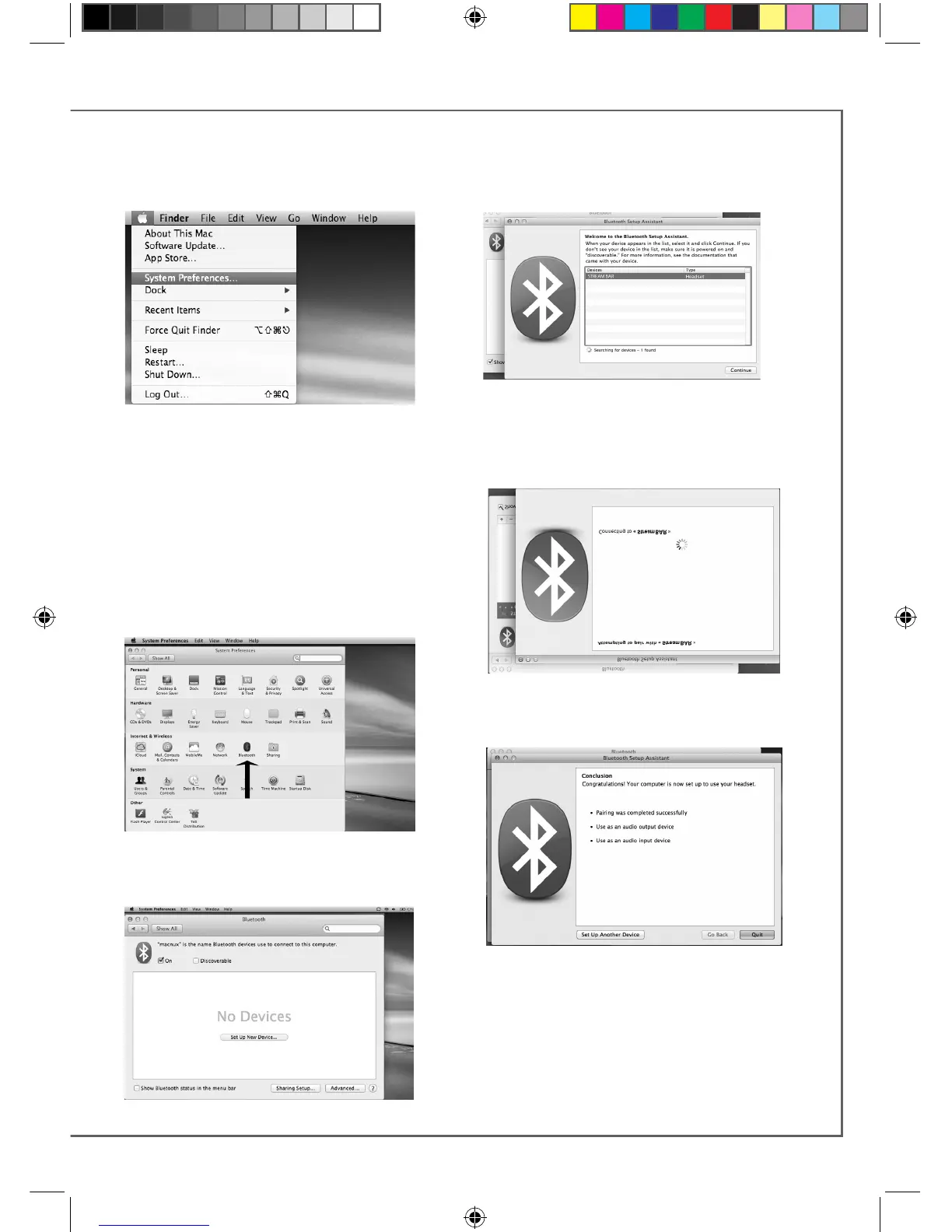
Connect the STREAM BAR to mains to
power it on. If STREAM BAR is already
on, stop any running Bluetooth connec-
tion between STREAM BAR and any
other item.
Activate the Bluetooth function of the
computer: open the « apple » menu and
select « Systems Preferences ».
Select « Bluetooth » in the window for the
«Systems Preferences ».
Select « On » and click on « Set Up New
Device”
Select « STREAM BAR » in the list of items and
click on “Continue”
Connecting…
Connection completed. STREAM BAR is now
paired with your Mac computer.
BLUETOOTH CONNECTION TO AN APPLE COMPUTER
1 BLUETOOTH MODE ACTIVATION
StreamBAR_manual_A4 V5.indd 31 6/10/2016 9:16:33 AM



 To Next Page