32
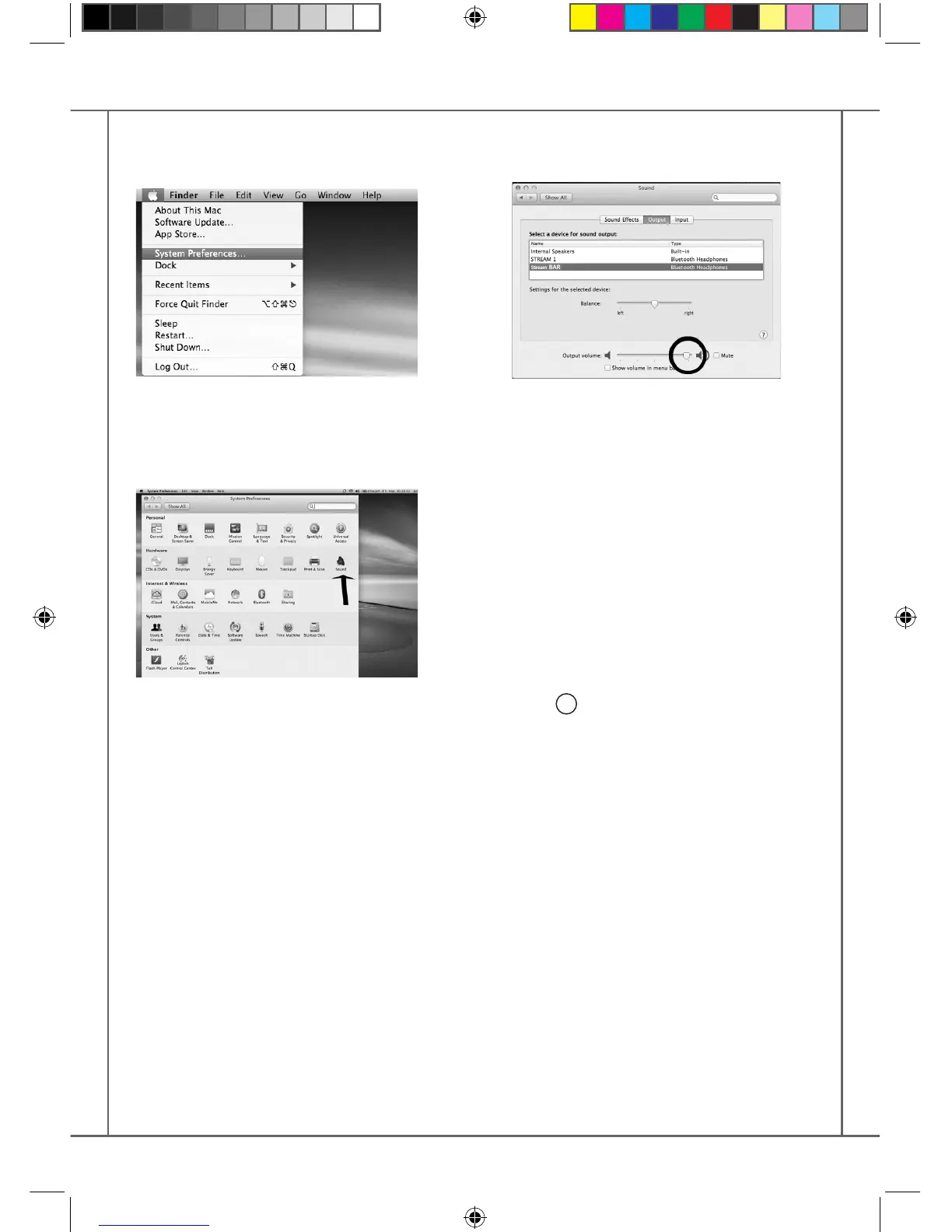
To enjoy the musics stored on you Mac with
STREAM BAR, set up STREAM BAR as your au-
dio output device in the “System Preferences”
menu.
Select « Sound » in the « Hardware » section.
Select "STREAM BAR Stereo" in the « Output»
tab. The line "STREAM BAR" stands for the
hands free set up to be used only with a smart-
phone.
Set the volume control on far right position.
Close the “Sound” window.
If the STREAM BAR is on Eco mode, it will take
around 6 seconds to start playing, the Blue-
tooth input being automatically selected. Use
the Stream remote control to adjust the sound
level.
If STREAM BAR is active and connected to ano-
ther active source (wi, analog) use the Stream
remote control and select the Bluetooth input
with the
8
key, then adjust the sound level.
2 SELECTION OF THE AUDIO OUTPUT DEVICE
StreamBAR_manual_A4 V5.indd 32 6/10/2016 9:16:34 AM



 To Next Page