IN THE BOX FEATURES & FUNCTIONS
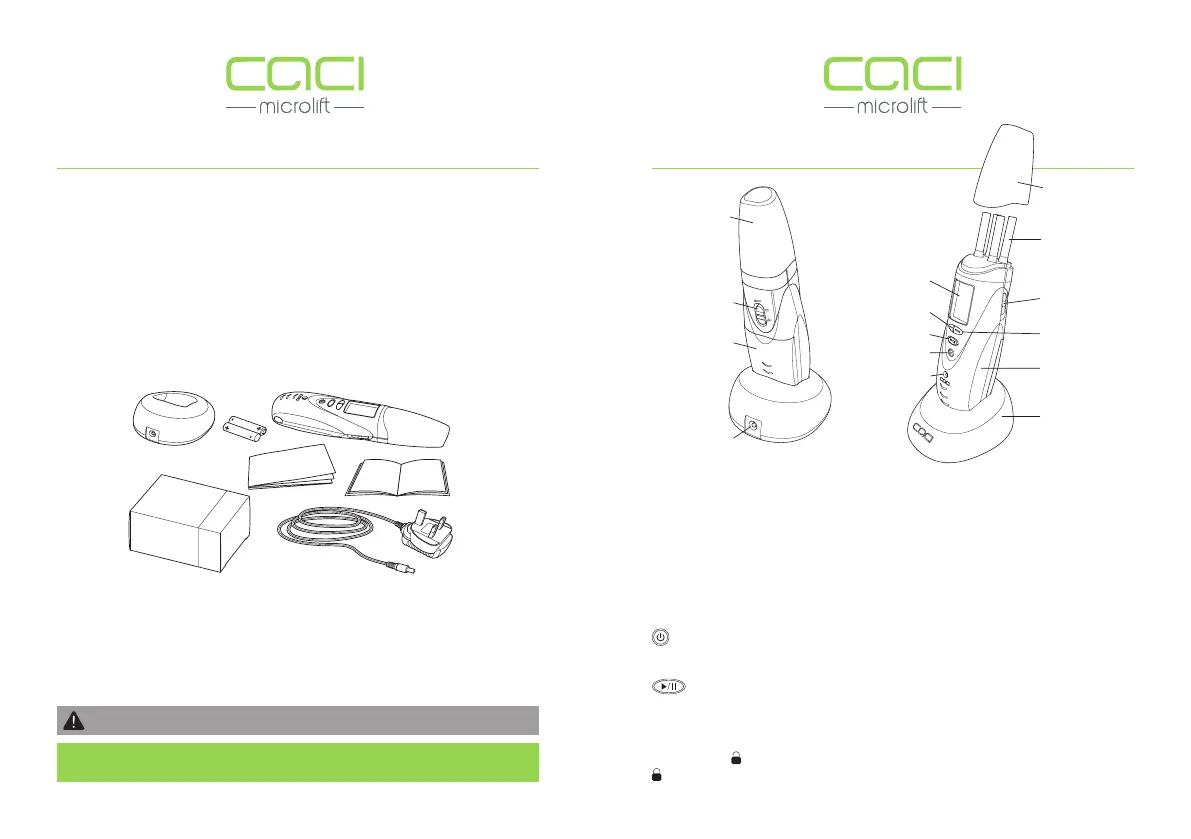
The CACI Microlift Personal Facial Toning System is supplied with the
following items:
1. CACI Microlift (Handset)
2. Charging Station
3. Mains Charger Lead
4. 2 x AAA 3.6v/3.7v Li-Ion 300-600 mAh rechargeable batteries
5. 1 box of Electro Buds (Qty 100)
6. User Guide
7. Treatment Guide
The mains charger lead is designed for use with a 240V~50Hz mains supply
and has been fitted with an approved UK plug. The CACI Microlift may be used
in Mainland Europe and other countries with a suitable plug adaptor.
1.
2.
3.
4.
5.
6.
7.
Fig.1
NOTE: If any items are damaged or missing please contact your place of
purchase.
BUTTON FUNCTIONS
(PROG) Program Button – Toggles between the two available programs
(TONING and WRINKLES).
(MODE) Mode Button – Toggles between the three available intensity modes
L (Low), M (Medium) and H (High).
Power Button – Press and hold the power button to turn the handset
On/Off. It is also used as a reset button when cancelling a treatment program.
Start/Pause Button – Starts and Pauses the selected treatment.
Mute Switch – Turns the audible ‘BEEPS’ On/Off. The mute icon will appear on
the LCD screen when mute has been switched ON.
Slide Lock – Opens the probes (use during the Toning program).
Locks the probes in a closed position (use during the Wrinkles program).
Mute Switch
Battery Cover
Cap
CACI Microlift
(Handset)
LCD Screen
Program Button
Start/Pause Button
Power Button
Probes
Slide Lock
(open/close)
Mode Button
Charging Station
LED Power/Charging
Indicator
Cap
Mains Charger
Lead Socket
Fig.2
6 7
DO NOT USE CACI MICROLIFT BATTERIES IN ANY OTHER DEVICE


 To Next Page