
 Need help?
Do you have a question about the Cactus Activity Tracker and is the answer not in the manual?
Instructions on obtaining and installing the necessary mobile application.
Guidance on initial device charging and preparation.
Steps to connect the activity tracker to a smartphone via Bluetooth.
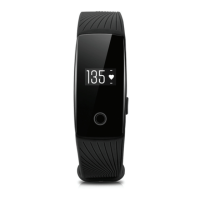
Describes the default display and data shown on the device.
How to access previously recorded sports activity data.
Steps for actively tracking exercise sessions like running or cycling.
Troubleshooting steps when the device is not discoverable.
Solutions for connectivity problems between the device and the app.
Procedure to reset the device to its original settings.
Instructions for updating the device firmware or software.
 General
| Connectivity | Bluetooth |
|---|---|
| Battery Life | Up to 7 days |
| Water Resistance | IP67 |
| Compatibility | iOS and Android |
| Display | OLED |
| Activity Tracking | Steps, distance, calories |
| Notifications | Call |
| Features | Step counter, calorie counter, sleep tracker |

 To Next Page