NX-480 Wireless Motion Sensor
Page 1
NX-480 Wireless
Motion Sensor
Document Number: 466-1479 Rev. D
May 1998
Installation
Instructions
Product Summary
A motion sensor (passive-infrared or PIR) detects
movement within a specific area by sensing the infra-
red energy emitted from a body as it moves across the
sensor’s field of view, causing a temperature change in
the sensor’s zones. When this motion is detected, the
sensor transmits an alarm signal to the control panel.
Use motion sensors to protect locations where door/
window sensors are impractical or not needed. For
example, use a motion sensor to protect large areas or
open floor plans. Motion sensors also provide backup
protection for door/window sensors.
The NX-480 Wireless Motion Sensor includes the fol-
lowing features:
■ 35 feet by 40 feet coverage area for standard and
animal- alley lenses
■ Masking kit provided to block portions of cover-
age area
■ 3-minute transmitter lockout time after an alarm
that helps extend battery life
■ Cover-activated tamper (optional wall-activated
tamper is included)
■ Supervisory signal transmitted every 64 minutes
to the control panel
■ Sensor low battery reports (trouble) to the control
panel
■ Field-selectable sensitivity options
60-639
Installation Guidelines
Motion sensors are ideal whenever it is not practical to
install Door/Window sensors on every opening. Large
areas in an open floor plan, downstairs family rooms,
and hallways are candidates for motion sensors.
Motion sensors are not suitable for rooms where pets
can enter.
Use the following guidelines for installing motion sen-
sors.
■ If possible, locate sensors within 100 feet of the
panel. While a transmitter may have a range of
500 feet or more out in the open, the environment
at the installation site can have a significant effect
on transmitter range. Sometimes a change in sen-
sor location can help overcome adverse wireless
conditions.
■ Mount the motion sensor on an insulated, outside
wall facing in.
■ Mount the motion sensor on a rigid surface which
is free from vibrations.
■ Position the sensor so it faces a solid reference
point, like a wall.
■ Do not aim the sensor at windows, fireplaces, air
conditioners, area heaters, forced air heating
vents, or place it in direct sunlight. Sudden
changes in temperature may trigger a false alarm
from these devices.
■ Do not mount the sensor near duct work or other
large metallic surfaces which may affect the RF
signals (see RF Testing). Actual acceptable trans-
mitter range should be verified for each installa-
tion.
■ Mount the sensor permanently on a flat wall or in
a corner. Do not set it on a shelf.
■ Windows should be closed in any area which has
an armed motion sensor.
■ A pet will trigger a motion sensor. See Animal
Alley lens guidelines to use a motion sensor when
pets are present.
■ Position the sensor to protect an area where an
intruder would be most likely to walk across the
detection pattern (see Figure 1).

 Need help?
 General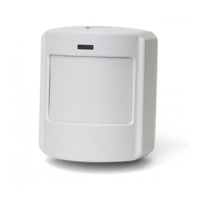

 To Next Page