EasyManua.ls Logo

CaddyTalk CUBE - Brightness Adjustment; Viewfinder Brightness Adjustment

CaddyTalk CUBE
23 pages
Print Icon
To Next Page IconTo Next Page
To Previous Page IconTo Previous Page
Loading...
BRIGHTNESS ADJUSTMENGT
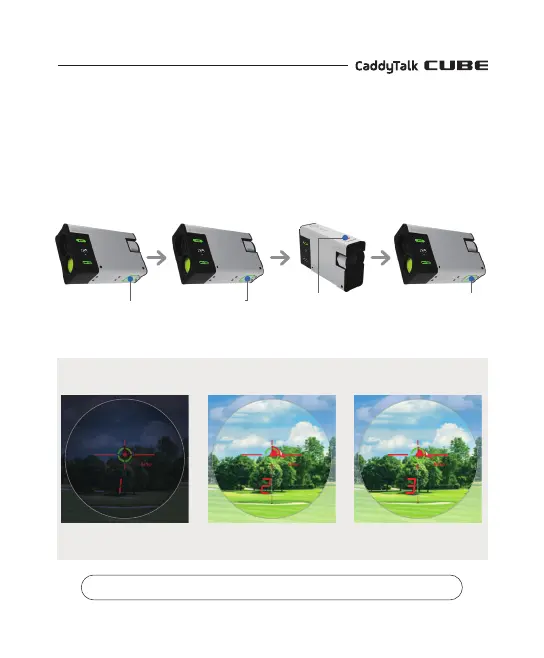
Turn the power on. Press the mode button for 2 seconds to activate the Set-Up Mode.
Press the mode button once more to adjust the brightness. Use the power button to
adjust the brightness from Level 1 to 3.
Mode button
Press for 2 seconds
for Set-up Mode
Mode button
Press it one more time
Use the power
button to adjust
the brightness from
Level 1 to 3
Press for 2 seconds
to turn off Set-Up Mode
※ You can adjust the viewfinder brightness according to the environment.
Basic Settings
Brightness level 1
(For night)
Brightness level 2
(Normal brightness)
Brightness level 3
(For daytime)