7-72 Infotainment System
Options
Select the Options screen button.
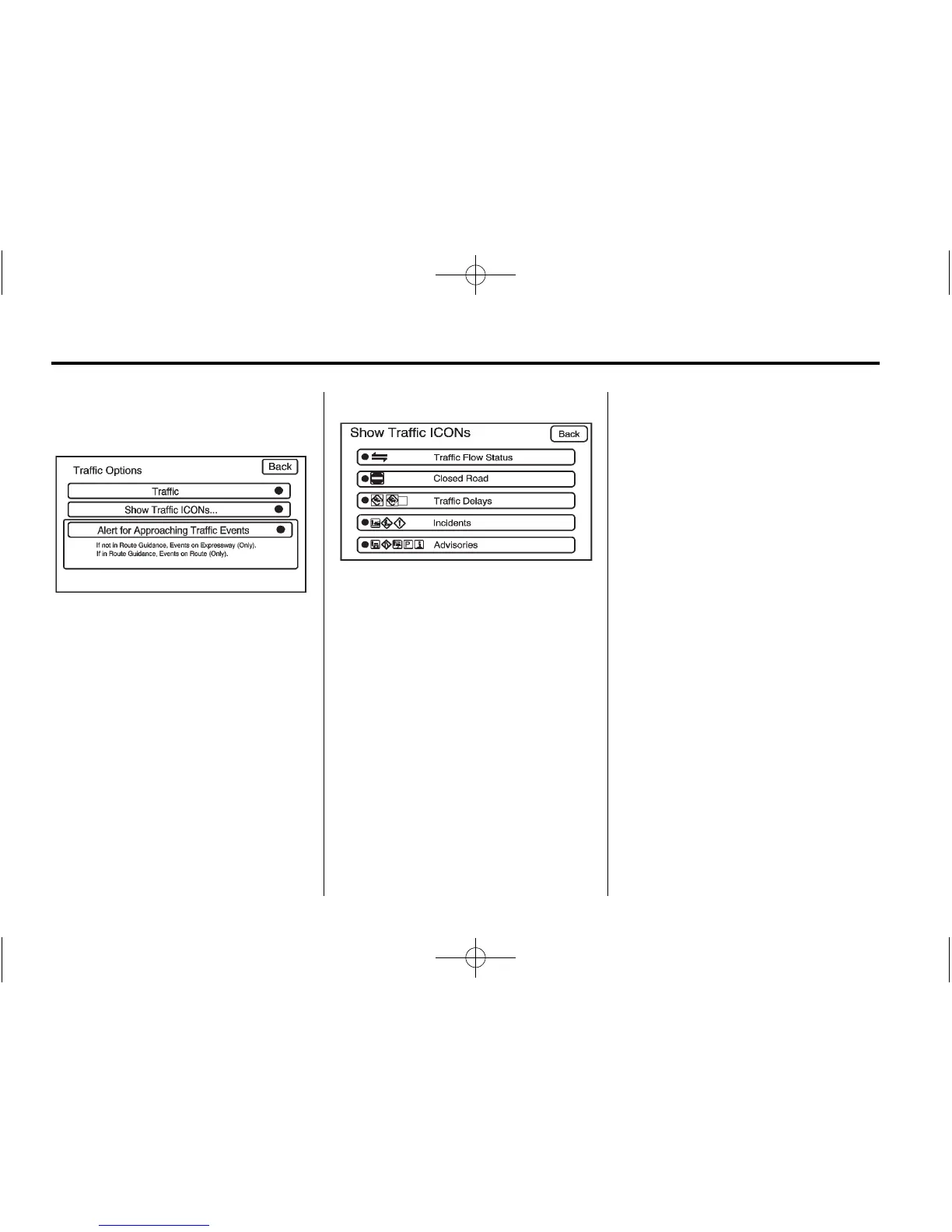
A Traffic Options menu displays.
Select the desired traffic related
option.
Traffic: Select to enable or disable
the traffic function.
Show Traffic ICONS: Select to
display traffic icons on the map
screen. This function allows which
traffic information displays.
Traffic Flow Status — This screen
button is used to enable or disable
the green, yellow, red and orange
arrows shown beside the roads and
used to show the traffic flow or
extent of a traffic event.
.
Black indicates a closed road
segment
.
Red indicates significantly
impaired traffic flow with average
speed of less than 25 mph
(40 km/h).
.
Yellow indicates slightly impaired
traffic flow with average speed
between 25 mph (40 km/h) and
45 mph(72 km/h).
.
Green indicates normal traffic
flow with average speed above
45 mph (72 km/h).
.
Orange indicates construction.
Traffic flow data arrows display on
the map when scaled up to
eight miles.
Closed Road, Traffic Delays,
Incidents, and Advisories — These
four screen buttons are used to
select the traffic event ICONS that
appear on the map screens.




 To Next Page