EasyManua.ls Logo

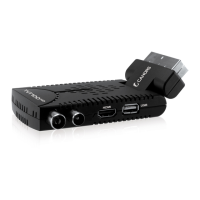
cahors TVT 100HD - User Manual

cahors TVT 100HD
66 pages
Go to English
Print Icon
To Next Page IconTo Next Page
Loading...

Table of Contents

Questions and Answers

  • D
    donald57Aug 1, 2025
    Why is there no picture and sound on my Cahors TV Receiver?
    • S
      Sarah HerringAug 1, 2025
      If you're not getting any picture or sound, here's what to check: * Ensure the cable connecting your TV and the receiver is correctly connected, and that the antenna is also connected properly. * Verify that you've selected the correct video or AV input on your TV. * If using a Composite or S-Video connection, make sure the video definition is set to 576i. You can adjust this by pressing EXIT and then FORMAT on the remote control until the picture appears.
  • J
    Jared AlvarezAug 6, 2025
    How to fix a cahors TVT 100HD TV Receiver remote control that is not working?
    • M
      Molly SmithAug 6, 2025
      If your remote control isn't working, try these steps: 1. Make sure batteries are inserted correctly. 2. Replace the batteries with new ones. 3. Ensure you are aiming the remote directly at the receiver and are within its operational range.
  • S
    Sharon BrownAug 11, 2025
    What to do if there is no sound from my cahors TVT 100HD?
    • D
      Dominique PatelAug 11, 2025
      If you're experiencing a lack of sound, check the following: * Ensure that the receiver and TV are not in mute mode by pressing the MUTE button on both devices. * Adjust the volume level on your TV using the TV remote control to set the desired volume.
  • T
    tmcintyreAug 16, 2025
    What causes picture and/or audio glitch on Cahors TV Receiver?
    • K
      Kristen PerezAug 16, 2025
      Glitches in the picture or audio can often be attributed to: * Insufficient signal strength: Verify that the antenna cable is securely plugged in and that the signal is adequate. * Electrical interference: Ensure that all antenna cabling is quad-shielded to minimize interference.
  • O
    Oscar MeadowsAug 21, 2025
    Why won't my cahors TVT 100HD read music files on my USB stick?
    • P
      Patricia RubioAug 21, 2025
      If your receiver isn't recognizing music files on your USB stick: * Confirm that the files are in the correct format, which should be MP3. * Ensure the files are located at the root or top level of the USB drive, not within any folders or directories.
  • T
    Tonya LopezAug 26, 2025
    How to fix cahors TVT 100HD TV Receiver when indicators on front panel do not light up?
    • A
      Anthony JohnsonAug 26, 2025
      If the indicators on the front panel are not lighting up, check that the AC power cord is properly connected to the wall socket and that the power switch is turned on.

Summary

TVT100 HD User Guide

Specifications

Important Safety Instructions

Operational Precautions

Guidelines on unit operation, ventilation, liquids, cleaning, and overloading.

Connection and Handling Safety

Safety advice for connections, battery handling, location, and attachments.

Controls and Indicators

Panel Layout and Functions

Identification and function of front and rear panel controls and connectors.

Remote Control Operation

How to Connect the STB

Antenna Connection

Procedure for connecting the antenna lead to the STB.

Choosing Connection Methods

Details on connecting via HDMI and other installation methods.

Coaxial and Loop-Out Connections

Instructions for Dolby Digital audio and VCR recording connections.

Getting Started

First-Time Setup and Use

Initial steps for powering on and setting up the receiver for the first time.

Device Operation

Basic Operations and Features

Covers channel selection, volume, information display, TV/Radio switching, closed captions, and picture freeze.

Channel Rescanning

Parent Control

Clearing and Resetting Data

Software Update

Troubleshooting

Common Issues and Solutions

A table listing common problems with their possible causes and solutions.

cahors TVT 100HD Specifications

General IconGeneral
HDTV SupportYes
USB PortYes
HDMI OutputYes
SCART OutputYes
EPGYes
TeletextYes
Power Consumption10W