

EasyManua.ls Logo

Caixing CX-808 - User Manual

Caixing CX-808
2 pages
Print Icon
To Next Page IconTo Next Page
Loading...
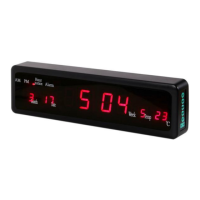
Electronic LED Digital Clock
Model:CX-808
User Manual
Operation:
(1)
Butting
(2)
Setting Of Time and Date:
1-
Under normal situation, press SET to begin the setting of date and time, and you
will see
the hour and minute displays showing the year with flash at the same time;
2-
Press MODIFY to
change year
(if you dont want to change the flashing number, do
not press modify, the following steps are in the same way); press flash on month
display, and then change the month by press MODIFY; press
SHIFT to move the
flash on day display, and then change the day by pressing MODIFY. During the
process of setting, the week follows the date changing automatically;
3-
Press SHIFT again, the date disappears and the hour flashes, then
change the hour
by pressing MODIFY; press SHIFT to more the flash or minute display, and then
change the minute by pressing MODIFY.
4-
Press SET again to resume the normal situation.
(3)
12 and 24 hour mode, under normal situation, press MODIFY for 3 second to switch
between 12 and 24-hour mode.
(4)
Hour Notice Setting:
Under normal situation press MODIFY to open or close the hour
notice function, and you will see the indicator on or off.
(5)
Setting Of Alarm:
1-
Under normal situation, press ALARM to view the set alarm
time, the alarm
indicator light is bright. When you see A1
on the temperature display position, it
means what you see on time display is the first group of alarm time. If the time
display shows-:--it means this group of alarm is workable when it shows time,
press MODIFY to switch between workable and unworkable.
2-
Press ALARM to modify alarm. Change the hour by pressing MODIFY while the
hour display flashing, then press SHIFT, the minute by the same way.
3-
Press ALARM to check the second ground
of alarm time, the way of setting is same
to
the first group, USE the same method
to finish the setting of the third to eight
www.ekt2 .com
Electronics
Katrangi
Trading
Question and Answer IconNeed help?

Do you have a question about the Caixing CX-808 and is the answer not in the manual?

Summary

Clock Operation

Setting Time and Date

Comprehensive guide to setting the clock's year, month, day, hour, and minute.

Hour Mode Switching

Instructions to switch between 12-hour and 24-hour time display formats.

Hourly Notice Function

How to enable or disable the hourly chime notification feature.

Alarm Configuration

Detailed steps for setting multiple alarm times and their active/inactive states.

Belling Mode

Belling and Music Playback

Describes the initial music playback and hourly chime/music function.

Other Instructions

General Operation and Reset

Covers auto-return to normal, stopping sounds, and using the reset function for issues.

Overview

The Electronic LED Digital Clock Model: CX-808 is a versatile digital clock designed for everyday use, offering time display, alarm functions, and an hourly notice feature. Its user-friendly interface allows for easy setting and modification of various parameters.

Function Description:

The primary function of the CX-808 is to display the current time, date, and day of the week. It supports both 12-hour and 24-hour display modes. Beyond basic timekeeping, it incorporates an alarm system with up to eight independent alarm groups, each capable of being set and activated or deactivated. An hourly notice feature provides an audible alert at the top of each hour within a specified timeframe. The clock also includes a "Belling Mode" which initiates a bell sound and plays music upon power connection.

Important Technical Specifications:

While specific technical specifications like power input or display type (beyond LED) are not explicitly detailed, the manual highlights several operational features:

  • Time Display: Shows hour, minute, year, month, day, and week.
  • Alarm Groups: Supports up to eight independent alarm settings (A1 through A8).
  • Hourly Notice: Operates from 7:00 to 21:00, providing an audible alert and music.
  • Alarm Sound: The alarm bell sound is described as "dong dong dong" and lasts for one minute.
  • Display Indicators: Includes indicators for AM/PM, Hour Notice, and Alarm.

Usage Features:

The CX-808 offers a straightforward user experience through its dedicated buttons: SET, MODIFY, SHIFT, and ALARM.

Setting Time and Date:

  1. Press SET to initiate time and date setting. The year display will flash.
  2. Use MODIFY to change the flashing year.
  3. Press SHIFT to move the flashing cursor to the month display, then use MODIFY to change the month.
  4. Press SHIFT again to move to the day display, then use MODIFY to change the day. The week display updates automatically with date changes.
  5. Press SHIFT to move to the hour display (date disappears), then use MODIFY to change the hour.
  6. Press SHIFT to move to the minute display, then use MODIFY to change the minute.
  7. Press SET again to save settings and return to normal operation.

Switching 12/24-Hour Mode:

  • In normal operation, press and hold MODIFY for 3 seconds to toggle between 12-hour and 24-hour display modes. The AM/PM indicator will show in 12-hour mode.

Setting Hourly Notice:

  • In normal operation, press MODIFY to toggle the hourly notice function on or off. An indicator will show its status.

Setting Alarms:

  1. Press ALARM to view the set alarm time. The alarm indicator light will be bright. The display will show "A1" on the temperature position, indicating the first alarm group.
  2. If the time display shows "-:--", it means the current alarm group is workable. Press MODIFY to switch between workable (showing time) and unworkable (showing "-:--").
  3. To modify an alarm, press ALARM. While the hour display is flashing, use MODIFY to change the hour.
  4. Press SHIFT to move to the minute display, then use MODIFY to change the minute.
  5. Press ALARM again to check or set the next alarm group (A2, A3, up to A8). The setting method is identical for all groups.
  6. After browsing or setting all alarm groups, press ALARM to return to normal operation. If all eight alarm groups are unworkable, the alarm indicator light will turn off.

Belling Mode:

  • Upon connecting to power, the clock will bell and play a piece of music.
  • When the hourly notice function is active, it will bell and play music at every hour from 7:00 to 21:00.
  • The daily alarm bells at the set time, producing a "dong dong dong" sound for one minute.

Maintenance Features:

The manual provides guidance for specific situations and troubleshooting:

  • Automatic Return to Normal: If no operations are performed for 30 seconds in any setting situation, the clock will automatically revert to normal operation.
  • Exiting Setting Mode: Pressing the SET button (referred to as "End" in one instance) will return the clock to normal operation from any setting mode.
  • Stopping Alarm/Belling: While the clock is belling (either for hourly notice or alarm), pressing any button will stop the sound.
  • Reset Function: In cases of LED confusion or display issues, a RESET button is provided. It can be pressed with a toothpick to reset the time, suggesting a small, recessed button to prevent accidental presses.

This comprehensive set of features makes the CX-808 a practical and reliable digital clock for managing time and alarms.
Caixing CX-808 Specifications

General IconGeneral
BrandCaixing
ModelCX-808
CategoryClock
LanguageEnglish