e-mail: hello@ridecake.com - www.ridecake.com
Charging advice:
If the charger will be disconnected from the battery during the charging process, the charge current will be interrupted mime-
daintily. In that case please disconnect the charger from the mains supply. For starting a new charging process please comply
with the relevant points.
For increasing the lifetimes of the battery please do not stop a charging process before the battery is fully charged. The
charger will automatically stop the charging process
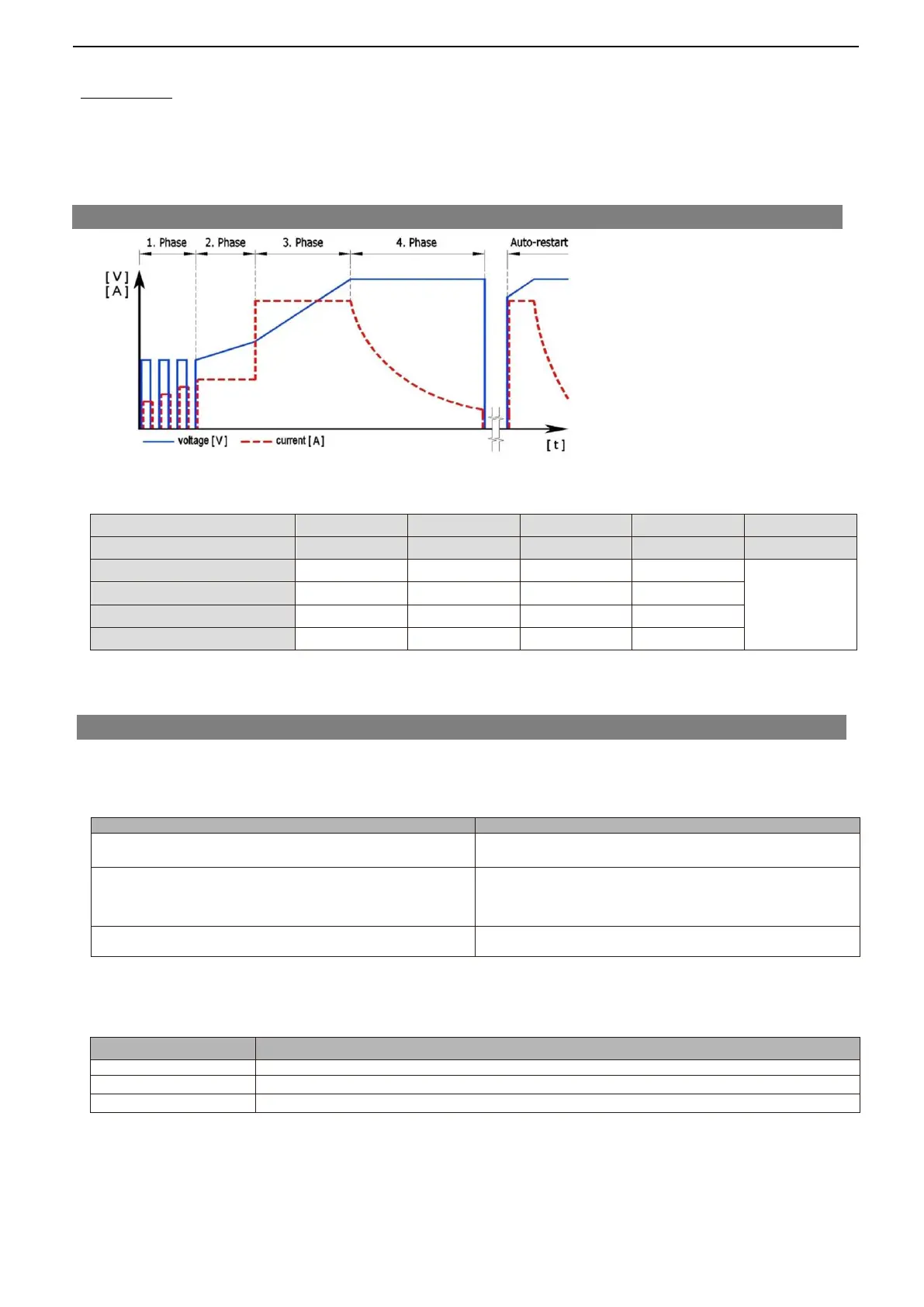
7. Charging Curve
Trigger criterion to next phase
8. Errors and Troubleshooting
Table 1: General errors:
No LED lighting or blinking after connecting mains
Check if charger is connected to mains supply
Check function of mains supply
Red Mains- LED is on, charger is connected to battery
and the charging process doesn't start
Check connection to battery
Check if battery is damaged or deeply discharged
Error-LED flashing (N x blinking / 2 sec pause)
Please see the table below for error description
Table 2: Error-LED blinking signals:
Battery voltage is too high or wrong battery connected
Charger temperature is too high as charging


 To Next Page