This document is a user manual for the C5S wireless earbuds.
Function Description
The C5S earbuds are designed to provide a comfortable and ergonomic in-ear experience, featuring new technology and exceptional audio quality. They offer a full touch control function for ease of use. The portable charging case allows for convenient charging anytime and anywhere, ensuring the best user experience.
Important Technical Specifications
Earbud Parameters:
- Bluetooth Version: 5.0
- Operation Voltage: 3.2V–4.2V
- Impedance: 32Ω
- Speaker Sensitivity: 105db
- Speaker Bandwidth: 20–20 KHz
- Microphone Sensitivity: –42±–2db
- Earbud Frequency: 2.4–2.48GHz
- Compatible: A2DP/HFP/HSP/AVRCPEarbud
- Working Range: 10M
- Single Eartalk Time: 6hrs
- Music Play: 4–5hrs
- Single Earbud Standby Time: 80 hrs
Charging Case Parameters:
- Large Capacity Battery
- DC Charging Voltage: DC5V
- DC Charge Current: 1A
- DC Output Current: Maximum 1.5A
Usage Features
Headphone Wearing Method:
The R/L marking is printed on the earphone case. Ensure the correct direction for optimal sound quality. The LED indicator faces downward when properly worn.
Connecting to Phone:
- Take out the earbuds from the charging case and remove the PET insulator.
- Put the earbuds back in the charging case to activate them.
- The earbuds will power on automatically once removed from the case.
- The L and R earbuds will pair with each other. A voice prompt "connected" will be heard.
- Open Bluetooth on your phone. When the two earbuds have successfully paired, the prompts "Left channel" and "Right channel" will be heard.
- On your device list, connect to "Touch Two C5S". A voice prompt "second device connected" will be heard.
- To use a single earbud, simply use either the L/R earbud alone. If you have connected your phone with both earbuds, you can put one of the L/R earbuds back into the charging box.
Touch Functions:
- Previous: Double click on the right ear touch surface.
- Volume Reduction: Long press of right ear touch surface.
- Next: Double click on the left ear touch surface.
- Volume Increase: Long press of left ear touch surface.
- Turn Off Earbuds: In standby mode, press and hold the touch area for 5 seconds. (Note: The earbuds can be used individually. Turning off a single earphone will not affect the other earphone).
- Activate Voice Assistant: In standby mode, continuous click.
- Touch Panel: Three times.
- Call Function: Click once on the touch panel to answer or hang up the phone.
- Reject Call: Double click on the touch panel.
- Play or Pause Music: Click once on the touch panel.
Charging Case:
- The charging box will automatically charge the earphones until they are full when the earbuds are put into it.
- The charging box has a smart switch function. Place the earbuds in the charging box and cover the case, which is charged. When the charging box is opened, the charging will be turned off automatically. The earphone will start to pair and connect back to the mobile phone when you pick up the earbuds from the open box. You can then listen to music and enjoy the intelligence of this product.
- The USB outlet supports 5V/1.5A output, which can provide emergency charging for mobile phones and other electronic products.
Single Earbud Mode:
The L/R Earbud can be used alone to connect to your Phone. On your phone, enter the Bluetooth device connection list and remove "Touch Two C5S" from the list. Redo the steps for Connect to Phone, but with only the L/R earbud.
Maintenance Features
Safety Rules:
- For safety, comply with the rules mentioned in this manual.
- Keep the device away from sharp edges, uneven surfaces, metal objects, and knock out.
- Do not open, dismantle, or attempt to repair the earbuds. Doing so may cause accidental fire, electronic board failure, or damage to the earbuds. All warranty will be canceled.
- Do not wipe or clean the earbuds with oils or any volatile liquids.
- Do not use the earbuds in places where potential personal safety is at risk or in danger.
Attention:
- Please remove the protective cover on the earbuds before operation.
- Please keep away from radio interference and avoid noisy environments when using earbuds.
- Please replay the high quality format of music or local music of the device.
- Remove the insulation cover before initial use.
- Recharge the charging case if not used for over 90 days.
- Only use good quality wireless charging transmitter and charging cable.
- The earbud LED light will turn blue when it is fully charged.
Troubleshooting Guide:
The manual provides a table for troubleshooting common issues, including:
- Unable to start: Low battery (Solution: Charge the headset).
- Silent after matching: Match operation is incorrect (Solution: Rematch).
- Can talk, but red indicator illuminates: The battery is low, bright red indicator (Solution: Clear the headset immediately).
- Charging without prompt: The headphones are not put well (Solution: Check if the headphones are in place).
- Headset Automatic shut-down: Low battery (Solution: Charge the headset).
- Headphones have echo: The volume is too high or the environment is to o noisy (Solution: Volume adjustment or change places).
- The call has a noise: Caused by environmental interference or sound source equipment is far away (Solution: Change place or will. The distance of the source device is close).
- The other party's voice is small: The headset is not worn correctly (Solution: Adjust the position of the headset and adjust the volume).
- Bad signal, intermittent: Too far or outside interference (Solution: Put the phone closer to the main earbud or keep from the outer interference signal).
FCC Compliance:
This device complies with Part 15 of the FCC Rules. Operation is subject to the following two conditions:
- This device may not cause harmful interference.
- This device must accept any interference received, including interference that may cause undesired operation.
Changes or modifications not expressly approved by the party responsible for compliance could void the user's authority to operate the equipment.
The device has been tested and found to comply with the limits for a Class B digital device, pursuant to part 15 of the FCC Rules. These limits are designed to provide reasonable protection against harmful interference in a residential installation. This equipment generates uses and can radiate radio frequency energy and, if not installed and used in accordance with the instructions, may cause harmful interference to radio communications. However, there is no guarantee that interference will not occur in a particular installation. If this equipment does cause harmful interference to radio or television reception, which can be determined by turning the equipment off and on, the user is encouraged to try to correct the interference by one or more of the following measures:
- Reorient or relocate the receiving antenna.
- Increase the separation between the equipment and receiver.
- Connect the equipment into an outlet on a circuit different from that to which the receiver is connected.
- Consult the dealer or an experienced radio/TV technician for help.

 Need help?
 General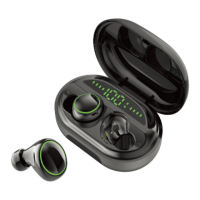

 To Next Page