Need help?
Do you have a question about the CallPass iGotcha Quick Device and is the answer not in the manual?
This document describes the installation and features of the CallPass iGotcha Quick Device, an OBDII pass-thru GPS tracking device designed for vehicle monitoring. The device is intended to provide peace of mind through its tracking capabilities, integrating with a dedicated mobile application for ease of use.
The CallPass iGotcha Quick Device is an OBDII pass-thru GPS tracker that allows for real-time location tracking of a vehicle. It connects directly to the vehicle's On-Board Diagnostics II (OBDII) port, providing power and data communication. The pass-thru design means that the vehicle's original OBDII port remains accessible for other diagnostic tools, as the device acts as an intermediary. Once installed and registered, the device transmits GPS coordinates and other relevant data, which can be accessed via the 'iGotcha GPS APP' on smartphones or tablets. The primary function is to enable users to locate their vehicle, making it suitable for personal vehicle tracking, fleet management, or asset recovery. The device utilizes both GPS for precise location data and cellular networks for transmitting this information to the user's application.
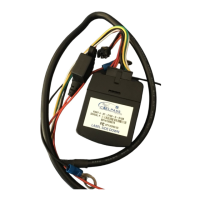
The device connects via a 14-pin power cable and an OBDII cable. The OBDII cable features both male and female connectors, allowing for a pass-thru installation where the device is inserted between the vehicle's factory OBDII plug and the original OBDII connector. This ensures that the vehicle's diagnostic port remains functional.
Key indicators on the device are two LEDs:
The device is labeled "Certified LTE-CAT.M," indicating its use of LTE Category M1 (Cat-M1) technology for cellular communication. This low-power wide-area (LPWA) technology is designed for IoT devices, offering extended battery life and improved coverage for applications like asset tracking. The label also includes a serial number (e.g., J7191506227) and an FCC ID (e.g., XMR2017078096), which are standard identifiers for electronic devices. The device is designed to be mounted under the dash, label side up, using a zip tie, ensuring it is discreet and secure.
The primary usage feature is real-time vehicle tracking through the 'iGotcha GPS APP'. Before installation, users are required to download this application from either the Apple App Store (for iPhones and iPads) or the Google Play Store (for Android phones or tablets).
The installation process is straightforward:
The application allows users to view the vehicle's location on a map, providing a user-friendly interface for monitoring. The pass-thru design ensures that the vehicle's diagnostic capabilities are not hindered by the device's installation, allowing mechanics or other diagnostic tools to still access the OBDII port when needed.
The device itself is designed to be low-maintenance, requiring no direct user intervention after installation. Its power is drawn directly from the vehicle's OBDII port, eliminating the need for separate batteries or charging. The use of LTE-CAT.M technology contributes to efficient power consumption, ensuring it doesn't significantly drain the vehicle's battery.
Maintenance primarily revolves around the associated software and support:
The robust design, simple installation, and dedicated support infrastructure aim to provide a reliable and hassle-free experience for vehicle tracking. The device's discreet placement under the dash also protects it from tampering or accidental damage during normal vehicle use.


 To Next Page
 General