The Calscan Falcon Electronic Deadweight is a robust and accurate instrument designed for precision temperature, pressure, and flow measurement. It offers a quick, convenient, and inexpensive way to measure static pressure in various environments, making it suitable for both field operators and instrumentation technicians.
Function Description:
The Falcon Electronic Deadweight is primarily used for measuring pressure. Unlike many other electronic pressure gauges, it is calibrated across a wide temperature range from -40°C to +60°C, utilizing advanced digital compensation technology to maintain accuracy even with rapidly changing temperatures. This feature eliminates concerns about external temperature fluctuations affecting the displayed pressure. The device is designed to be highly durable, featuring a custom-made aluminum case that is water-resistant and incorporates an advanced shock-absorbing system. This construction allows it to withstand more abuse than typical electronic deadweights.
The device operates in three main modes: Sampling, Memory, and Setup. In Sampling mode, the Falcon takes pressure readings every 3 seconds. The Memory mode displays the last saved pressure value, or if PeakMin-Detect is activated, it shows the peak and minimum pressures recorded, alternating every 3 seconds. The Setup mode allows users to change various settings, including engineering units, resetting the zero offset, activating PeakMin-Detect, and configuring the Sleep-Mode.
Important Technical Specifications:
- Accuracy: +/- 0.04% Full-Scale Total Error Band.
- Resolution: 0.1 psi or 1 kPa.
- Calibrated Operating Temperatures: -40°C to +60°C.
- Storage Temperature: -40°C to +85°C.
- Hazardous Area Classification: Div I Class 1 Groups A, B, C, D EEx ia IIC T4, Maximum Ambient: +50°C.
- Certifications: CSA / UL / CENELEC-ATEX-100, CE approved for Europe.
- Enclosure: Rugged Case, Weather Proof NEMA IV, IP65.
- Dimensions: 3.9 inches in Diameter.
- Design: Advanced Shock Resistant Design.
- Battery Life: One year when used continuously for 3 hours a day, 7 days a week. Includes a Low Battery Indicator.
- Engineering Units: psia, psig, kPaa, kPag.
- Process Connection: 1/4 NPT or 3/4 NPT.
- Power: 2 AA Lithium Battery Pack.
- Calibration Traceability: Masses: NIST, Pistons: NIST and LNE (France).
- Agency Approvals: UL 913, Fifth Edition; CSA C22.2 157-M1992; ATEX-100; EN 50081-2; EN 61000-6-2.
- Pressure Ranges: 750, 1500, 3500, 5000, 10000 psi.
- Included Accessories: Water Tight Carrying Case.
Usage Features:
- Ease of Operation: The Falcon is designed for user convenience with features like one-touch memory, peak pressure detection, and manual zero.
- Quick Connects and Fittings: The device ships with a 1/4" NPT to 1/2" NPT adapter, allowing easy connection to most standard adapters or quick connects. However, it is crucial to use a wrench when attaching fittings to prevent damage to the threads or by rotating the case, which would void the warranty.
- Fluid Trapping Prevention: Users are warned against trapping fluid against the pressure sensor, especially when using quick connects or valves that seal fluid, as temperature changes can cause overpressure and damage the sensor. If a quick connect is used, it must have no check valve (SESO type) to allow pressure to bleed.
- Turning On/Off: The device is turned on by pressing either the Menu or Save key. It automatically turns off based on the Sleep-Mode setting.
- Sampling Mode: Displays "busy" during sampling and does not respond to key presses until finished.
- Zero Offset: In gauge mode (psig or kPag), the pressure can be zeroed to atmospheric pressure by pressing both the Save and '+' keys while sampling. This feature has no effect in absolute mode. The zero offset can be reset to the factory zero in the Setup mode.
- Engineering Units Selection: Users can easily toggle between psia, psig, kPa, and kPag in the Setup mode.
- PeakMin-Detect: When activated, this feature records and displays the highest and lowest pressures sampled, alternating every 3 seconds in Memory mode. Pressing the Save button in sampling mode clears the peak and minimum values for new recordings.
- Sleep-Mode: The Falcon offers two sleep modes: "toff" and "ton." In "toff" mode, the device stays on as long as there is more than 2 pounds of pressure and shuts off after 5 minutes of inactivity if pressure drops below this threshold. In "ton" mode, it shuts off after 5 minutes of inactivity regardless of pressure, once no buttons have been pressed.
Maintenance Features:
- Battery Replacement: The Falcon uses a specific battery pack model, LS14500/2BPW, which is designed to operate across its temperature range and protect against sparks, ensuring intrinsic safety. It is critical to use only this specified replacement battery pack to maintain the intrinsic safety of the device.
- Warranty: Cal-Scan Services Ltd. provides a one-year warranty for repair or exchange due to manufacturing defects. Proof of purchase is required for warranty credit; otherwise, the manufacturing date will be used. The warranty does not cover damage from normal use or accidents. Warranty repairs must be performed by the manufacturer or authorized repair centers. Shipping costs to the repair center are prepaid by the customer, and return shipping costs for warranty repairs are covered by Cal-Scan.
- Contact Information: For warranty, calibration, replacement battery, and local distributor information, users can contact Cal-Scan Services Ltd. via email at sales@calscan.net or calscan@telusplanet.net, by phone at (780) 944-1377, or by fax at (780) 944-1406. Their website is www.calscan.net. The physical address is 4188 93 Street, Edmonton, Alberta, T6E 5P5.

 Need help?
 General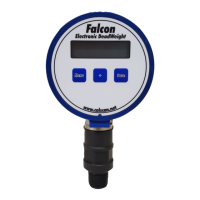

 To Next Page