70 Series DVD player 8
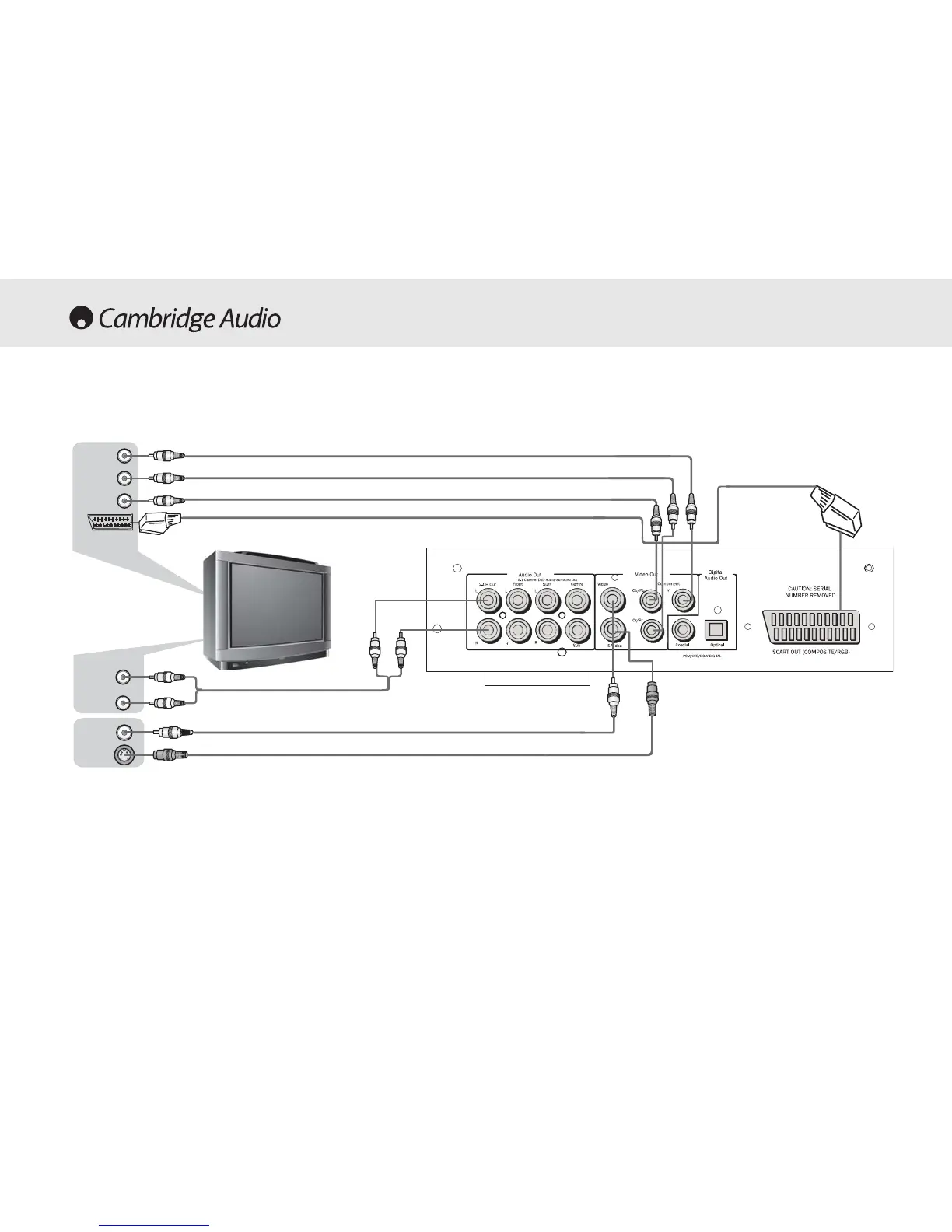
Connections to a TV /Display - DVD77 only
If your TV has S-Video inputs, an S-Video interconnect can be used to
connect this player. When the S-Video output is used the component
video outputs cannot be used.
If the TV has a component video input, the component video output of
this player can be used. When the component video outputs are in use
the S-Video output cannot also be used.
If the Audio Out of this player is connected to your TV, the ‘2-CH out’
sockets should be connected to your TV’s Audio In terminals.
The RGB outputs from the Scart connector and the component outputs
cannot be used simultaneously.
Rear ppanel
SS-VViiddeeoo
AAuuddiioo CCaabbllee
VViiddeeoo CCaabbllee
SS-VViiddeeoo CCaabbllee
AAuuddiioo IInn
VViiddeeoo IInn
SS-VViiddeeoo
oorr
((YY))
((CCrr))
((CCbb))
SSccaarrtt



 To Next Page