Need help?
Do you have a question about the Cambridge Audio MXN10 and is the answer not in the manual?
Switches the unit between Standby and On modes, with power consumption details.
Indicates network connection status; refer to LED descriptions for details.
Used to access and store presets, controllable via StreamMagic app.
Importance of Wi-Fi connection for updates and compatibility.
Step-by-step instructions for pairing a Bluetooth source device with the player.
Steps to play music from USB drives using the StreamMagic app.
How the player appears in apps; naming for easy identification.
Selects the type of standby mode (Network or Eco) for power saving.
Sets the inactivity period before the player enters standby.
Checks for and applies new firmware updates automatically.
Restores the player to its original factory settings.
How to disable or adjust the Automatic Power-Down (APD) feature.
The Cambridge Audio MXN10 is a network player designed to integrate digital music streaming into your existing audio system. It allows you to access a wide range of digital music sources, including internet radio, popular streaming services, and your local digital music collection. The device is controlled primarily through the StreamMagic app, available for both Apple and Android devices, which provides a comprehensive interface for setup, source selection, and playback control.
The MXN10 serves as a bridge between your digital music and your amplifier or pre-amp. It receives digital audio signals from various network sources and converts them into high-quality analog or digital outputs. This allows you to enjoy a vast library of music with the superior sound quality associated with Cambridge Audio products.
The core function of the MXN10 is its network streaming capability. It connects to your home network via Wi-Fi (supporting both 2.4GHz and 5GHz bands) or Ethernet, enabling access to internet-based services and local network storage. Once connected, the StreamMagic app guides you through the setup process, including selecting your preferred language and configuring network settings. The app is crucial for the initial setup and ongoing control of the player, allowing you to browse and play music from various sources.
The MXN10 supports several built-in streaming services, including Spotify Connect, TIDAL, Qobuz, and Deezer. For Spotify Connect, your phone, tablet, or computer acts as a remote, allowing you to stream music directly to the MXN10. TIDAL Connect also enables direct streaming from the TIDAL app, with the MXN10 appearing as an output device. Qobuz and Deezer can be streamed via Chromecast built-in, where your mobile device casts the content to the player. Additionally, Qobuz and Deezer are accessible directly through the StreamMagic app, requiring you to sign into your accounts within the app.
Beyond streaming services, the MXN10 offers robust support for playing your local digital music collection. This involves connecting a hard drive, computer, or Network Attached Storage (NAS) device to your network, running an active UPnP music or media server, and ensuring your router allows the UPnP service. The StreamMagic app then allows you to browse and play files from these local sources. The MXN10 is compatible with various audio formats, including ALAC, WAV, FLAC, AIFF, DSD (x512), WMA, MP3, AAC, HE AAC, AAC+, and OGG Vorbis, supporting high-resolution audio up to 768KHz 32-bit PCM and DSD512.
For direct media playback, the MXN10 includes USB inputs on the rear panel, allowing you to connect USB SSDs, HDDs, or flash drives. These USB ports are designed for convenient connection of thumb drives, supporting FAT32 and NTFS formats. While it can read large capacity hard drives, some may require their own power supply. Playback from USB media is also managed through the StreamMagic app.
The MXN10 also features Bluetooth connectivity, allowing you to stream wireless audio from your phone, tablet, or laptop. Pairing is initiated through the StreamMagic app, where you add Bluetooth as a source and then select the MXN10 from your device's Bluetooth settings.
The device provides multiple output options to connect to your amplifier or other audio equipment. These include fixed-level analogue RCA outputs, as well as S/P DIF coaxial and TOSLINK optical digital outputs. All outputs remain active simultaneously, allowing you to connect to multiple devices if desired, though volume control must be managed by the connected amplifier or DAC as the MXN10 outputs a fixed volume level.
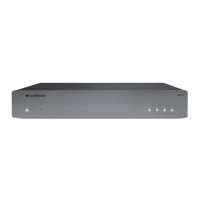
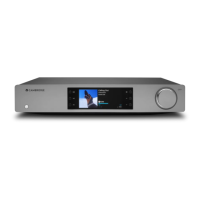
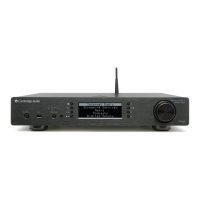
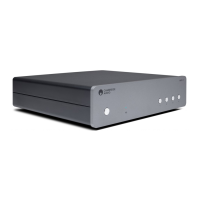
The MXN10 is designed for ease of use, with the StreamMagic app at its core. The front panel features a power button, a network state LED, and four preset buttons. The network state LED provides visual feedback on the unit's status, indicating booting, network connection status, setup mode, and software updates through different colors and flashing patterns.
The preset buttons offer quick access to your favorite internet radio stations, playlists, or albums. You can store currently playing media as a preset by long-pressing a preset button within the StreamMagic app's Home tab.
The MXN10 supports Google Home and Chromecast built-in, allowing it to be integrated into your smart home ecosystem. This enables you to cast music, podcasts, and playlists from hundreds of apps directly to the MXN10 using your phone, tablet, or laptop as a remote. Multi-room casting with other Chromecast-enabled speakers is also supported.
AirPlay 2 is another key feature, enabling seamless streaming from Apple devices. Once the MXN10 is connected to your network, you can AirPlay audio from any app on your iPhone, iPad, or Apple TV, and even use Siri to control playback. The device can also be added to the Apple Home app for integrated control.
Settings for the MXN10 are managed through the StreamMagic app. You can customize the device name, AirPlay name, and standby mode (Eco or Network Standby). Network Standby allows the player to remain controllable by the app, while Eco mode consumes less power but requires manual power-on. An Automatic Power-Down feature can be configured or disabled to prevent the unit from switching to standby after inactivity. The app also allows you to check for and apply firmware updates, ensuring your device always has the latest features and security protocols. An "Early Update" option lets you try out new firmware ahead of general release.
Maintaining the MXN10 involves ensuring it remains connected to a Wi-Fi network for regular firmware updates. These updates are crucial for security, third-party compatibility, and overall performance. Cambridge Audio emphasizes that failure to maintain regular firmware updates may void the product warranty and lead to operational issues. The device is designed to check for and apply new updates automatically when left in network standby overnight.
Troubleshooting guidance is provided in the manual to address common issues. If network connection problems arise, users are advised to check antenna connections, confirm internet access on other devices on the same network, and verify Wi-Fi password accuracy. For issues with internet radio, checking station availability and internet speed is recommended. If the StreamMagic app fails to connect to the MXN10, users should ensure both devices are on the same network, allow app access in mobile settings, and check for VPN or anti-virus interference.
For UPnP playback problems, verifying server software compatibility with file types, ensuring non-DRM files are used, and considering a wired Ethernet connection for high-resolution content are suggested. USB media playback issues can often be resolved by checking file type compatibility, ensuring non-DRM files, verifying the USB device's power requirements, and confirming the USB device's format (FAT32/NTFS). Organizing USB media into structured folders (e.g., Artist > Album > Tracks) is also recommended for efficient browsing.
In case of no power, users should check the AC power cord connection, plug insertion, and mains plug fuse. A factory reset option is available through the StreamMagic app or manually by holding the standby button while reapplying power, which will return the player to its default settings.
The MXN10 does not come with a remote control; all controls and settings adjustments are performed via the StreamMagic app, simplifying the user experience and reducing the need for additional hardware. The service port on the rear panel is strictly for authorized service use and should not be connected to any other devices to prevent damage. Both supplied antennas must be connected for full Wi-Fi functionality, and one antenna connected to the Bluetooth-labeled port is necessary for Bluetooth functionality.
 General
| DAC | ESS Sabre ES9033Q |
|---|---|
| Maximum Resolution | 24-bit/192kHz |
| Connectivity | Wi-Fi, Ethernet, Bluetooth |
| Type | Network Player |
| Streaming Services | Spotify Connect, TIDAL, Qobuz, Deezer, Internet Radio |
| Audio Formats | ALAC, WAV, FLAC, AIFF |
| Digital Inputs | USB |
| Digital Outputs | Coaxial, Optical |
| Analog Outputs | Stereo RCA |
| Wi-Fi | 802.11b/g/n |
| Bluetooth | Bluetooth 5.0 |
| USB | USB Type-A |
| Control | StreamMagic app |
| Dimensions | 215 x 191 x 52 mm |
| Power Supply | 100-240V, 50/60Hz |

 To Next Page