8
Remote control
Important!
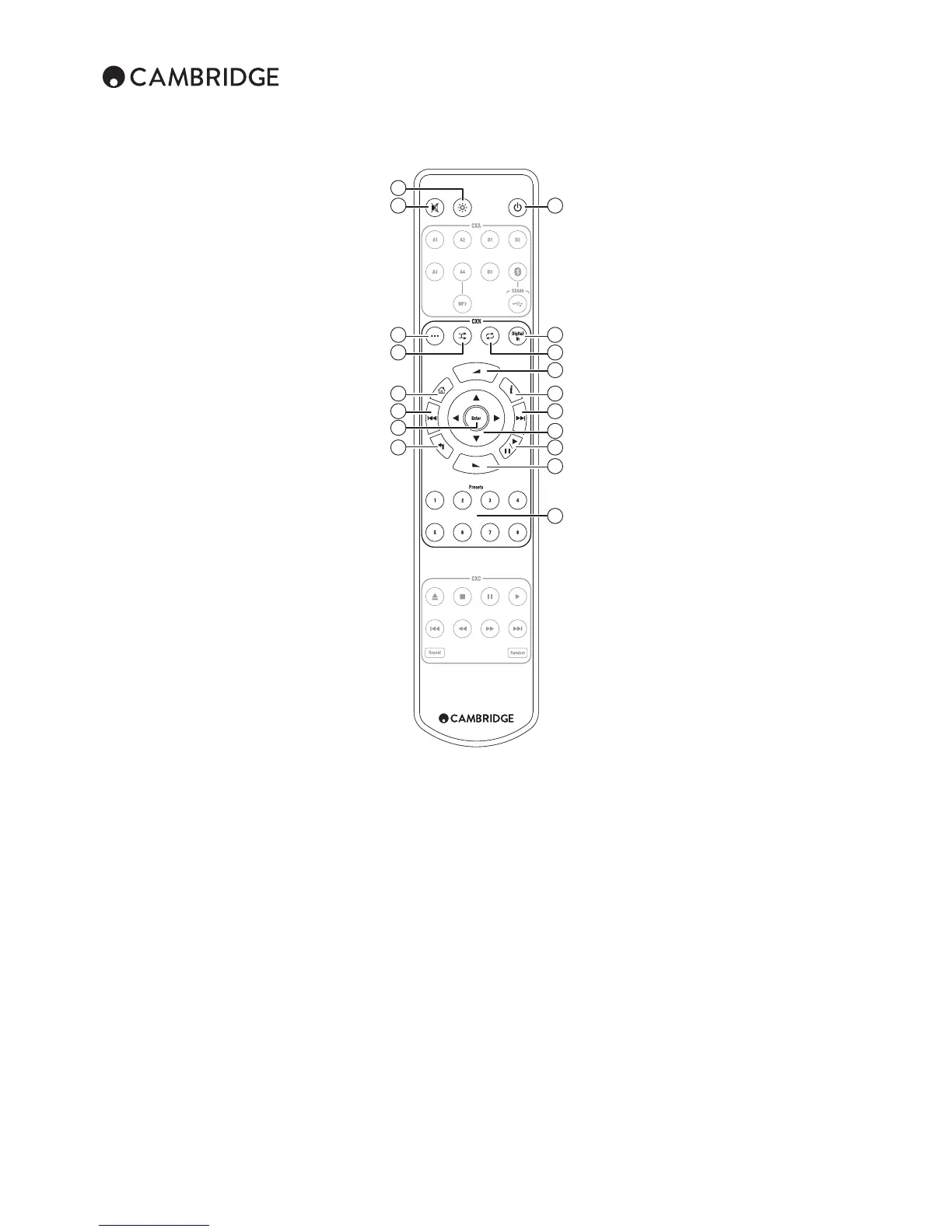
The default mode for the remote allows combined control
of the CXN and other CX range products.
1. Standby/On
Switches the CXN between On and low power eco-friendly
Standby mode. If enabled, you can also switch the unit into
Idle mode.
Note: The CXN takes approximately 30 seconds to come
out of Standby, during this time the front panel Standby/
On LED will ash but nothing will be shown on the display.
2. Brightness
Alters the brightness of the CXN display backlight. There
are three brightness levels; o, dim, bright and an option to
switch-o the backlight.
When the display is set to OFF, nothing will be displayed
onscreen until a selection is made via the front panel or
remote control. The display will then re-activate allowing
you to browse the menu and make your selection. The
display will then automatically switch back o after a few
seconds if no further selections are made.
3. Mute
4. (More)
This is the reply/interactive button. Press when listening
to an Internet Radio station or Streaming Service that has
some form of interaction with the user. This function will
bring up an interactive menu (where available). This feature
is commonly used to allow indication that you like or don’t
like the current stream so the service can tailor the music
served to your personal taste.
For Media Play back (UPnP or Local) this button will toggle
between the 'Now Playing' display and the 'Queue' display.
5. Digital Inputs
Press to select the digital input source.
6. Random
Press to turn the random/shue playback function on and
o.
7. Repeat
Press to turn repeat playback function (media play back
only) on and o.
8. Volume
Increases or decreases the volume of the Amplier/
Receiver.
9. Home
Go directly to the top Home Menu.
10. (Info)
Pressing this button toggles between Menu position and
Now Playing screen.
11. Skip
Press once to skip forwards or backwards one track.
12. Enter
Press to accept the item/function highlighted in the display
menu. In tuner mode, press and hold to store the current
station in the preset bank.
13. Navigation
Press to navigate around the main menus.
14. Return
Press to return to the previous menu.
15. Play/Pause
Press once to start media playback. Press and hold to
pause media playback.
16. Presets
Press to directly access stored presets.
1
5
8
8
16
7
10
11
15
13
2
3
4
12
6
9
11
14


 To Next Page