EasyManua.ls Logo

CAMDEN CM-120wV2 - User Manual

CAMDEN CM-120wV2
12 pages
Print Icon
To Next Page IconTo Next Page
Loading...
CM-120i/CM-120wV2 Ver. 3
Digital Keypads
Installation Instructions
Section 1__________________
General Description
Models:
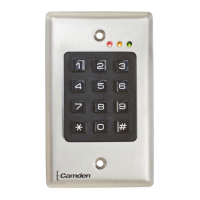
CM-120i Indoor model with plastic buttons
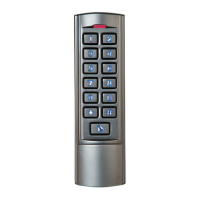
CM120W Outdoor illuminated model with all metal
keypad
Camden CM-120 series are versatile self contained,
single-gang, stand-alone keypads mounted on a
heavy stainless steel single gang faceplate. They
feature up to 999 users, and offer over 1,000,000
possible user codes (from one to eight digits). They
operate on 12-24V AC/DC, have two user-
configurable relay outputs, and have a non-volatile
memory.
Another unique feature is the ability to simultaneously
transmit wirelessly to one or two 915Mhz Lazerpoint
receivers. The CM-120 can also output in 26-bit
Wiegand format.
Section 2__________________
Installation
Mounting
The CM-120 has been designed to fit into a standard
single gang electrical box. The terminal strips are
carefully positioned so all wiring exits is out the back,
so it won’t interfere with, or short out on, the sides of
the box.
Wiring
Wiring of this unit is per Wiring Diagrams 1-3, on
pages 9-11. Included with the keypad is an MOV to
be used when an electric strike or magnetic lock is
connected directly. See diagrams for correct wiring
procedure.
Once wiring is complete, fasten the keypad to the
enclosure using the two #6-32 screws provided and
turn on power. Proceed to next section for
programming instructions.
Section 3__________________
How to Program Keypad
Using This Manual
Brackets and spaces are not part of the codes. They
are used here to clarify the operations and group like
functions. Square brackets [ ] are used to indicate
that the keys inside the brackets are to be pressed at
the same time. (Requiring two keys to be pressed
simultaneously reduces the chance that someone will
accidentally get into programming mode.)
When entering a code in brackets, first press the
star key and, while holding down the star key,
press the second key. Release them both
together.
Using the Keypad
Each user on the system is assigned two different
numbers. The first is the User Number, which he/she
does not use directly. This number, from 1 to 999, is
used to keep track of who is assigned to the system.
All leading zeroes are ignored. The second is the
User Code, a 1 to 8 digit programmable code that the
user will enter into the keypad to activate certain
functions. This code can have leading zeroes as part
of the code. This information should be recorded and
stored in a safe place for future reference. The
keypad can support a total of 999 users, from 1 to
999 (See chart on page 10).
User number one belongs to the Master User and has
a default user code of 1234. Note that the master
user code is used for administration ONLY, and will
not (normally) operate relays, wiegand, or wireless
functions. When a global disable is engaged (all
users locked out), the master code will still operate
relay one.
Package Contents
- (1) Keypad and faceplate assembly
- (1) Foam gasket (CM-120W only)
- (1) Lock Varistor (MOV)
- (2) #6-32 x 1” S/S Phillips screws
- (2) #6-32 x 1” Tamperproof screws
- (1) Tamperproof screwdriver
Question and Answer IconNeed help?

Do you have a question about the CAMDEN CM-120wV2 and is the answer not in the manual?

Summary

Installation Procedures for CM-120 Keypad

Keypad Programming and Setup Guide

Entering Program Mode

Procedure to enter programming mode using the Master Code and star key.

Setting User Code Length

Configure fixed or variable length for user codes and the terminator key.

Administration Functions for Keypad Configuration

Incorrect Code Count Alarm

Configure an alarm after a specified number of invalid code entries.

Forcing Unique User Codes

Ensures each user code entered is unique.

Anti-Tailgating Feature

Enable or disable anti-tailgating for immediate relocking upon door closure.

User Two Global Lockout

Allows User #2 to globally enable/disable access for other users.

Relay Output Mode Configuration

Select how relays are allocated: Relay 1 only, split, or sequenced.

User Management and Timing Configuration

Adding or Changing User Codes

Step-by-step guide to add or modify user numbers and their codes.

Deleting User Codes

Procedure to remove a specific user code from the system.

Changing the Master Code

Instructions on how to change the Master User Code.

Relay 1 Operate Duration

Set the duration Relay 1 remains active or in toggle mode.

Door Prop Open Alarm Delay

Configure the delay before open door contacts trigger an alarm.

Relay 2 Operate Duration

Set the duration Relay 2 remains active or in toggle mode.

Relay 2 Delay on Operate

Set the delay before Relay 2 activates in sequence mode.

Latching Modes and Alarm Control Settings

Incorrect Code Alarm Annunciation

Configure how the incorrect code alarm is announced (buzzer, relay 2, or both).

Stuck Key Alarm

Enable or disable the alarm for a key being held down too long.

Door Prop Open Alarm Annunciation

Configure how the door prop open alarm is announced.

Incorrect Code Alarm Lockout

Configure lockout after multiple incorrect code entries.

Door Forced Open Alarm Annunciation

Configure how the door forced open alarm is announced.

Wiegand and Annunciation Control Functions

Configuring Door Forced Open Alarm

Steps to set the announcement method for forced open alarms.

Wiegand Protocol Selection

Select Wiegand output protocol: disabled, 26b raw, or 26b raw with facility code.

Wiegand Facility Code

Set the facility code for 26-bit Wiegand output.

Annunciation, Defaults, and System Reset

Resetting the Master User Code

Instructions on using the reset jumper to restore the Master Code.

Erase Keypad Memory and Factory Reset

Procedure to perform a full factory reset, clearing all programming.

Troubleshooting Tips for Keypad Operation

CAMDEN CM-120wV2 Specifications

General IconGeneral
TypeKeypad
ModelCM-120wV2
Number of Keys12
Number of Codes100
Weather RatingIP65
ConnectivityWired
ColorSilver
Power Supply12V DC
Operating Temperature-20°C to 50°C
MountingSurface Mount
Relay Contacts1
ConstructionMetal
MaterialZinc

Related product manuals