RFID
+
Ð
M1
PROG
A
D
VA/01 - VA/08
B
C
beeeep
RFID
+
Ð
M1
PROG
E
RFID
+
Ð
M1
PROG
F
G
VA/01 - VA/08
VA/01 - VA/08
Page 7 - Manual FB00880-EN - vers. 1 - 09/2017- © Came S.p.A. - The contents of this manual may be changed, at any time, and without notice.
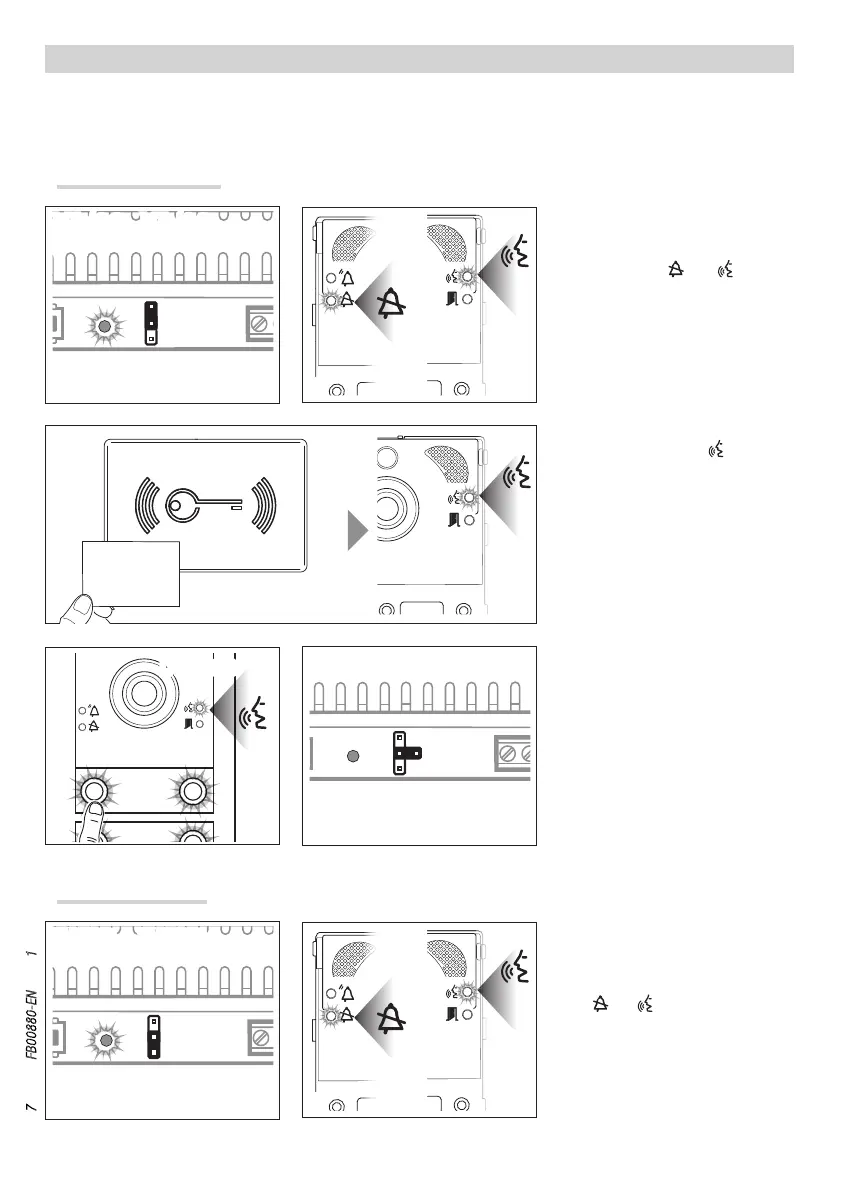
To remove badges, put the power sup-
ply's RFID PROG jumper in the “–” po-
sition.
The PROG LED on the power supply and
LEDs
and will flash slowly F G.
Removing badges
Press the call key of the group the
badge is to be associated with. A long
beep will confirm the procedure was
correct D.
In the event of an error, this will be
indicated by 3 fast beeps. Repeat the
stage correctly.
When programming is completed, posi-
tion the RFID PROG jumper as shown in
figure E.
Swipe the badge to be programmed.
If the badge is valid, the
LED on the
entry panel stays constantly on and it is
possible to continue with programming
C.
To associate badges, put the RFID PROG
jumper of the power supply in the “+”
position. The PROG LED on the power
supply and LEDs
and will flash
quickly A B.
PROGRAMMING ACCESS CONTROL WITH BADGES
This procedure lets you associate badges with each group of users, identified by a single call, or remove them, to control the
door release in audio module MTMA/01, MTMA/08 and video module MTMV/01, MTMV/08.
A maximum of 5 badges can be associated per group.
Associating badges


 To Next Page