CAME S.p.A.
Via Martiri Della Libertà, 15
31030 Dosson di Casier - Treviso - Italy
tel. (+39) 0422 4940 - fax. (+39) 0422 4941
H
beeeep
I
beeeep
Page 8 - Manual FB00880-EN - vers. 1 - 09/2017- © Came S.p.A. - The contents of the manual are to be considered as subject to change at any time and without the need for any advance warning.
This product complies with the relevant directives in force.
Decommissioning and disposal. Dispose of the packaging and the device at the end of its life cycle responsibly, in compliance with the laws in force in
the country where the product is used. The recyclable components are marked with a symbol and the material's ID marker.
THE DATA AND INFORMATION SHOWN IN THIS MANUAL ARE TO BE CONSIDERED AS SUBJECT TO CHANGE AT ANY TIME AND WITHOUT THE NEED FOR ANY ADVANCE
WARNING.
MEASUREMENTS, UNLESS OTHERWISE INDICATED, ARE IN MILLIMETRES.
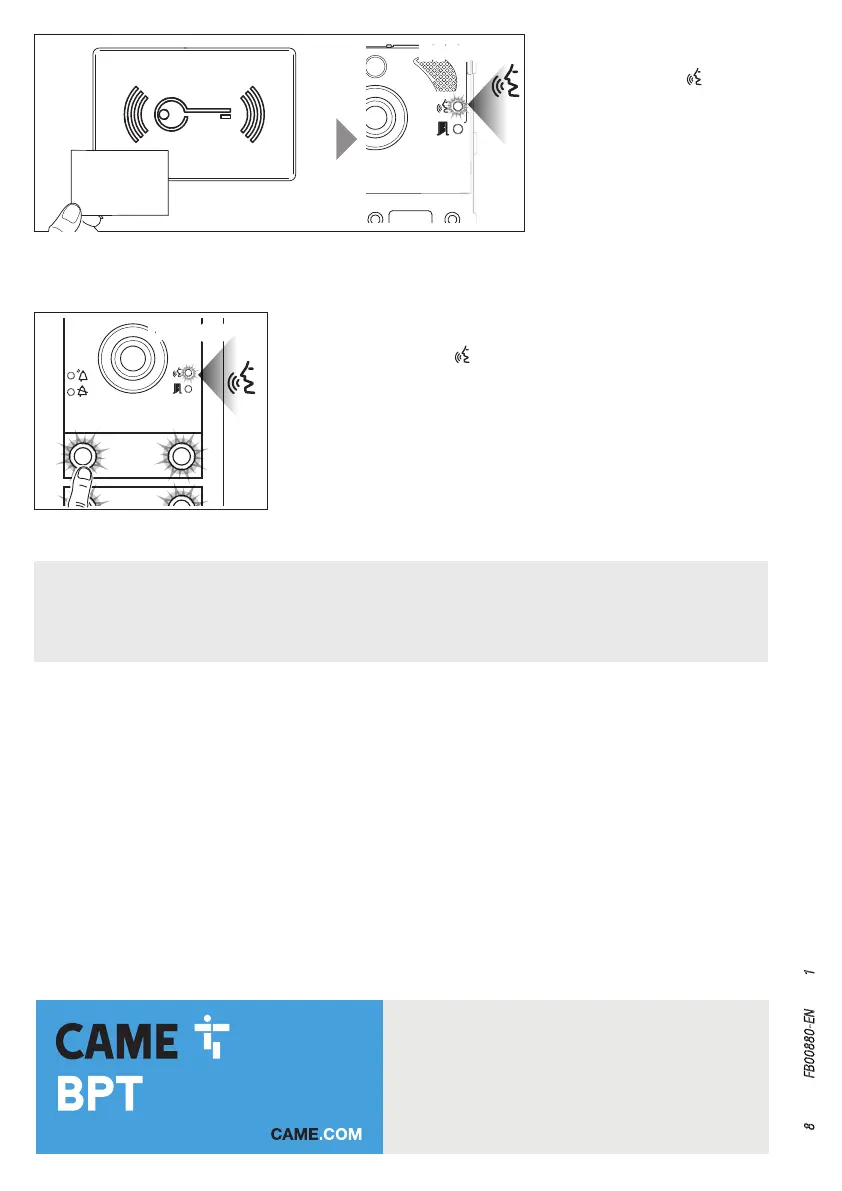
To delete all the badges relating to a group, press the call key relating to the group
whose badges you want to delete.
If the code is valid, the LED
stays constantly on and it is possible to cancel.
Press the call key relating to the group again.
A long beep will confirm the procedure was correct I.
In each of the two stages of deletion any error condition will be signalled
by three fast beeps. Repeat the stage correctly.
When programming is completed, position the RFID PROG jumper as shown in
figure E.
Approach the badge relating to a
group to the reader and swipe it.
If the badge is valid the
LED on the
entry panel will stay constantly on.
Swipe the badge again to confirm the
operation.
A long beep will confirm the proce-
dure was correct H.
In each of the two stages of
deletion any error condition will be
signalled by three fast beeps. Re-
peat the stage correctly.


 To Next Page