21
Hotel mode
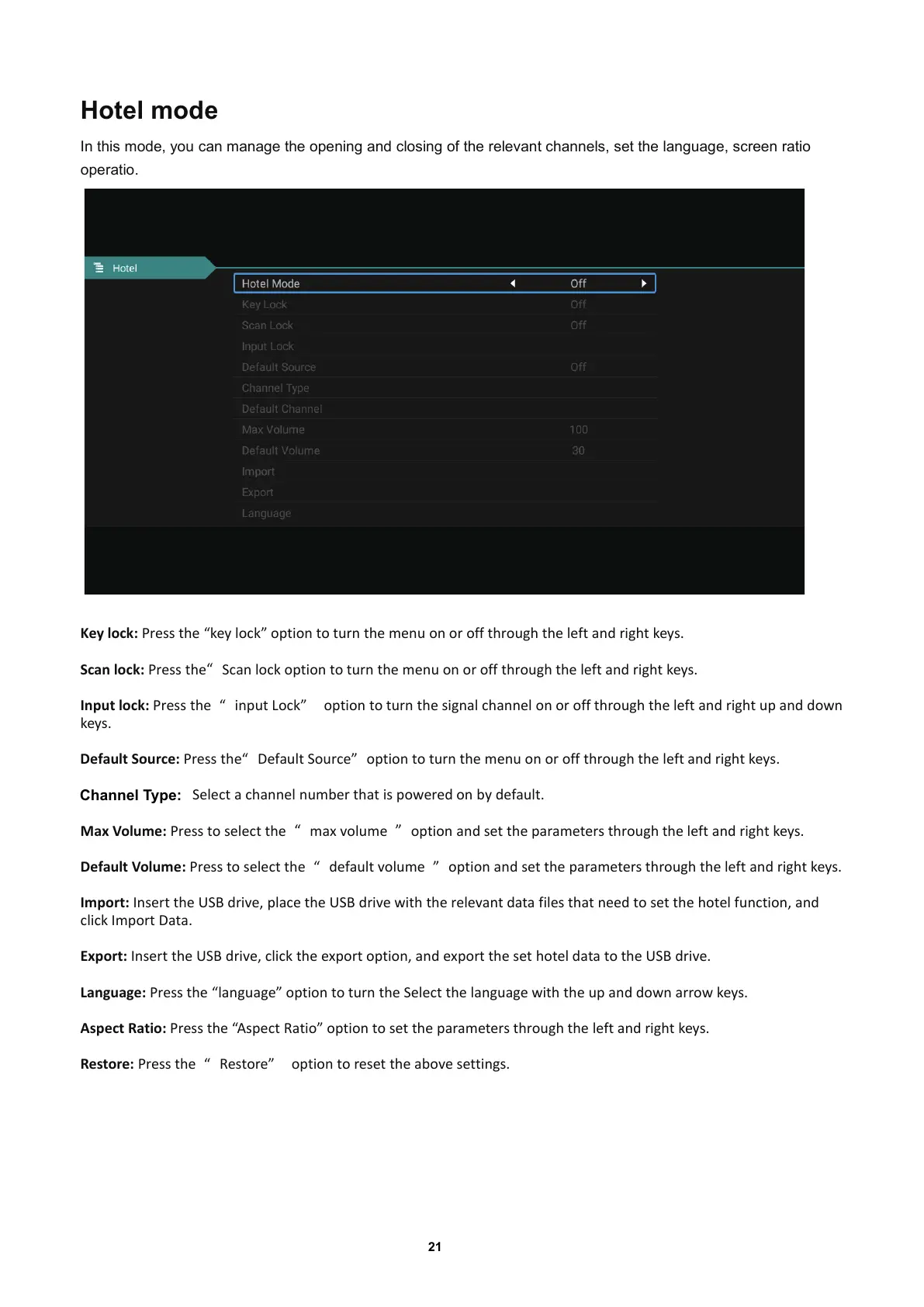
In this mode, you can manage the opening and closing of the relevant channels, set the language, screen ratio
operatio.
Key lock: Press the “key lock” option to turn the menu on or off through theleftandrightkeys.
Scan lock:
Press the
“
Scan lock option to turn the menu on or off through the left and right keys.
Input lock:
Press the
“
input Lock
”
option to turn the signal channel on or off through the left and right up and down
keys.
Default Source: Press the
“
Default Source
”
option to turn the menu on or off through the left and right keys.
Select a channel number that is powered on by default.
Channel Type:
Max Volume: Press to select the
“
max volume
”
option and set the parameters through the left and right keys.
Default Volume: Press to select the
“
default volume
”
option and set the parameters through the left and right keys.
Import:
Insert the USB drive, place the USB drive with the relevant datafilesthatneedtosetthehotelfunction,and
click Import Data.
Export: Insert the USB drive, click the export option, and export the set hotel data to the USB drive.
Language: Press the “langu
age” option to turn the Select the language with the up and down arrow keys.
Aspect Ratio: Press the “Aspect Ratio” option to set the parameters through the left and right keys.
Restore:
Press the
“
Restore
”
option to reset the above settings.



 To Next Page