

EasyManua.ls Logo

Cameo CFP-200 - User Manual

Cameo CFP-200
36 pages
Print Icon
To Next Page IconTo Next Page
Loading...
Question and Answer IconNeed help?

Do you have a question about the Cameo CFP-200 and is the answer not in the manual?

Summary

Chapter 1 Safety Information

1.1 Key Contents

Summarizes critical safety aspects and potential hazards for furnace operation and maintenance.

1.2 How to use and keep this manual

Provides guidance on the proper usage, storage, and importance of the operator's manual.

Chapter 2 Safety Maintenance and Precautions

2.1 Installation location

Details recommended environmental conditions, clearances, and spacing for safe furnace installation.

2.2 Idle mode

Explains how to transition the furnace to idle mode and actions to protect it.

2.3 Installation and use

Covers unpacking, placement, grounding, initial checks, and safe startup procedures.

2.4 Cleaning

Provides instructions for cleaning the furnace, including precautions for electrical safety.

2.5 Precautions for vacuum pump installation

Outlines the steps and precautions for correctly connecting the vacuum pump assembly.

2.6 Active cooling fan

Explains the role of the active cooling fan in post-firing cooling efficiency.

2.7 Automatic temperature regulation

Describes the system's automatic temperature adjustment for precise control and deviation management.

Chapter 3 Furnace Introduction

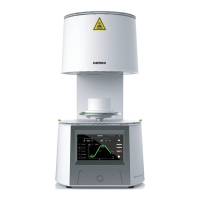
3.1 Cameo CFP-200 Proclain Furnace

Introduces the specific furnace model with a component diagram for identification.

3.2 Features

Lists the key functional and technological features of the Cameo CFP-200 furnace.

3.3 Software

Details the furnace's software capabilities, including curve management and user-defined options.

3.4 Technical parameters

Presents comprehensive technical specifications for the furnace and its vacuum pump.

3.5 Packing List

Lists all standard accessories and components included in the furnace package.

Chapter 4 Operation Guidance

4.1 Main interface

Explains the primary user interface elements and real-time information displayed.

4.2 Quick curve selection interface

Guides users on navigating and selecting firing curves efficiently.

4.3 First-stage firing interface

Details the interface for monitoring and managing a single-stage firing process.

4.4 Two-stage firing interface

Explains the interface for controlling and monitoring a two-stage firing procedure.

4.5 Confirm the firing interface and exit it

Covers the process of confirming heating actions and exiting operational interfaces.

4.6 Curve Program Choose Screen

Describes options for program editing, starting firing, and previewing curves.

4.7 Curve parameters setting screen

Details how to configure firing curve parameters, including vacuum and temperature settings.

4.8 Abnormal reminder of parameters setting

Explains error prompts related to illogical or invalid parameter configurations.

4.9 Function setting screen

Introduces the main functional modules available for furnace operation and settings.

4.10 Vacuum test

Describes how to initiate and perform a vacuum system test.

4.11 Vacuum test interface

Explains the interface for conducting and interpreting vacuum detection results.

4.12 Temperature calibration function

Details the procedure for calibrating the furnace's temperature control for accuracy.

4.13 Standby temperature setting

Guides users on setting the furnace's standby temperature for optimal readiness.

4.14 Sleep mode interface

Explains how to activate and exit the furnace's power-saving sleep mode.

4.15 Furnace cleaning

Provides instructions for running the automated furnace cleaning cycle.

4.16 System setting

Covers various system configurations like display, sound, self-test, and language.

4.17 Furnace self-check

Explains how to perform and understand the furnace's automated self-diagnostic checks.

4.18 Language setting

Details the process for selecting and changing the furnace's display language.

4.19 Device information

Shows how to access and view essential device information like serial number and operating time.

4.20 Abnormal alarm

Lists common error codes and messages, guiding users on troubleshooting.

Chapter 5 Warranty terms

Warranty terms

Outlines the warranty coverage, period, exclusions, and terms for the furnace.

Firing Curve

Details various firing curves with parameters for different ceramic materials and processes.
Summary

Chapter 1 Safety Information

1.1 Key Contents

Summarizes critical safety aspects and potential hazards for furnace operation and maintenance.

1.2 How to use and keep this manual

Provides guidance on the proper usage, storage, and importance of the operator's manual.

Chapter 2 Safety Maintenance and Precautions

2.1 Installation location

Details recommended environmental conditions, clearances, and spacing for safe furnace installation.

2.2 Idle mode

Explains how to transition the furnace to idle mode and actions to protect it.

2.3 Installation and use

Covers unpacking, placement, grounding, initial checks, and safe startup procedures.

2.4 Cleaning

Provides instructions for cleaning the furnace, including precautions for electrical safety.

2.5 Precautions for vacuum pump installation

Outlines the steps and precautions for correctly connecting the vacuum pump assembly.

2.6 Active cooling fan

Explains the role of the active cooling fan in post-firing cooling efficiency.

2.7 Automatic temperature regulation

Describes the system's automatic temperature adjustment for precise control and deviation management.

Chapter 3 Furnace Introduction

3.1 Cameo CFP-200 Proclain Furnace

Introduces the specific furnace model with a component diagram for identification.

3.2 Features

Lists the key functional and technological features of the Cameo CFP-200 furnace.

3.3 Software

Details the furnace's software capabilities, including curve management and user-defined options.

3.4 Technical parameters

Presents comprehensive technical specifications for the furnace and its vacuum pump.

3.5 Packing List

Lists all standard accessories and components included in the furnace package.

Chapter 4 Operation Guidance

4.1 Main interface

Explains the primary user interface elements and real-time information displayed.

4.2 Quick curve selection interface

Guides users on navigating and selecting firing curves efficiently.

4.3 First-stage firing interface

Details the interface for monitoring and managing a single-stage firing process.

4.4 Two-stage firing interface

Explains the interface for controlling and monitoring a two-stage firing procedure.

4.5 Confirm the firing interface and exit it

Covers the process of confirming heating actions and exiting operational interfaces.

4.6 Curve Program Choose Screen

Describes options for program editing, starting firing, and previewing curves.

4.7 Curve parameters setting screen

Details how to configure firing curve parameters, including vacuum and temperature settings.

4.8 Abnormal reminder of parameters setting

Explains error prompts related to illogical or invalid parameter configurations.

4.9 Function setting screen

Introduces the main functional modules available for furnace operation and settings.

4.10 Vacuum test

Describes how to initiate and perform a vacuum system test.

4.11 Vacuum test interface

Explains the interface for conducting and interpreting vacuum detection results.

4.12 Temperature calibration function

Details the procedure for calibrating the furnace's temperature control for accuracy.

4.13 Standby temperature setting

Guides users on setting the furnace's standby temperature for optimal readiness.

4.14 Sleep mode interface

Explains how to activate and exit the furnace's power-saving sleep mode.

4.15 Furnace cleaning

Provides instructions for running the automated furnace cleaning cycle.

4.16 System setting

Covers various system configurations like display, sound, self-test, and language.

4.17 Furnace self-check

Explains how to perform and understand the furnace's automated self-diagnostic checks.

4.18 Language setting

Details the process for selecting and changing the furnace's display language.

4.19 Device information

Shows how to access and view essential device information like serial number and operating time.

4.20 Abnormal alarm

Lists common error codes and messages, guiding users on troubleshooting.

Chapter 5 Warranty terms

Warranty terms

Outlines the warranty coverage, period, exclusions, and terms for the furnace.

Firing Curve

Details various firing curves with parameters for different ceramic materials and processes.

Cameo CFP-200 Specifications

General IconGeneral
BrandCameo
ModelCFP-200
CategoryFurnace
LanguageEnglish