7
DMX
DEUTSCHFRANCAIS
ESPAÑOL
ENGLISH
ITALIANO POLSKI
W-DMX™
1. To pair with W-DMX™ compatible transmitters, enable W-DMX™ in the device settings (Settings -> Wireless Setting -> W-DMX On Off
-> On) and reset the W-DMX™ module (Receive Reset -> Yes). Start the pairing process as described in the operating instructions of the
W-DMX™ transmitter. Pairing is then completed automatically.
2. Pair a group of W-DMX™ devices to create a DMX universe with them. Disconnect all devices that are supposed to form the group
(Settings -> Wireless Setting -> Receive Reset). Now activate a CLES3 with a DMX controller via DMX cable and in the settings, select
"Transmit" (Send) (Settings -> Wireless Setting -> Operating Mode -> Transmit). In the settings of the W-DMX™ devices to be controlled
via W-DMX™, select "Receive" (Settings -> Wireless Setting -> Operating Mode -> Receive), pair them and confirm by selecting "Link"
(Settings -> Wireless Setting -> Link -> Link) in the settings of the CLES3 controlled via DMX cable. Pairing is then completed automatically.
3. It is also possible to create a connected group of W-DMX™ devices via W-DMX™, and operate them in master/slave mode. First
decouple all devices that should form the group (Settings -> Wireless Setting -> Receive Reset). In the settings (Settings -> Wireless Setting
-> Operating Mode) of the master unit select "Transmit", and in the settings of the slave units select "Receive". On the master unit select
"Link" (Settings -> Wireless Setting -> Link -> Link) and confirm your selection by pressing ENTER. Pairing of the devices is then completed
automatically. In the master unit, select one of the standalone modes (Auto Program, Static) to control the slave units.
DMX Address
001
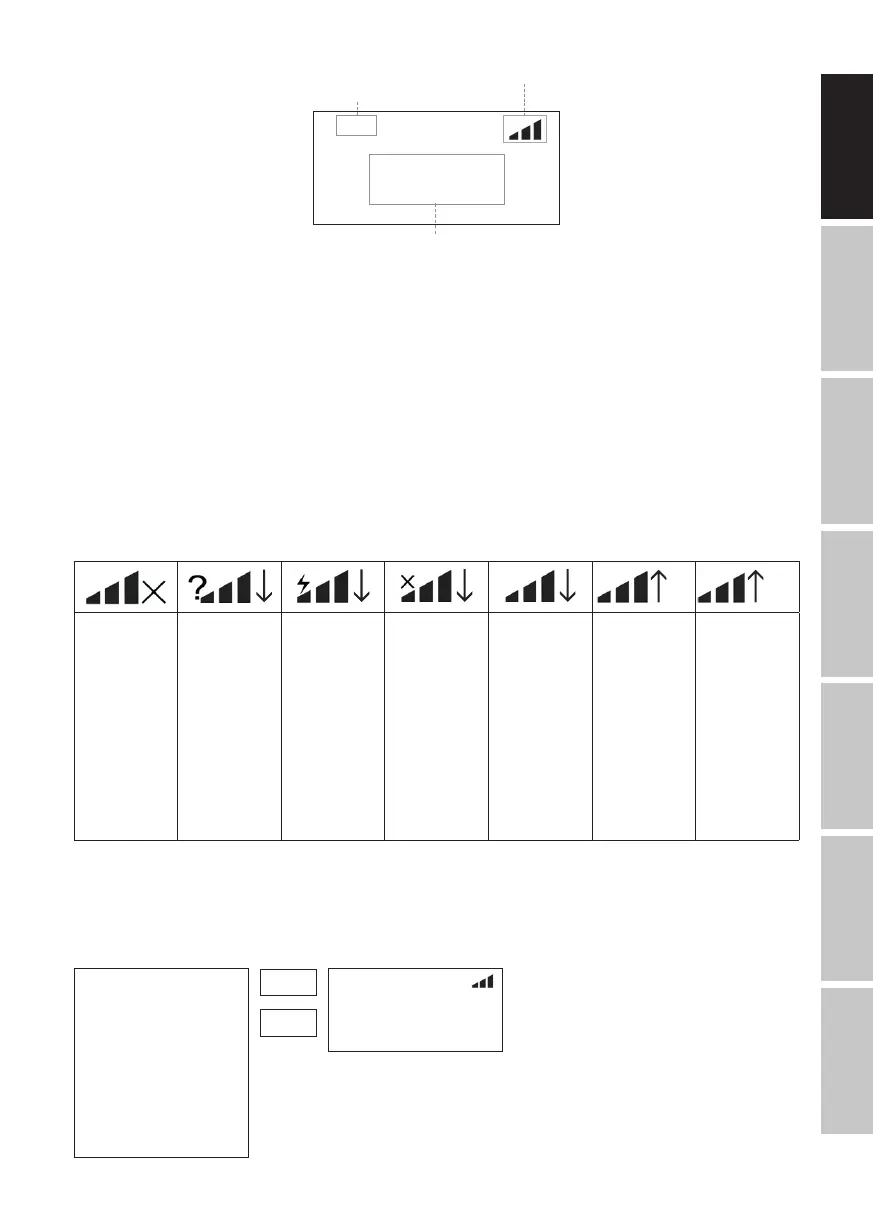
W-DMX™ status
Current operating mode
40°C
LED unit
Temperature
SETTING DMX START ADDRESS (DMX ADDRESS)
Press MENU to access the selection menu. Using the UP and DOWN control buttons, select the menu item “DMX address” (observe
arrow) and confirm with ENTER. The display will show a three-digit number field and you can use the UP and DOWN buttons to
configure the desired DMX start address. Confirm the entry with ENTER and press MODE to return to the main display (in the example, “DMX
address 001”).
---------------- Menu ----------------
DMX Address
DMX Mode
Stand Alone
Slave
Settings
Network Settings
System Info
1
512
-
DMX Address
001
40°C
G3 G4S
W-DMX™
deactivated
W-DMX™
activated as
receiver,
not paired
W-DMX™
activated as
receiver and
is coupled to
device,
Transmitter is
switched off or
out of range
W-DMX
activated and
is coupled to
device,
no DMX signal
W-DMX™
activated as
receiver and
is coupled to
device,
DMX signal is
present
W-DMX™ and
transmission
mode G3 is
enabled
Up arrow =
Send operation
Arrow Down
= Receive
operation
Arrow flashes=
pairing process
Flashing stops =
paired
W-DMX™ and
transmission
mode G4S
activated
Up arrow =
Send operation
Arrow Down
= Receive
operation
Arrow flashes=
pairing process
Flashing stops =
paired
W-DMX™ STATUS


 To Next Page
 Loading...