Need help?
Do you have a question about the Cameo FLAT PAR CAN TRI 3W IR and is the answer not in the manual?
Welcome message and brief introduction to Cameo Lights products, emphasizing reliability and user enjoyment.
Comprehensive instructions for safe operation, installation, handling, and disposal of the equipment to prevent hazards.
Specific precautions for connecting the equipment to the power mains, including earthing, voltage checks, and cable handling.
Warnings regarding electric shock, internal repairs, and the meaning of safety symbols used in the manual.
Guidance on preventing hearing damage from high volume levels and precautions for lighting products, including eye safety and epilepsy.
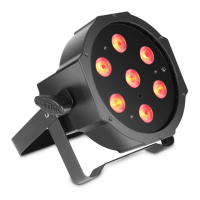
Details on FLAT PAR CAN TRI 3W IR and RGB 10 IR, including control functions, features, and operation.
Explanation of IEC power input/output sockets and 3-pole XLR sockets for DMX IN/OUT.
Identification and function of the microphone, MODE, ENTER, UP/DOWN buttons, and 4-digit LED display.
Instructions for setting static colours (Red, Green, Blue) and stroboscope effects with intensity/speed adjustments.
Guide to selecting predefined colour combinations (macros) using the control panel.
How to operate Colour Change (Jumping) and Strobe effects with adjustable rates (00-99).
How to operate Colour Blending (Fading) and Strobe effects with adjustable rates (00-99).
Explanation of AUTO, SLAVE, and MUSIC CONTROL modes, including microphone sensitivity adjustment.
Steps for selecting DMX modes and setting the DMX start address (A001-A512).
Detailed explanation of remote buttons: BL, SP, Brightness, FL, R/G/B/W/A, Ju, Fa, Au, Su, CM+ / CM-.
Explanation of Su (Music Control) and CM (Colour Macros) buttons on the remote for advanced control.
Channel mapping for 2-channel DMX mode, covering master dimmer and colour macro selection.
Channel mapping for 3-channel DMX Mode 1, including dimmer, strobe, colour macros, and blending.
Channel mapping for 3-channel DMX Mode 2, controlling Red, Green, and Blue intensity.
Channel mapping for 6-channel DMX mode, covering dimmer, strobe, colours, colour macros, and blending.
Overview of DMX-512 as a universal transmission protocol for controlling lighting devices.
Instructions for daisy-chaining multiple DMX devices using DMX IN and DMX OUT connectors.
Guidelines for fabricating DMX cables, including proper wiring, shielding, and termination resistor usage.
Information on using terminating resistors to prevent signal issues and using cable adapters for different XLR types.
Side-by-side comparison of key specifications including model name, LEDs, power, dimensions, and features.
Details on warranty coverage, duration, repair/replacement, and exclusions for Adam Hall branded products.
Information on Adam Hall's liability limits, specific rights granted by warranty, and how to request service.
Guidelines for environmentally friendly disposal of the product and energy-saving tips.
 General
| Colour spectrum | RGB |
|---|---|
| Number of LEDs | 3 |
| Control Protocol | DMX512 |
| Beam Angle | 25° |
| Weight | 0.7 kg |
| DMX input | 3-Pin XLR |
| DMX output | 3-Pin XLR |
| Indicators | LED Display |
| Housing material | Plastic |
| Housing colour | Black |
| Cooling | Convection |
| Dimensions | 180 x 175 x 95 mm |
| Infrared | Yes |
| Input Voltage | 100 - 240 V AC, 50/60 Hz |
| Product type | LED PAR Light |
| LED Type | 3W Tri-LED |
| DMX Channels | 3 |
| DMX mode | 3-channel |
| DMX Functions | RGB control |
| Standalone modes | colour fade, colour jump, static colour |
| Power connector | IEC |

 To Next Page