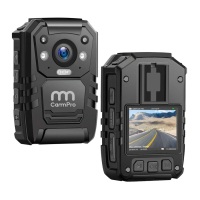
Video Recording
When the camera is in standby mode, short press , then the camera body will
shake with voice Guide Law-enforcement, video recording start , and afterwards
the red video light flash on, which indicates the video recording start.Press key
again to stop recording, and the camera body will shake again, with red video light
off, and the recording is finished and saved. (Note: this function is close in default)
• One Key Video Recording
When the camera is off, Long press • for 4 seconds to start one key video recording.
• Focus Adjustment
Long press key
to adjust the focus. (Note: Focus can't be adjusted under
HD 1920*1080 video resolution)
• Laser Pointer
Long press for 4 seconds to open laser point light. Do it again to turn it off.
• Snapshot Under Video Recording
Short press key • to take a photo in video recording mode.
• Switch Between IR Red Light and LED White Light
a
to turn on IR red light. Press it again to shut down in video
Short press
recording or standby mode. The IR red light can help to record video in the night
06


 To Next Page
 Loading...