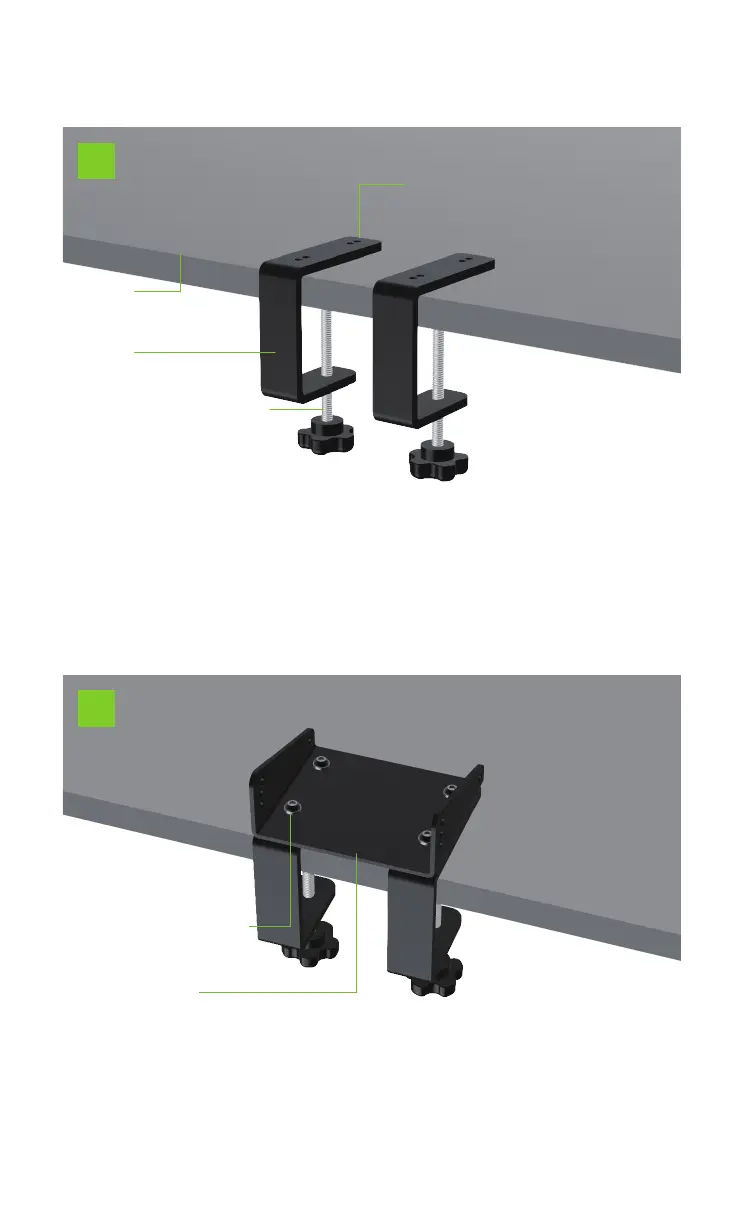
C5 desktop application installation steps:
Desktop
Desktop stand
1
Hexagon socket head screw M6X10*4
Desktop bracket lower plate
2
Corresponding to the 4 screw holes, it is compatible with
other brands of desktop brackets and the fixed position
of the desktop
Desktop
Five-star handle screw with pressing sheet
Adjustable handle screw*2
1. Put the 2 pieces of desktop brackets on the appropriate
position on the desktop. And tighten the adjustable handle
screw through two five-star handle screws with pressing
pieces to fasten the desktop brackets with the desktop.
2. Fix the lower plate of the desktop bracket and the desktop
bracket together. And insert 4 M6X10 hexagon socket head
screws into the corresponding screw holes to fasten the
desktop bracket and the desktop together.


 To Next Page