Hexagon socket head screw M6X10*4
4 5
10°
Chute*2
6105 Blower
3
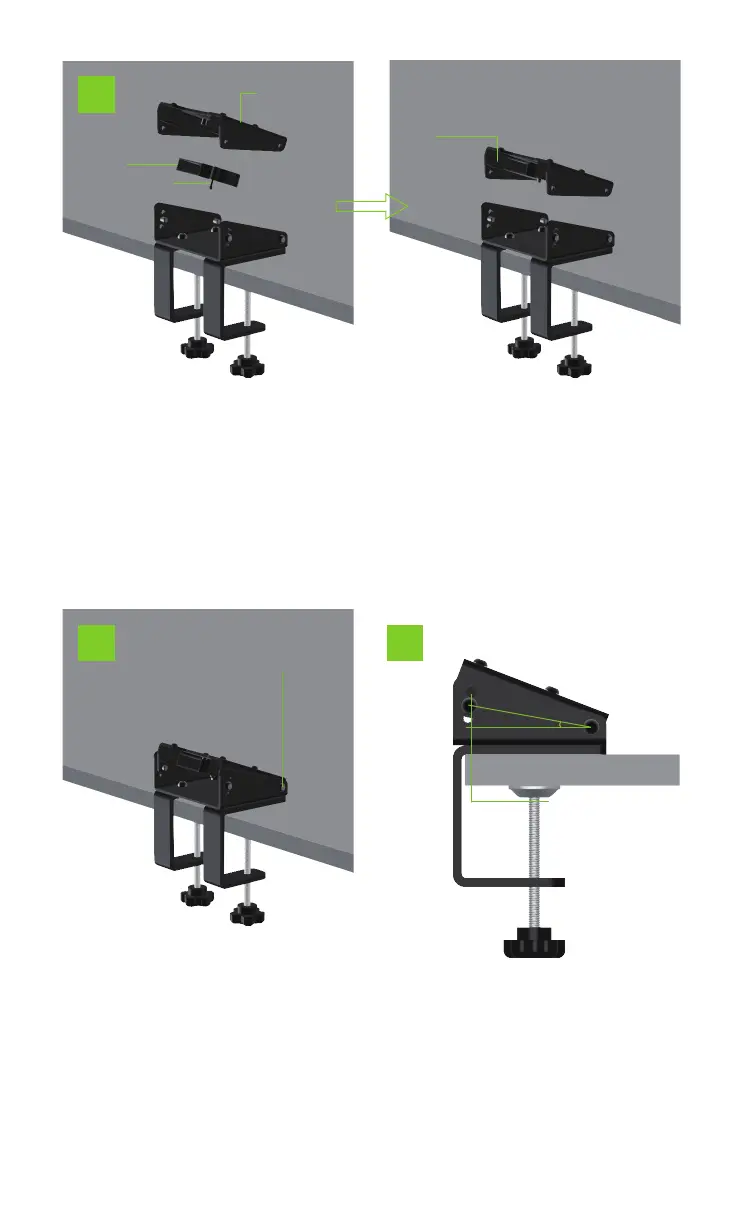
3. Fasten the blower of model 6105 to the mounting flange of
the desktop bracket with two M3X20 cross-recessed screws
with pads.
4. Fasten the assembled
flange assembly of the desk-
top bracket with 4 M6X10
hexagon socket head screws
The lower plate of the desk-
top support.
5. Adjust the angle direction
of the mounting flange of the
desktop support through the
three screw holes on the
lower plate of the desktop
support(Adjustable 6 degrees
each up and down).
Desktop Stand
Mounting Flange
Cross recessed screw
with pad M3X20*2
Three screw holes can
adjust the angle direction of
the desktop bracket
mounting flange
(up and down angles can
be adjusted by 6 degrees
each)


 To Next Page