steering wheel assembly
Base flange*2
6 7
8
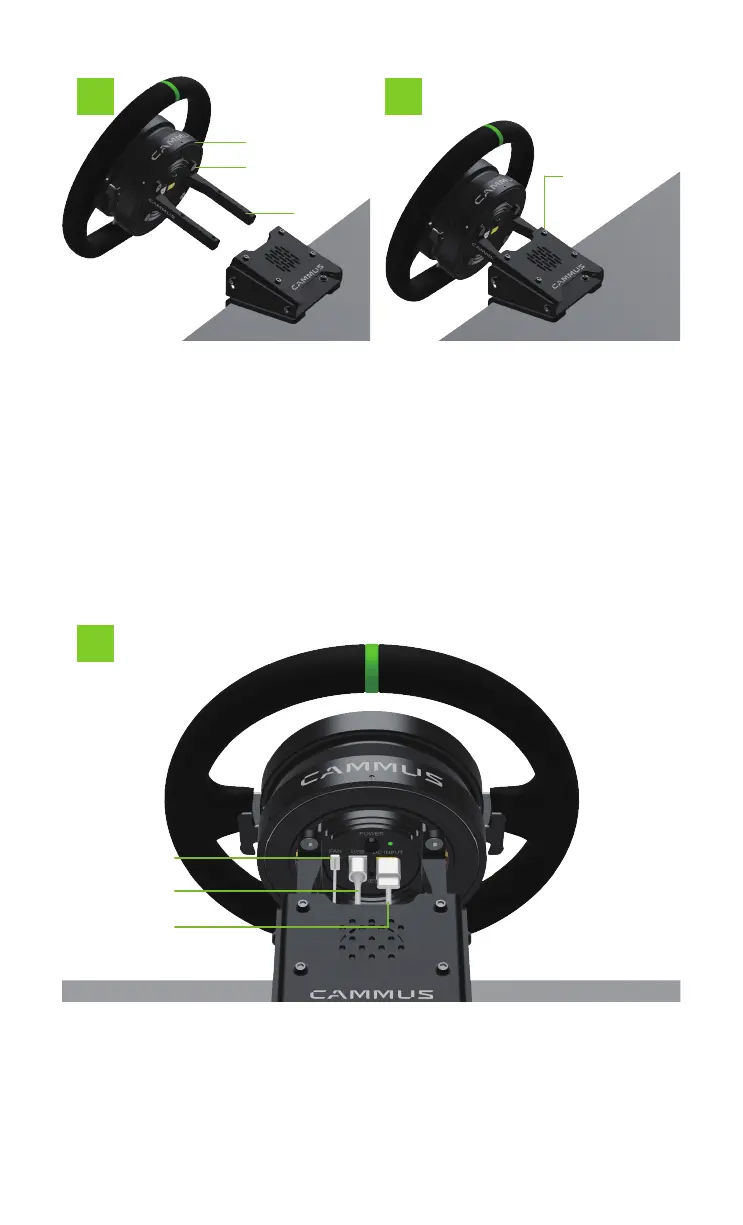
8. Connect the power cable, UBS cable and fan cable
required for the interface socket on the back of the steering
wheel.Complete the port socket wiring operation. And you can
enjoy the gaming experience brought by the two-in-one steer-
ing wheel.
6. Fasten and connect the
steering wheel with the base
flange through 4 M6X12 hexa-
gon socket head screws.
7. Insert the connected
steering wheel assembly into
the mounting flange of the
desktop bracket through the
chute, and pass 4 Fasten and
connect with two M6X10
socket head cap screws.
Thus, the installation of the
desktop steering wheel is
completed.
Hexagon socket head
screw M6X10*4
Inner hexagon
countersunk head screw
M6X12*4
Fan seat
Power base
USB socket



 To Next Page