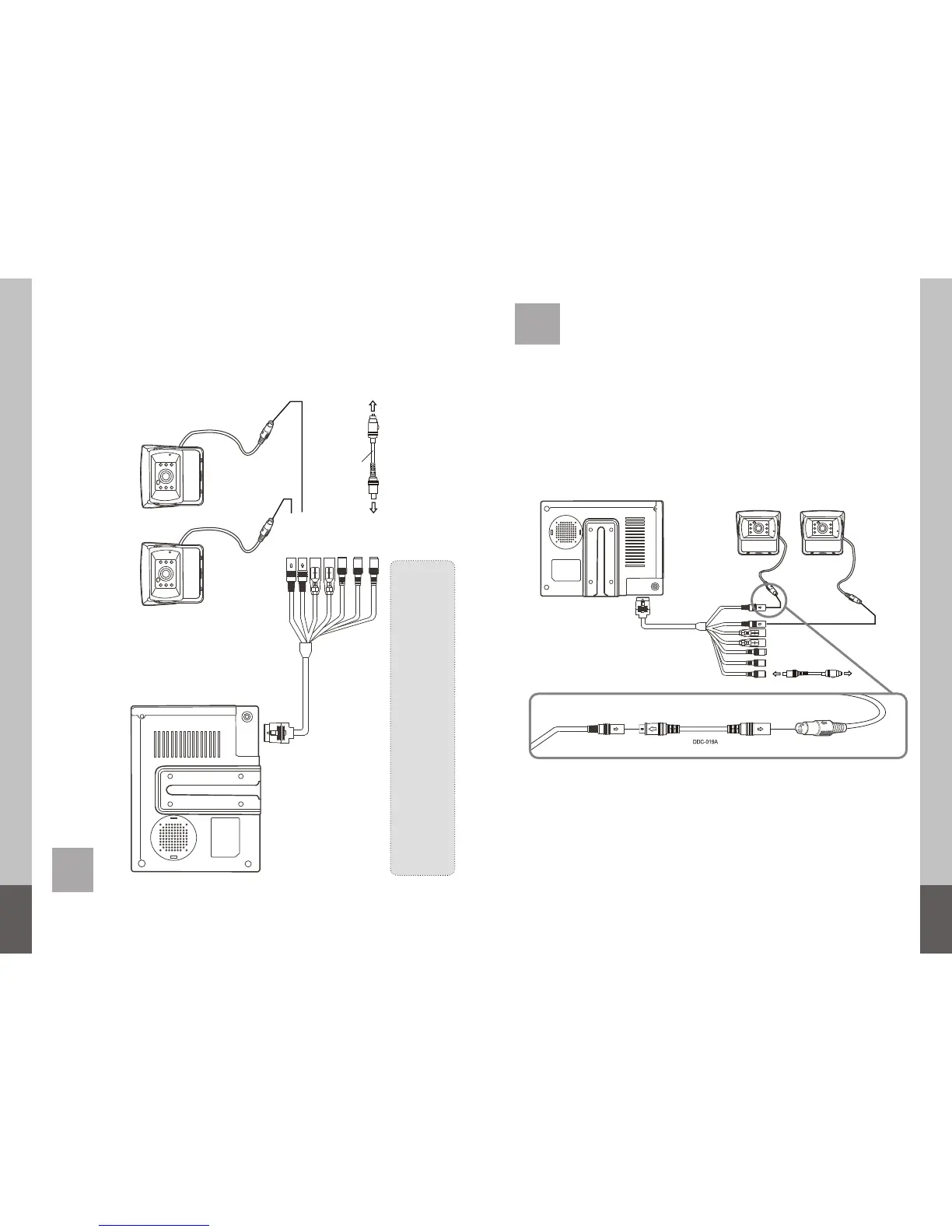
CAMERA 1, 2 / AV1
6. Connections
12 13
BLACK (CAMERA 1, Priority)
GREEN ( )CAMERA 2
FOR REAR VIEW
Connect this line to “+” of reverse light lamp.
FOR SIDE VIEW
Connect this line to “+” of side light lamp.
DC INPUT
CAMERA 1
BLACK (CAMERA 1)
GREEN (CAMERA 2)
CAMERA 2
VIDEO
AUDIO
Camera 1(Not Supplied)
CIGARETTE LIGHTER
ADAPTOR
CIGARETTE LIGHTER
SOCKET IN
MDM-026A
Camera 2(Not Supplied)
Camera connector
Camera 1
(optional)
Camera 2
(optional)
MDM-026A
(supplied)
The monitor also includes an extra adapter cable (DDC-019A) to change from mirror
to normal view.
To use this function, please connect the cable as described in the drawing below between
the multi function cable of the monitor and the camera.
7. Adapter cable for camera normal view
MDM-026A
(Supplied)


 To Next Page